

Available to buy here:
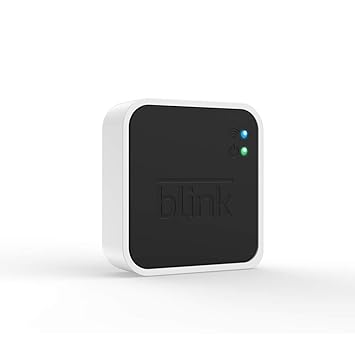
Blink Add-On Sync Module 2
Hello, hey there, I’ve got one of those gadgets that quietly does its job without asking for monthly fees—a tiny hub with some surprising muscle under the hood. Meet the Blink Add-On Sync Module 2, a sleek little box that brings all your Blink cameras together and tells them where to stash their video clips, no subscription required (though it plays nice with those too).
Picture it this way: you know how juggling multiple Blink cameras can feel like herding cats? That’s where this module steps in. It connects up to ten Blink devices—Indoor, Outdoor, XT2, XT, Video Doorbell and Mini. But don’t get tangled up in that “add-on” word—Blink Minis can run on their own if you like, though they slot right into the system if you ask nicely.
Let’s get the details straight: it has a USB-A port that accepts 1 GB to 256 GB flash drives (just don’t overfill it—keep at least 375 MB free). Plug one in, and eligible cameras like Outdoor, Indoor (3rd Gen), Video Doorbell and Mini will stream their motion clips straight to it—you’ll get local storage without cloud fees. Older models like the XT2, XT, and 1st-gen Indoor… well, they’re on Blink’s free Basic Cloud plan with limited storage—no local stash for them.
Inside, it’s powered by a Micro-USB at 5 V/1 A, taps into 2.4 GHz Wi-Fi and Blink’s 900 MHz network, and weighs next to nothing. It even comes with useful LEDs—green for power, blue for internet, red for oops-something’s-wrong—and includes the cable, adapter, and quick-start guide.
Once it’s all set up, it operates just like any Blink hub: scan the QR, hook up to Wi-Fi via the app, and your system is up and running. Insert a drive, and it either saves clips directly (local mode) or, with a subscription, does a once-daily backup while still using cloud storage.
Now, putting that into everyday life… imagine you’ve got several cameras around the house—front porch, living room, driveway. Normally you’d pay for the cloud, worry about monthly fees, or swap clips endlessly. With this, slap in a USB drive, and everything you need is saved right there at home. Flick through motion alerts in the app if you’re in local mode—or if you’ve subscribed, rely on the cloud and just let the module back it up once a day.
Now, if you’re halfway through checking out and thinking, “Do me a favor and hit like, subscribe, maybe tap that bell if you want more honest reviews like this,” go right ahead—no harm in getting your voice heard.
Let’s talk upside: battery life for your cameras gets a bump because they dodge sending full video clips over Wi-Fi; local storage cuts cloud costs; managing up to ten devices from one hub is tidy. It’s simple to install, uses compatible flash drives that you already know how to work with, and video is saved as MP4—viewable without fuss.
On the flip side, live view recording? Nope, that’s off-limits. Older cameras can’t use local storage so they rely on Blink’s limited free cloud seconds. And, yes, if your network or the USB gets removed mid-clip, you might lose footage—or get an alert “USB removed” message.
Speaking of value, this module usually goes for around £30–35 on its own. Compare that to cloud subscriptions piling up month-after-month—it quickly covers itself. Alternatives like the Sync Module Core don’t offer local storage, and the original Sync Module lacks the hardware to do this altogether. So if saving locally is your aim, this module is the one.
Structurally, it’s lightweight plastic, unobtrusive, modestly built—but that’s fine, since it lives plugged in and out of harm’s way. Blink’s track record doesn’t show widespread hardware failures, and it’s basically a simple connector. No drama, just a tidy little hub.
Blink’s customer support? In my experience, solid enough—responses come in a reasonable time. The company’s docs are clear, FAQs thorough, and setup smooth. I haven’t needed to call for help yet, which is always a good sign.
No software updates to talk about here—this module just does its job. Firmware updates happen quietly via the app, but they’re behind the scenes—so let’s keep the focus tight.
In sum, this little hub delivers exactly what Blink promised—local storage without fees, central control over multiple cameras, and a simple, dependable build. If you’re managing a Blink ecosystem and want to avoid ongoing cloud costs, it’s a smart, practical choice. Just know its limitations: no live-view recording, older cameras don’t benefit from local storage, and you’ll need a compatible USB. Perfect for tech-savvy users looking for calm, cost-effective clip management—not fancy extras.
Thanks for sticking around to listen. You’ll find a link to grab one in the comments below. If you already own one—or are curious—drop your questions or thoughts in the comments. Goodbye till next time—and remember to stay sharp with Reviews inside tv.
Available to buy here:


