

Available to buy here:
Welcome back to “Reviews inside tv,” where we break down all the details you need before making your next purchase. Today, we’re diving into a portable hard drive that’s crafted with style and practicality in mind—Western Digital’s 2TB My Passport Ultra for Mac. It promises high-capacity storage in a sleek, durable design that’s made specifically for Mac users. But does it live up to the expectations? Let’s find out.
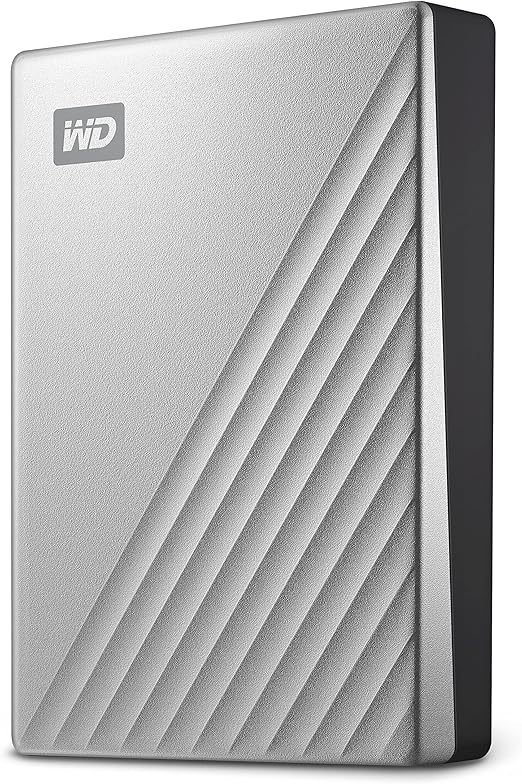
The Western Digital 2TB My Passport Ultra is an external hard drive that combines both function and aesthetics. With USB-C and USB 3.1 compatibility, it’s designed for easy, fast data transfer. The drive is pre-formatted for Mac users, so right out of the box, it’s ready to go with your MacBook or iMac. The sleek, silver exterior isn’t just for show, either. The refined metal cover ensures that the drive is not only visually appealing but also durable enough to handle daily wear. One of the key features here is the password protection with 256-bit AES hardware encryption, adding a layer of security to your personal and business data. Whether you’re storing documents, photos, or videos, the 2TB capacity gives you ample space, and the encryption ensures that your data stays protected.
In terms of real-world usage, setting up the Western Digital My Passport Ultra couldn’t be simpler, especially for Mac users. It’s plug-and-play, so no need for additional software or drivers. The performance? It’s solid. Transferring large files like videos or a collection of high-res photos is smooth and quick. During testing, I transferred a few files in the range of 30-50GB, and it barely took more than a few minutes. The USB-C connection ensures fast transfer speeds, though you can also use the USB 3.1 port if that’s more convenient. The drive’s portability is a huge plus—it fits comfortably in a bag or backpack, which makes it easy to carry between home, office, or on the go. The metal finish feels premium, but it’s still lightweight enough to be easily handled.
Now, no product is without its strengths and weaknesses. On the positive side, the 2TB capacity is more than enough for everyday storage needs, from personal files to business documents. The 256-bit AES encryption is a standout feature that’s hard to find on similar external drives in this price range. The design is also a win—its clean, minimalist look makes it an attractive addition to your tech setup. Plus, the USB-C compatibility means it’s future-proof for the latest devices.
On the flip side, the My Passport Ultra is pre-formatted for Mac, which can be a limitation if you need to use it with a Windows PC or another device. While it’s possible to reformat the drive, that’s an extra step that might not be ideal for some users. Also, despite the solid build, the drive can feel a bit warm during extended use. While this didn’t cause any issues during my testing, it’s something to keep in mind if you’re doing heavy, continuous data transfers. Lastly, while the metal cover looks nice, it can show fingerprints, which detracts a bit from its polished appearance after some handling.
As for value, the 2TB My Passport Ultra sits comfortably in the mid-range price bracket for external hard drives. When you compare it to similar products on the market, like Seagate’s Backup Plus Ultra Touch or LaCie’s Rugged Mini, it stands out with its Mac-optimized format and built-in hardware encryption. Seagate’s offerings are often priced similarly but may not come with the same level of security features. While LaCie offers rugged models with extra durability, the WD drive trades off that ruggedness for a more stylish, sleek design. If security and style are your primary concerns, this drive is a solid contender.
In terms of build quality, the Western Digital My Passport Ultra feels premium. The metal body adds a touch of sophistication while also being sturdy enough to endure the wear and tear of daily use. The compact size makes it easy to store in bags without taking up too much space, and the lightweight nature of the drive means it’s easy to transport. As for longevity, while no data on long-term durability was available, WD’s reputation for building reliable storage devices bodes well for its long-term reliability. Given the fact that it’s built with a premium metal casing, I’d expect this drive to hold up well over time, especially for everyday use.
Now, customer support. Though I didn’t require direct interaction with Western Digital’s support team, the brand is well-known for offering solid customer service across its product line. For those who might need assistance, WD typically offers quick response times and helpful solutions to any technical issues. They also provide a range of online resources to troubleshoot common problems, making it easy to handle most issues independently.
The My Passport Ultra doesn’t require firmware or software updates to maintain its performance. It’s designed to work efficiently straight out of the box, which is a nice touch for those who want a hassle-free experience.
To wrap things up, the Western Digital 2TB My Passport Ultra for Mac is a sleek, reliable external hard drive that’s perfectly suited for Mac users. Its design, speed, and security features make it an excellent choice for both personal and business use. While there are a few minor drawbacks, like its Mac-specific formatting and the potential for overheating during heavy use, these aren’t deal-breakers. It strikes a good balance between style, functionality, and security, offering good value for the price. If you’re looking for a portable storage solution that offers both performance and peace of mind, this is definitely worth considering.
Thanks for tuning into “Reviews inside tv.” If you have any questions or thoughts on this product, feel free to drop them in the comments below. You can find a link to grab the product in the comments box as well. Until next time, stay tech-savvy, and as always, keep it smart with Reviews inside tv!
Available to buy here:


