

Available to buy here:
Welcome back to Reviews inside TV, where we bring you the most insightful and detailed product reviews for all your tech and gaming needs. Today, we’re checking out the Logitech G213 Prodigy Gaming Keyboard. Whether you’re a casual gamer or someone who spends hours in front of your screen, this keyboard promises to be a solid companion. But does it live up to the hype? Stick with me as we take a closer look at this device to see if it’s worth your investment.
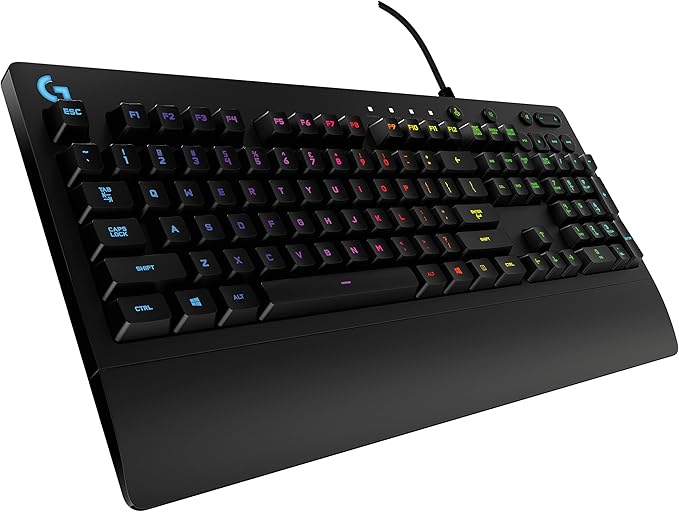
The Logitech G213 Prodigy is a full-sized gaming keyboard that brings together key features that gamers look for—lighting customization, durability, and responsive performance. One of the standout features is the RGB backlighting, which allows you to personalize five individual lighting zones from a spectrum of over 16.8 million colors. Whether you want your keys to match your setup, display your favorite colors, or sync with other Logitech G devices for a coordinated lighting effect, this keyboard has you covered. The low light leak around each keycap ensures that the illumination shines brightly, making it easy to spot your keys even in the dark.
Now, if you’ve ever spilled your drink during an intense gaming session, you’ll appreciate the G213’s spill-resistant design. This keyboard is built to handle a bit of liquid, crumbs, or dirt, making cleanup a breeze. It features a slim, durable body with an integrated palm rest and adjustable feet, allowing you to customize the keyboard’s angle for maximum comfort during those marathon gaming sessions. No more sore wrists or uncomfortable hand positions—just pure gaming comfort.
Performance is where the G213 shines. Each key on this keyboard is designed to deliver ultra-quick, responsive feedback, making it up to four times faster than standard keyboards. It also includes anti-ghosting technology, ensuring that you can press multiple keys simultaneously without any errors, a crucial feature for fast-paced games where every millisecond counts.
In addition to its impressive performance, the G213 includes dedicated media controls. These controls let you adjust your volume, skip tracks, or even pause and play music and videos—all without having to switch out of your game. Whether you’re grinding in a battle royale or relaxing with some music, this feature adds convenience and functionality.
The Logitech G213 Prodigy also allows for full customization through Logitech Gaming Software. You can tweak your RGB lighting, assign multiple functions to the function keys (F1-F12), and much more. This software gives you the flexibility to tailor the keyboard to your exact needs, whether you’re gaming or working.
Let’s now talk about how the keyboard performs in real-world scenarios. Setting it up was easy, and the keys felt responsive right from the get-go. I tested it for both gaming and typing, and I was impressed with how quickly it responded to my key presses. The tactile feedback was perfect for gaming, whether I was playing something fast-paced like a shooter or something more strategy-driven. The customizable RGB lighting was a fun bonus, and I loved syncing it with other Logitech G devices for a cohesive gaming setup.
However, there are a few things to keep in mind. The keyboard’s key switches are not mechanical, so if you’re used to the clicky feel of a mechanical keyboard, you might find it a bit lacking. The keys are quieter and softer, which can be a pro for some and a con for others. Additionally, while the palm rest is comfortable, it’s a bit on the smaller side compared to some higher-end keyboards, so long-term comfort might be an issue for users with larger hands.
When it comes to value for money, the Logitech G213 Prodigy is priced competitively for a keyboard that combines both gaming and productivity features. Compared to other gaming keyboards in this price range, it offers a solid balance of performance, customization, and durability. For instance, alternatives like the Razer Cynosa V2 or the Corsair K55 RGB are in the same price range but might not offer as robust a set of features, like the spill-resistant design or multi-key input. The G213 excels in providing a premium experience without reaching the high-end price tag of other mechanical keyboards, making it a great option for gamers looking for a functional, budget-friendly choice.
In terms of build quality, the G213 Prodigy feels solid and durable, with the spill-resistant design giving it an edge in terms of longevity. However, the plastic construction might feel a bit lightweight for some users who prefer the heavier feel of higher-end keyboards. Over time, the keys are likely to hold up well, but only long-term testing will show how well the G213 performs after extended use.
Customer support from Logitech has generally been reliable, with their support team known for being responsive and helpful. If you ever run into issues, you can expect quick service through their online support portal. However, I haven’t had to reach out for support, as the keyboard’s design and performance have been flawless so far.
When it comes to software updates, Logitech Gaming Software is easy to use and offers seamless integration with the keyboard. While the software doesn’t require constant updates, it’s good to know that Logitech ensures it stays compatible with newer devices, making the keyboard future-proof in that sense.
To sum it all up, the Logitech G213 Prodigy Gaming Keyboard is a solid choice for anyone looking for a budget-friendly yet feature-packed gaming keyboard. It delivers on the key features that matter most to gamers—customizable RGB lighting, responsive keys, and dedicated media controls—while offering a spill-resistant design and comfort for long gaming sessions. The performance is impressive, but it might not satisfy those who prefer mechanical switches. If you’re looking for a reliable, all-around keyboard for both gaming and productivity, the G213 is definitely worth considering.
Thanks for watching! Don’t forget to hit the like button, subscribe, and ring that bell for more in-depth reviews from Reviews inside TV. If you’ve already tried the G213 or have any thoughts or questions, drop them in the comments below—I’d love to hear your experiences! Until next time, keep your setups smooth, your gameplay smooth, and your RGB lighting on point!
Available to buy here:


