

Available to buy here:
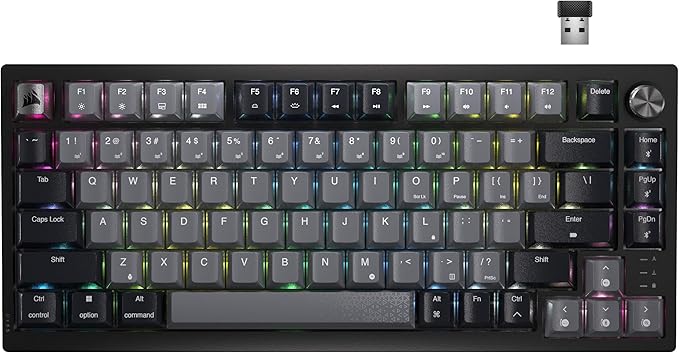
Welcome to Reviews inside tv, where we take a deep dive into the latest and greatest in tech and gadgets. Today, we’re checking out the Corsair K65 Plus Wireless 75% RGB Mechanical Gaming Keyboard, a compact yet feature-packed gaming keyboard that promises high performance and versatility. With pre-lubricated Corsair MLX Red linear switches, a long-lasting battery, and a sleek design, it looks like it has everything a gamer could want. But, does it live up to the hype? Let’s find out.
The K65 Plus is designed with both gamers and casual users in mind, offering a variety of features that cater to different needs. The pre-lubricated MLX Red switches are the standout here, delivering a smooth, linear keypress that’s responsive and quiet. Perfect for both gaming and typing, these switches are engineered to give you a seamless experience, whether you’re hammering out code or making the winning move in your favorite FPS. What’s more, the switches are pre-lubricated for smoother keystrokes, which could be a big selling point for those looking for an upgrade from standard, scratchy mechanical switches.
Another notable feature is the wireless connectivity options. The K65 Plus offers three ways to connect: 2.4GHz wireless, Bluetooth, and USB wired. The 2.4GHz wireless is designed for low-latency performance, which is crucial for gaming, ensuring that there’s no noticeable delay between your actions and what’s happening on screen. AES encryption adds an extra layer of security, so you can game without worrying about your connection being compromised. Whether you prefer the freedom of wireless or the reliability of a wired connection, the K65 Plus has you covered.
One feature that’s likely to catch your eye is the multi-function dial and FN shortcut keys. This rotary dial can be used to control media, adjust volume, or switch between apps, giving you one-touch access to essential commands while you game. It’s an intuitive, versatile addition to the keyboard that really boosts its practicality, especially for those who like to multitask or streamline their workflow during extended gaming or work sessions.
The build quality of the K65 Plus is solid, with the keyboard featuring durable PBT dye-sublimated keycaps. These keycaps are resistant to fading, wear, and shine, meaning that after years of heavy use, your keyboard should still look as good as new. For many users, this is a critical feature, as cheap keycaps can wear down quickly, affecting both aesthetics and performance.
In terms of battery life, the K65 Plus is impressive. With RGB lighting turned off, it boasts an impressive 266 hours of wireless battery life. That’s a lot of gaming without worrying about recharging. If you prefer to use the RGB lights, you’ll find that the battery life will understandably be shorter, but it still lasts long enough for extended gaming sessions before needing to be plugged in.
Now, I’ve spent some time using the K65 Plus in various scenarios, from typing long documents to gaming in a competitive setting, and the experience has been smooth overall. The key switches are responsive and quiet, making typing feel effortless, and the wireless connection holds up well even in fast-paced gaming situations. The multi-function dial is particularly useful for adjusting volume or quickly launching apps without needing to leave the game.
However, there are a few things worth mentioning. The keyboard is a 75% layout, which means it’s smaller than a full-sized keyboard, but that’s not necessarily a bad thing for those who value space-saving or prefer a more compact setup. However, some users may miss the additional keys, particularly the number pad, which is omitted in this layout. Also, while the build is solid, it’s not quite as premium-feeling as some other high-end gaming keyboards out there. If you’re used to an all-metal construction, this might feel a bit more plasticky, though it still feels sturdy enough for everyday use.
The price of the K65 Plus is competitive for what it offers, especially when you consider the pre-lubricated switches, long battery life, and customizable features. However, there are competitors out there that offer similar features at a lower price point, particularly in the wireless category. Some brands like Logitech and Razer have solid offerings at a similar price, so it’s worth comparing them if you’re on the fence. That said, the Corsair K65 Plus does stand out in terms of build quality and the combination of features, which justifies the price.
When comparing the K65 Plus to other wireless gaming keyboards, a few things come to mind. For instance, Logitech’s G Pro X is also a wireless option with hot-swappable switches, but it’s slightly more expensive and lacks the multi-function dial. On the other hand, Razer’s BlackWidow V3 Mini HyperSpeed, another wireless 75% keyboard, features green switches that may feel more clicky compared to the quieter MLX Reds, so it really depends on your preference for sound and feel. Ultimately, if you’re looking for smooth, linear switches, a solid wireless connection, and a compact design, the K65 Plus stands out in this category.
As for long-term durability, the K65 Plus seems well-built, with sturdy keycaps and solid construction that should hold up well over time. Given Corsair’s reputation for quality, I have no doubt that this keyboard will last for years if properly cared for. The PBT keycaps in particular should resist wear and tear much better than cheaper ABS alternatives.
Customer service-wise, Corsair is known for being responsive and helpful, but I haven’t had to reach out for support with this keyboard yet. Still, it’s reassuring to know that the brand is generally well-regarded for its customer service.
Now, if you’re considering the K65 Plus, I think it’s safe to say that it’s a solid choice if you’re looking for a compact, wireless mechanical keyboard. The pre-lubricated switches make typing and gaming feel smooth, the multi-function dial adds an extra layer of convenience, and the battery life is fantastic. While it may not be the most premium-feeling keyboard out there, it certainly offers great value for its price, especially if you’re after a balance of performance and practicality.
Before we wrap up, don’t forget to hit that like button, subscribe to Reviews inside tv, and ring the bell so you don’t miss our latest reviews. Let me know in the comments if you’ve used the Corsair K65 Plus or if you’re considering it. I’d love to hear your thoughts!
Thanks for watching! The link to grab your own Corsair K65 Plus is in the comments below. If you have any questions or thoughts about this keyboard, feel free to leave them down there too. Until next time, take care and game on!
Available to buy here:


