

Available to buy here:
Welcome to “Reviews inside tv,” the place where we explore the latest and greatest tech products on the market. Today, we’re taking a closer look at the ASUS ROG Falchion RX Low Profile Wireless Gaming Keyboard. If you’ve been hunting for a compact, feature-rich keyboard that offers ultra-fast responsiveness and multiple connectivity options, you might want to stick around for this review.
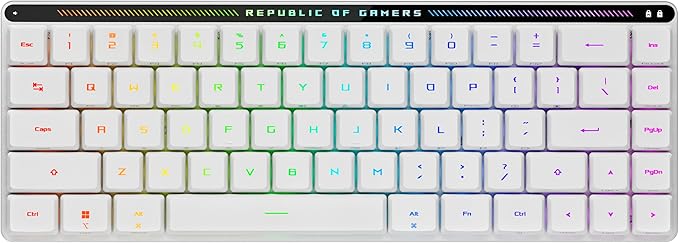
The ASUS ROG Falchion RX is a 65% compact mechanical keyboard with a sleek, ultra-slim design that’s packed with impressive features. It boasts ROG RX Low-Profile Optical Switches, offering you precision and speed with every keypress. These switches are pre-lubed, feature centralized RGB lighting, and ensure consistent, wobble-free keystrokes with almost zero debounce delay. The keyboard is designed to provide a seamless typing experience with near-instant feedback, which is especially important for gamers who require the quickest response times in critical moments. The compact 65% layout cleverly integrates the arrow and navigation keys, which are often missing from smaller keyboards, without compromising the slim profile. The keyboard’s thickness sits at just 26.5mm, making it extremely portable and space-efficient.
When it comes to connectivity, the Falchion RX truly stands out. It offers three connection modes: Bluetooth, 2.4 GHz wireless using ASUS’s ROG SpeedNova technology, and a wired USB connection. The Bluetooth option allows you to pair up to three devices, which is perfect if you’re the type of person who works across multiple devices or needs to quickly switch between platforms. The wireless mode ensures a fast, stable connection, while the wired mode gives you zero-latency performance for those moments when every millisecond counts. The ROG Omni Receiver allows you to connect multiple devices simultaneously, freeing up USB ports for other essential peripherals. That’s a huge bonus for anyone who’s running out of USB slots or trying to keep things tidy on their desk.
In real-world use, the setup process was incredibly straightforward. I connected the keyboard using the USB cable first, which immediately recognized it on both my PC and Mac without the need for any additional drivers. Switching to Bluetooth was just as simple, and I could effortlessly pair it with multiple devices, toggling between them seamlessly with just a press of a button. The keyboard feels solid in hand, and the low-profile keys are responsive and comfortable to type on, even during long gaming sessions. The ROG RX Blue switches provide tactile feedback that’s satisfying, but not too loud, making it an excellent option if you’re in a shared space or working late hours. One of the standout features is the intuitive touch panel on the keyboard, which allows for easy media control and quick adjustments to the RGB lighting. It’s a simple, yet elegant feature that adds to the overall user experience.
Now, let’s talk about the pros and cons. On the positive side, the compact form factor is a major plus for people who are looking for a keyboard that doesn’t take up too much space, whether you’re on a smaller desk or need something portable for gaming on the go. The tri-mode connectivity is also a game-changer, offering versatility and freedom to switch between devices with ease. The ROG RX Low-Profile Optical Switches provide an excellent balance of speed and comfort, ideal for both typing and gaming. The intuitive touch panel adds convenience for adjusting settings on the fly, and the overall build quality feels premium for a keyboard of this size.
However, there are a couple of drawbacks worth mentioning. While the low-profile design is sleek and compact, it may not be for everyone—especially those who prefer a more traditional key feel with deeper key travel. The RGB lighting is bright and vibrant, but some users might find it a bit too flashy for their taste, especially with the touch panel lighting up constantly. Another potential downside is the price point. At this range, you’re paying a premium for the design and features, and while the keyboard delivers, it might be a bit much for those who are just looking for a basic mechanical keyboard. Additionally, the touch panel, while functional, might not be as intuitive for all users. Some may prefer dedicated media buttons instead of swiping through controls.
When you compare this keyboard with similar models in the market, like the Logitech G Pro X or the Corsair K70 RGB TKL, the ASUS ROG Falchion RX holds its own in terms of features, particularly with its tri-mode connectivity and the ROG RX Low-Profile switches. However, the K70 offers a more traditional design with more robust key travel, and the Logitech G Pro X allows for switch customization, which could be a dealbreaker for enthusiasts. In terms of value, the Falchion RX is competitive but slightly higher in price due to its premium build and specialized features. If you prioritize compactness, multi-device connectivity, and sleek design, this keyboard will certainly serve you well.
As for the build quality, the ASUS ROG Falchion RX feels solid. It’s made from high-quality materials that provide a durable, long-lasting feel. The ultra-slim profile is sturdy enough to withstand daily use without compromising on portability. While long-term data isn’t available yet, ASUS has a reputation for delivering quality products, and I wouldn’t expect any issues with the keyboard’s reliability down the line. That being said, it’s always worth keeping an eye on user reviews for any potential long-term concerns as time goes on.
Regarding customer support, I haven’t had any need to reach out to ASUS yet, but their reputation for support is generally strong. The setup process was smooth, and there have been no noticeable issues with the keyboard that would require support. ASUS offers a standard warranty, so if anything were to go wrong, you’d be covered.
In terms of updates, this keyboard doesn’t rely on firmware or software updates to maintain its performance, so there’s no need to worry about constant patching or changes that might affect how it functions. It’s plug-and-play out of the box and works great without additional tweaks.
To wrap things up, the ASUS ROG Falchion RX Low Profile Wireless Gaming Keyboard is a solid choice for those looking for a sleek, compact, and versatile keyboard that doesn’t sacrifice performance for size. With its tri-mode connectivity, fast optical switches, and innovative touch panel, it offers a high level of customization and usability. While it may not suit everyone due to its low-profile design and price point, it certainly delivers on its promises for users who need a gaming keyboard that can do it all. If you’re someone who values portability, multi-device connections, and a high-quality typing experience, the ASUS ROG Falchion RX could be a great fit for you.
Thanks for watching, and be sure to check out the link to get your hands on the ASUS ROG Falchion RX in the comments box. If you already own one, feel free to drop your thoughts or questions below—I’d love to hear your experience. Until next time, this is “Reviews inside tv,” where we bring you the best tech insights straight to your screen. Stay tuned for more!
Available to buy here:


