

Available to buy here:
Welcome to Reviews Inside TV, where we bring you honest, in-depth, and unfiltered reviews of the latest tech products. Today, we’ve got the Lenovo Legion K500 RGB Mechanical Gaming Keyboard—one that’s designed to stand out in a crowded market. With gaming accessories often leaning toward flashy and overloaded features, the Legion K500 goes for a clean, minimalist approach. But does simplicity mean sacrifice in performance? Let’s find out.
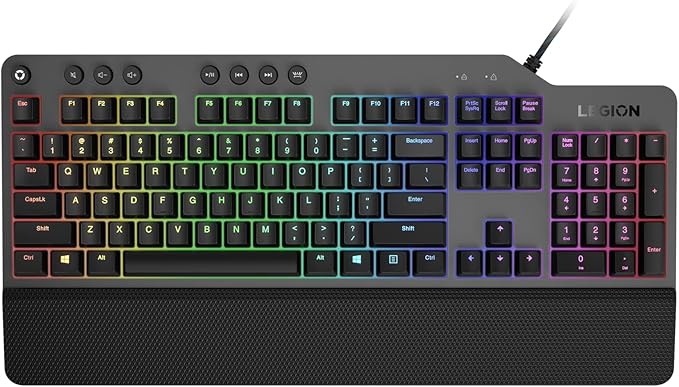
The Legion K500 is a full-sized mechanical keyboard, combining style and practicality. Its design is sleek and compact, focusing on delivering the essential features that matter most to gamers. The keyboard has 104 keys, each equipped with Lenovo’s signature Red mechanical switches, known for their smooth keystroke and quieter operation. A standout feature is the 50 million-click lifespan of the keys, which means durability isn’t a concern here. On top of that, it offers 100% anti-ghosting and 104-key rollover, ensuring every input is registered, no matter how fast or furious your gaming session gets.
In terms of customization, this keyboard shines with 16.8 million RGB colors available per key. It’s fully customizable to match your gaming setup or mood, without feeling overwhelming. The inclusion of 7 programmable hot keys and a dedicated game mode key lets you streamline your gameplay experience, minimizing accidental key presses. A comfortable detachable palm rest is also included for those long sessions, keeping your hands in a relaxed position to avoid strain. Additionally, the keyboard boasts a 1.8-meter braided cable, ensuring durability and flexibility for your setup without tangling up.
During my time testing the Legion K500, I found it incredibly easy to set up, requiring only a USB connection to start enjoying the full experience. Whether I was tackling high-speed FPS games or typing up lengthy emails, the K500 felt solid and reliable. The Red mechanical switches were responsive, offering a satisfying typing experience without feeling too noisy, which is a huge plus for those who value quiet keystrokes. I also appreciated the 7 programmable hot keys—they’re not just a gimmick. I set them up for quick access to in-game functions, and they worked perfectly every time. The Game Mode key worked seamlessly, ensuring that there were no accidental presses while in the heat of battle.
When it comes to the cons, there are a few. The RGB lighting, while customizable, might not be as vibrant as some other keyboards out there, especially those with more advanced lighting features or more intricate color schemes. The lack of wrist support, aside from the removable palm rest, might also be a dealbreaker for some, especially if you’re used to keyboards with a built-in wrist rest. But for many, the simplicity of the design will outweigh these minor issues.
In terms of value for money, the Lenovo Legion K500 delivers solid performance for its price. It’s well-built, feels premium, and offers a seamless experience that’s hard to beat in this price range. You’re getting the essentials right—mechanical switches with a great lifespan, anti-ghosting, customizable RGB lighting, and a durable build. But when compared to other mechanical keyboards in a similar price bracket, like the Corsair K55 or the Logitech G413, the K500 stands out with its minimalist design and the durability of its switches. It may not have all the bells and whistles of some higher-end models, but if you value functionality over excessive extras, this keyboard is a strong contender.
As for build quality, the K500 excels in the premium materials used, giving it a sturdy and durable feel. It doesn’t feel cheap or flimsy, and that’s reassuring when you’re talking about a product meant to withstand millions of keystrokes. Over time, the Red switches should continue to perform well, and the 50 million-click lifespan gives you peace of mind that the keyboard won’t wear out too quickly. Though, I’d like to point out that this is more of a speculation based on the reputation of the brand and the materials used, as long-term testing data isn’t available just yet.
Now, I didn’t have any direct interactions with Lenovo’s customer support, but based on their reputation for solid service, I’d say you’re likely to be in good hands if you ever need help. Lenovo has generally received positive feedback when it comes to support for their gaming products, so that’s a good sign.
If you’re wondering whether there have been any updates to the software or firmware for the K500, I can tell you that updates aren’t as crucial for a mechanical keyboard like this. Since it relies more on the hardware, there isn’t much that can change with updates, which isn’t necessarily a bad thing.
In conclusion, the Lenovo Legion K500 is a solid mechanical keyboard that brings together a minimalist design and impressive performance. Its clean aesthetic will appeal to those who don’t need a ton of flashy features but still want reliable gaming performance. It’s built to last, offers excellent customization options, and provides a comfortable typing experience. That being said, the lack of advanced lighting and wrist support might be a drawback for some, but if you’re looking for a durable, no-nonsense mechanical keyboard, this could be the one for you.
If you’ve found this review helpful, don’t forget to like and subscribe to Reviews Inside TV for more honest, in-depth reviews like this one. And if you have any questions or thoughts about the Lenovo Legion K500, feel free to drop them in the comments below. Thanks for watching—until next time, keep gaming and stay comfortable!
Available to buy here:


