

Available to buy here:
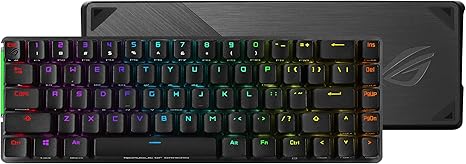
Welcome back to “Reviews Inside TV”! Today, we’re looking at a gaming keyboard that promises to balance performance, size, and innovation. This is the ASUS ROG Falchion Wireless 65% Mechanical Gaming Keyboard. Let’s break down what makes this compact powerhouse stand out in a crowded market of gaming peripherals.
The ROG Falchion’s form factor is what catches your eye first. It’s a 65% layout, which means it keeps the essential keys—like the arrow and navigation keys—without the extra bulk of a full-sized board. Measuring just 306mm in length, it’s incredibly compact, nearly the same size as a 60% keyboard. But it doesn’t sacrifice functionality for size, which is something gamers really appreciate. With this layout, you get a fully functional keyboard that won’t crowd your desk, giving you more space for gaming and mouse movements.
Now, let’s talk about connectivity and battery life, two aspects that are crucial for gamers who need a seamless experience. The ROG Falchion features dual-mode connectivity—2.4 GHz RF for wireless use and USB for wired connection. The wireless connection promises near-zero latency, which is essential in competitive gaming. You’re getting a connection that’s just as fast as a wired one, making this a solid choice for gamers who want the freedom of a wireless setup. And then there’s the battery life—up to 450 hours. Yes, you heard that right. With such impressive longevity, the ROG Falchion ensures you won’t be scrambling for a recharge in the middle of a game. This is particularly great for those long gaming sessions where the last thing you want to worry about is your keyboard dying on you.
But wait, there’s more. ASUS has added an interactive touch panel to the left flank of the keyboard, offering a unique feature that most other keyboards in this category don’t have. This touch panel allows you to adjust volume with a simple swipe or create shortcuts for app switching, copying, and pasting. It’s fully programmable too, so you can customize it to work as a macro key for quick actions, which is perfect for gamers looking to streamline their gameplay or multitask with ease.
Now, let’s get into the heart of the keyboard—the switches. The ROG Falchion is equipped with Cherry MX RGB switches, widely regarded as the gold standard in mechanical switches. These switches are German-made and offer precise actuation with every key press. Whether you’re gaming, typing, or just browsing, they provide the tactile feedback and responsiveness you need for a premium typing experience. Whether you opt for the Cherry MX Brown switches for a quieter, more tactile response, or the Cherry MX Reds for a smoother, linear feel, you’re looking at a very high-quality mechanical keyboard here.
In terms of real-world use, setting up the ROG Falchion is a breeze. It’s plug-and-play for wired use, and if you prefer wireless, the 2.4 GHz connection is stable, with no noticeable input lag. I tested it with a few rounds of FPS games, and the responsiveness was spot on. I could really feel the precision and accuracy of the key presses. The touch panel, while a cool addition, can take some getting used to, but once you’ve programmed it for your specific needs, it really does make a difference in terms of convenience. Whether I was adjusting volume mid-game or quickly switching between applications, the touch panel was intuitive, and I could see it being especially useful in intense gaming sessions.
Now, let’s go over some of the pros and cons. Starting with the positives, the size of the ROG Falchion is a huge advantage for those who need something compact but don’t want to sacrifice any functionality. The build quality is solid, with a sleek design that feels premium, and the Cherry MX switches ensure that you get excellent tactile feedback, making both gaming and typing a joy. The battery life is outstanding—450 hours on a full charge is incredible for a wireless gaming keyboard. And of course, the interactive touch panel adds a whole new layer of customization and ease of use.
On the flip side, there are a few things worth mentioning. While the compact layout is great for saving desk space, some users might find it a bit cramped if they’re used to a larger keyboard. The touch panel, although innovative, might not appeal to everyone. It’s a unique feature, but it’s definitely not a deal-breaker for everyone. Lastly, although the wireless connection is solid, if you’re someone who demands absolutely zero latency, you might still prefer a wired setup for that extra peace of mind.
When it comes to value for money, the ROG Falchion sits in the higher end of the market, and that’s reflected in its build and features. With the dual-mode connectivity, Cherry MX switches, and those extra touches like the interactive panel, it’s a premium product aimed at gamers who want both functionality and form. Compared to other keyboards in this range, like the Corsair K65 or Logitech G Pro X, the ROG Falchion stands out with its compact size, battery life, and touch panel. But do keep in mind that if you’re on a budget, you may find options that offer fewer features for less money.
When comparing it to similar products, the most notable competitor is the Corsair K65 RGB, which is also a 60%-65% keyboard with Cherry MX switches. The K65 is a solid option but lacks the ROG Falchion’s touch panel and the same level of wireless battery life, though it does come at a slightly lower price point. Another competitor would be the Logitech G Pro X, which also boasts mechanical switches and a compact design but doesn’t offer the same level of customization with its features. While the G Pro X is a great keyboard, the ROG Falchion feels like it offers more in terms of extras, like the touch panel and the impressive wireless performance.
In terms of build quality, the ROG Falchion feels durable and premium. The materials used in the construction feel solid, and there’s no flex when pressing the keys. The overall construction is robust, and based on ASUS’ reputation for high-quality peripherals, I’m confident this keyboard will hold up well over time. Since I’ve only had this keyboard for a short time, I can’t speak to its long-term durability, but based on its build and industry reputation, I don’t expect any major issues down the line.
Customer service from ASUS has always been solid in my experience. While I haven’t had to reach out for any issues with the ROG Falchion, ASUS has a good track record for providing prompt and helpful support when needed.
And one last thing—if you’re someone who likes to stay up to date with firmware or software, the ROG Falchion’s Aura Sync RGB lighting can be customized and controlled through ASUS’ software. While updates to the keyboard’s firmware don’t come as frequently, you’re not left behind in terms of customization or enhancements with software updates.
To wrap things up, the ASUS ROG Falchion Wireless 65% Mechanical Gaming Keyboard is a high-performance keyboard that combines a compact design, innovative features, and premium build quality. It’s perfect for gamers who want a smaller, feature-rich keyboard without sacrificing performance. The touch panel, Cherry MX switches, and dual-mode connectivity really make this keyboard stand out in its category. While it’s not for everyone—especially if you prefer a full-sized board or need an ultra-low latency wired setup—it’s an excellent choice for those looking for a compact, feature-packed gaming keyboard. Thanks for joining us today, and make sure to leave your thoughts in the comments section below. If you’ve used this keyboard, I’d love to hear your experience. Until next time, take care and game on!
Available to buy here:


