

Available to buy here:
Welcome to Reviews Inside TV, where we bring you the latest in gaming tech and gear. Today, we’re talking about something that’s really caught the eye of enthusiasts in the gaming world—the ASUS ROG Falchion NX 65% Wireless RGB Gaming Mechanical Keyboard. Compact, but powerful, this little keyboard is packed with features that could elevate your gaming experience. Let’s take a closer look at what this gaming keyboard brings to the table.
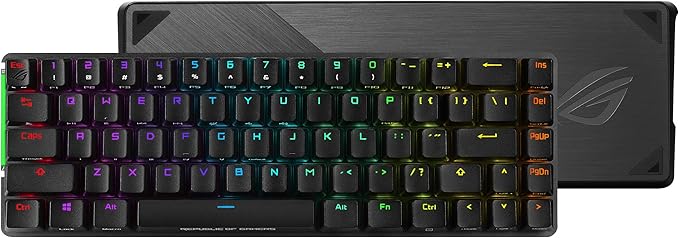
The ROG Falchion NX is a 65% form-factor mechanical keyboard, designed to save space on your desk while still giving you all the functionality you need. Its compact size, measuring just 306 mm in length, places it in the same category as the 60% keyboards, but ASUS has managed to integrate the essential arrow and navigation keys. This means you get all the essential keys without losing valuable desktop space—perfect for those of us who want to declutter while maintaining full keyboard functionality.
Now, let’s talk about the key feature that really stands out: the dual-mode connectivity. Whether you’re gaming wirelessly or in wired mode, the ROG Falchion NX has you covered. In wireless mode, it uses a near-zero latency 2.4 GHz RF connection, ensuring stable and uninterrupted gameplay. And with a staggering 450-hour battery life, you won’t have to worry about your keyboard dying in the middle of a session. If you’re running low, you can always switch to USB wired mode for the ultimate gaming experience without any interruptions.
The keyboard also comes equipped with ROG’s PBT Doubleshot keycaps. These aren’t your standard plastic caps. They’re durable, provide a premium tactile feel, and reduce key wobble. The mid-height design of the keycaps adds comfort, especially during long gaming sessions. You’ll notice that the keystrokes feel more solid and responsive, which is a game-changer when it comes to competitive gaming.
One of the coolest features of the ROG Falchion NX is the interactive touch panel. It’s not just for show; it offers real functionality that could enhance your overall gaming experience. This touch panel lets you control things like volume, skip tracks, or change settings on the fly—all with a simple touch. This is a feature that adds a layer of interactivity, something many keyboards miss.
When it comes to durability, the ROG Falchion NX impresses with its polycarbonate keyboard cover. This transparent cover protects your keyboard when you’re not using it, and it’s also handy when taking the keyboard to LAN parties. It provides extra protection while keeping the sleek design intact. Plus, when you’re using it, you can place the cover under the keyboard to diffuse the RGB lighting from the underside—giving you a cool, soft glow that really adds to the aesthetic.
But no product is without its pros and cons. On the positive side, the compact 65% form factor is a great choice for those who want to save space without sacrificing important features. The dual-mode connectivity is fantastic, giving you options depending on your needs. The PBT Doubleshot keycaps are a standout feature, offering both durability and comfort. The touch panel adds a fun and functional twist, and the polycarbonate cover is an excellent addition for protection and aesthetics.
On the flip side, the compact design may not suit everyone. If you’re someone who prefers a full-sized keyboard with a numpad, this might feel a little limiting. While the 65% layout is perfect for gaming, it could be a challenge for users who frequently type or do work that requires a lot of numerical input. Additionally, the lack of dedicated media keys means you’ll rely on the touch panel or function keys for media control, which may not be as intuitive for some users.
When it comes to value for money, the ROG Falchion NX is positioned at a premium price point. Considering the features it offers—especially the dual-mode connectivity, long battery life, and the tactile PBT keycaps—it delivers solid value. However, if you’re just after a budget-friendly option and don’t mind sacrificing some of the premium features, you might find alternatives that cater to your needs for less money.
Looking at direct competitors, the Logitech G Pro X and Razer Huntsman Mini come to mind. The G Pro X offers a similar compact form factor and performance, though it’s a bit pricier and lacks the same level of wireless performance. Meanwhile, the Razer Huntsman Mini offers a slightly different switch feel and focuses on ultra-fast optical switches, but again, the wireless connectivity isn’t on the same level as the ROG Falchion NX. In terms of overall features, ASUS’s offering stands strong, especially if wireless performance and battery life are a top priority for you.
In terms of build quality, ASUS has certainly delivered. The keyboard feels solid and durable, especially with the inclusion of the polycarbonate cover, which is a nice touch. While long-term reliability data is still emerging, ASUS’s reputation in the gaming space speaks for itself. Given the premium materials used, I expect this keyboard to last and perform well for years to come, barring any unforeseen issues.
If you’re someone who values top-notch customer service, ASUS has a good reputation, but there were no specific support interactions for this product in this review. That said, if past experiences are any indication, they typically offer solid support should you run into any issues.
To wrap things up, the ASUS ROG Falchion NX 65% Wireless RGB Gaming Mechanical Keyboard is a solid choice for gamers who want a compact, feature-packed, and highly customizable keyboard. Its dual-mode connectivity, long battery life, tactile keycaps, and interactive touch panel make it a standout in its class. While the compact design might not be for everyone, it offers great value for those who prioritize space-saving and premium features.
If you’re looking for a top-tier wireless gaming keyboard that doesn’t skimp on functionality, the ROG Falchion NX could be exactly what you need. Thanks for watching! Feel free to share your thoughts or ask any questions about the keyboard in the comments below. If you’ve used this keyboard, we’d love to hear your experiences as well.
Goodbye for now, and remember, keep those RGB lights glowing—only here at Reviews Inside TV!
Available to buy here:


