

Available to buy here:
Welcome to Reviews inside TV, the place where we dive deep into the world of tech and gaming gear to bring you the most honest and informative reviews. Today, we’re checking out the KOORUI 60% Mechanical Gaming Keyboard. If you’re after a compact, yet powerful mechanical keyboard that offers a balance of gaming performance and stylish backlighting, this one might just be on your radar. So, let’s take a closer look at what this keyboard has to offer.
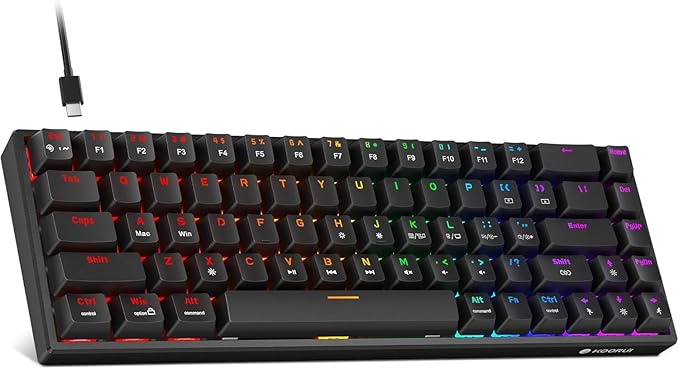
First, let’s start with the basics. The KOORUI 60% Mechanical Gaming Keyboard comes with 68 keys, designed to save precious desk space while still offering the necessary controls for a high-performance gaming experience. One of its standout features is its LED backlighting, which boasts 19 different cool lighting modes. Whether you’re gaming in the dark or just want to add some flair to your desk setup, these modes give you a lot of flexibility. And if you’ve got a favorite light setup, the memory function ensures you can easily pick up where you left off, even after restarting your computer.
Now, let’s talk about its construction. The keyboard is available in two switch options: red and blue, with this model specifically featuring the blue switches. These blue switches are known for their tactile feedback and audible click, making them a favorite for gamers who enjoy the mechanical feel and sound that comes with each keypress. The keycaps are dual-color injection molded, made from high-quality ABS plastic, and feature laser-engraved text. With a lifespan of up to 50 million key presses, you can count on these keys to hold up over time without the worry of fading or losing their responsiveness.
The keyboard doesn’t stop at its look and feel—it also features full-key anti-ghosting technology. This means you can press multiple keys simultaneously without losing any input, an essential feature for gamers who need quick, precise movements in high-stakes situations. So, whether you’re executing complex combos in a game or just typing away in a fast-paced work environment, the KOORUI ensures that every keystroke is registered.
In terms of versatility, this keyboard doesn’t fall short. It includes 12 multi-function keys for things like adjusting volume or controlling media playback, making it ideal for multitasking. It’s compatible with both Windows and Mac OS, so whether you’re gaming on your PC or using it for work, it integrates well with both Apple and Microsoft operating systems.
Now, after spending some time with the KOORUI 60% Mechanical Gaming Keyboard, I can tell you it’s a solid performer, especially for those who need a compact and portable solution. The setup is incredibly easy—just plug it in, and you’re ready to go. It doesn’t require any drivers or extra software to get up and running, which is a huge plus for those who don’t want to deal with additional setup steps.
When I tested the keyboard with gaming, it really shined. The blue switches provided satisfying clicks with each press, giving me that extra bit of tactile feedback while playing. The anti-ghosting feature held up well in more complex games where multiple keys needed to be pressed at the same time—no missed inputs, no interruptions. Typing on it was smooth too, though the louder clicking sound of the blue switches might be a bit distracting for anyone in a shared or quiet space.
Now, moving on to the pros and cons. The keyboard’s small form factor is a huge plus if you’re looking for something that doesn’t take up too much desk space. It’s also lightweight and portable, thanks to its detachable Type-C cable, which makes it easy to toss in a bag if you’re heading out on a business trip or to a gaming session. The backlighting is another major plus, offering lots of customization options to match your mood or gaming setup.
However, it’s not all perfect. The blue switches, while great for gaming, can be pretty loud. If you’re someone who values a quieter typing experience, this could be a dealbreaker. The lack of dedicated arrow keys and a number pad might also be a downside for people who prefer a more traditional layout or do a lot of typing tasks that require those keys. Also, while the keyboard works perfectly fine with both Windows and Mac OS, you may find some of the multimedia controls to be slightly limited on non-Windows devices.
As for value for money, this keyboard definitely delivers. Given its compact design, mechanical switches, and customizable backlighting, it’s priced reasonably compared to other similar options on the market. When you compare it to other compact 60% keyboards, many of which come at a higher price point, the KOORUI stands out as a solid option, especially for gamers on a budget. However, if you’re looking for a quieter typing experience or more advanced features like programmable keys, you might want to consider some other options in the same price range.
In terms of comparisons, there are a few other keyboards worth mentioning. For example, the Logitech G Pro X and the Razer Huntsman Mini both offer similar compact layouts and mechanical switches. However, those keyboards tend to come with higher price tags and offer features like hot-swappable switches or higher-end RGB customization. If you’re primarily looking for a straightforward mechanical keyboard that gets the job done without the extra bells and whistles, the KOORUI is a strong contender. It excels in portability, ease of use, and performance while remaining budget-friendly.
When it comes to build quality, the KOORUI doesn’t disappoint. It feels sturdy and well-made, with the plastic construction holding up well under extended use. The keycaps are durable and have a satisfying feel, with no signs of wear after several weeks of heavy gaming and typing. While long-term reliability is still to be fully tested, based on the quality of materials and the brand’s reputation for durable products, this keyboard seems like it will hold up well over time.
I didn’t have any direct interactions with customer service for this product, but KOORUI has generally built a solid reputation for providing good customer support. If you ever encounter any issues, you can expect a reasonable response time and helpful assistance, though it’s worth noting that this is a more niche product and may not be supported in every region as readily as some of the larger brands.
As for updates, since this is a wired keyboard and not a smart device, there are no software updates to worry about here. You’ll just need to plug it in and go. The backlighting is great, and with its built-in memory, you don’t need to fiddle around with settings every time you restart your computer, which is a big convenience.
To sum up, the KOORUI 60% Mechanical Gaming Keyboard delivers a great balance of features for both gamers and everyday users looking for a compact and functional mechanical keyboard. Its blue switches, customizable lighting, and solid performance make it a worthwhile consideration for anyone in need of a budget-friendly, portable mechanical keyboard. While the noise of the switches and the lack of some keys may be a downside for some, it’s hard to argue against its value for money. If you’re looking for a compact keyboard with great performance, this one might be just what you need.
Thanks for watching today’s review. If you have any thoughts or questions about the KOORUI keyboard, drop them in the comments below! Also, if you’re considering picking one up, you can find the link to get it in the comments box as well. Don’t forget to like, subscribe, and hit that bell icon to stay updated with all our latest reviews. Until next time, it’s been a pleasure bringing you the inside scoop on tech gear—stay tuned for more on Reviews inside TV!
Available to buy here:


