

Available to buy here:
Welcome to “Reviews inside tv,” the channel where we break down the latest tech and gaming gear to see if it really lives up to the hype. Today, we have something special— the ASUS ROG Falchion NX 65% Wireless RGB Gaming Mechanical Keyboard. With a compact 65% layout, this keyboard promises to deliver high performance in a smaller footprint, boasting features like wireless connectivity, RGB lighting, and durable PBT keycaps. But does it live up to expectations? Let’s take a closer look.
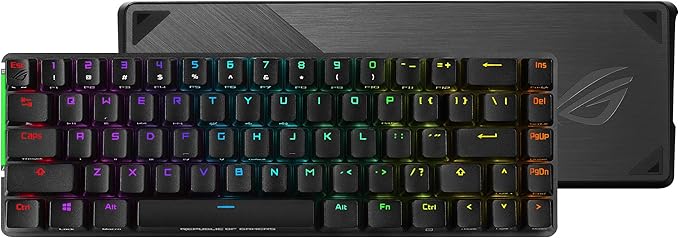
The ASUS ROG Falchion NX is a compact, wireless mechanical keyboard that brings all the essentials of a full-sized keyboard into a more compact form. It’s designed for gamers who want functionality without sacrificing space. With a 65% layout, you get your usual letter keys plus a column of arrow and navigation keys, so you’re not missing out on any essential functions. It’s perfect for those who want a minimalist setup but still need a fully functional keyboard. The ROG Falchion NX also features a 2.4 GHz wireless connection with a stable, near-zero latency, making it suitable for high-paced gaming. On top of that, it offers up to 450 hours of battery life, meaning you can game for days without worrying about charging.
This keyboard also stands out with its PBT Doubleshot keycaps, which not only provide a premium feel but also ensure durability. These keycaps are designed to withstand heavy usage without wearing down quickly. The mid-height keycaps further enhance the typing experience by reducing key wobble, making it feel more responsive. Plus, it’s equipped with the innovative touch panel for controlling volume or adjusting settings on the fly, which is a neat addition to the overall design. And let’s not forget the polycarbonate keyboard cover— transparent and durable, it protects your keyboard when you’re not using it, or even when you’re traveling for LAN parties. It’s a nice touch that adds both protection and style, especially when you flip it over to showcase the RGB lighting underneath.
Now, let’s talk about how it performs in real-world scenarios. Setting up the ROG Falchion NX is straightforward—just plug it in for a wired connection or switch to wireless mode with the 2.4 GHz RF connection. Switching between modes is seamless, and the keyboard pairs quickly without any lag. I put it to the test with both gaming and typing. For gaming, it handled fast-paced FPS sessions like a pro. The key response is quick and precise, giving you that satisfying click with every keypress. For those of you who prefer a quieter typing experience, though, the clicky ROG NX Blue switches might be a bit loud, but they’re designed for those who enjoy that tactile feedback. As for day-to-day typing, the keycaps feel solid, and the mid-height design really helps in reducing strain during long sessions. The touch panel is also responsive, though I do wish it was a bit more customizable for advanced functions. Still, it’s a nice feature for volume adjustments or controlling playback while gaming.
Let’s talk about the pros and cons. On the plus side, the compact design is a game-changer, especially for those who want a minimalistic desk setup. The build quality is fantastic— the PBT Doubleshot keycaps and the polycarbonate cover make it feel premium, durable, and protected. The wireless connectivity with such long battery life is a huge win for gamers who don’t want to deal with cables. The performance during gaming was stellar, and the RGB lighting is a nice touch to set the atmosphere.
But, it’s not all perfect. The main downside is the noise level. The ROG NX Blue switches are loud— they provide that satisfying click but could be distracting in shared environments. Also, while the 65% layout is ideal for minimalism, it’s not for everyone—if you rely on a numpad or a full function row, this might not be the keyboard for you. The touch panel, while useful, could definitely benefit from more customization options, as it currently feels a little basic.
When it comes to value for money, the ASUS ROG Falchion NX is priced at a premium, which might raise some eyebrows. But considering the high-quality build, wireless functionality, long battery life, and RGB lighting, it does justify its price tag for serious gamers or those looking for a premium compact keyboard. It competes with similar 65% keyboards from brands like Corsair and Logitech, but where the Falchion NX stands out is its wireless connectivity and the unique inclusion of the polycarbonate keyboard cover. For those who want that touch of style and protection, it’s an appealing choice, though some may find it a bit expensive compared to non-RGB wireless options.
Comparing it to competitors, the Logitech G Pro X and Corsair K65 RGB both offer similar features but are slightly more limited in terms of wireless battery life and additional protection. The Falchion NX has a slight edge in terms of build quality and customization options, though. If you don’t mind the noise of the switches, this one has a little more style and a lot of longevity.
As for build quality, the ASUS ROG Falchion NX is built to last. The PBT keycaps and polycarbonate cover make it feel like a premium product, and even after extended use, it holds up well. The key switches are responsive and durable, though the long-term durability of the touch panel and the battery life will depend on how often you use wireless mode. However, based on ASUS’ reputation for quality products, it’s safe to say that this keyboard is built to withstand the rigors of both gaming and everyday use.
If you’ve ever needed to contact ASUS customer service, you’ll know they have a solid reputation for helpfulness and quick response times, though I didn’t need to reach out for this product. Still, it’s good to know that their customer service is reliable in case anything goes wrong.
Finally, as for updates, this product doesn’t require firmware or software updates unless you’re using it with ASUS’ Armoury Crate software for further customization, but that’s more about personalizing your experience than improving performance.
To wrap things up, the ASUS ROG Falchion NX offers a strong mix of performance, portability, and durability. The 65% layout is perfect for those who value desk space but don’t want to sacrifice functionality. Its wireless capability and long battery life make it a top contender for gamers who need reliability. However, the loud switch sound and premium price tag might be a turnoff for some. If you’re someone who loves that tactile feedback, wants a compact design, and doesn’t mind spending a little extra for premium features, the Falchion NX is worth considering.
Thanks for watching, and if you have any questions or thoughts on the ROG Falchion NX, feel free to drop them in the comments. Don’t forget to hit like, subscribe, and press the bell icon so you never miss an update on all things tech. Good bye till next time, and remember, here at “Reviews inside tv,” we only bring you the best reviews—no compromises, just insights!
Available to buy here:


