

Available to buy here:
Welcome to Reviews inside tv, where we break down the latest in tech to help you make informed decisions. Today, we’re checking out the Roccat Vulcan II Mini, a compact 65% optical gaming keyboard that’s been making waves. Whether you’re looking to up your gaming setup or want something sleek and functional for work, this little keyboard packs a punch. Let’s see what it’s all about.
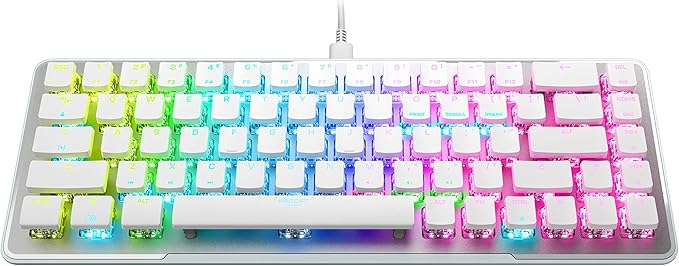
The Roccat Vulcan II Mini comes with a 65% form factor, meaning it keeps all the essential keys—like your arrow keys—while trimming down the rest to make it more portable and less cluttered. It’s a favorite for gamers who prefer a smaller keyboard, but still want the full functionality of a traditional one. The Titan II Optical Switches inside are what really set it apart. These switches are engineered for ultra-fast linear actuation, offering incredibly fast response times—perfect for competitive gaming. What’s more, these switches are rated for 100 million keystrokes, which means you’ll be clicking away for years to come without worrying about wear and tear.
Now, here’s an interesting feature: the Easy-Shift button duplicator technology. This allows you to create a second function layer on any key, giving you even more control and customization. If you’ve ever wished you could press a single button and trigger multiple functions, this keyboard has you covered. Additionally, there are Smart Keys on the keyboard with dedicated LEDs that light up when secondary functions are active—making it easy to know what’s happening without fumbling through settings.
Another cool feature is the on-board storage that supports up to five user profiles. If you have different setups for various games or tasks, this feature lets you save them directly on the keyboard, so you can take them anywhere without needing to reinstall or reconfigure on a new computer.
As for build quality, the Roccat Vulcan II Mini features an anodized aluminum top plate. This not only adds durability but also gives it a premium feel. The cross-shaped stems ensure compatibility with third-party keycaps, so if you’re into customizing your setup, this could be a nice touch. And let’s not forget about the AIMO RGB lighting, which is both vibrant and customizable, giving your keyboard a dynamic look that can sync up with other AIMO-enabled devices.
The detachable USB-C cable makes it easy to store and move around, and it’s a solid addition for anyone who’s constantly on the go. Now, I’ll share my real-world experience with the Roccat Vulcan II Mini. When I first set it up, the process was smooth. The keyboard felt solid in my hands, with the switches providing a satisfying, fast response. The lighting effects were bright, and the RGB customization options were impressive. The compact design is perfect for small desk setups, and it didn’t feel cramped, even after extended use.
However, I did notice a couple of areas where it might not be for everyone. While the 65% layout is great for those who prefer minimalism, it can be an adjustment if you’re used to a full-size keyboard, especially when it comes to typing long documents or general productivity tasks. For gaming, though, the layout was spot on, and I didn’t miss any keys during sessions. The Easy-Shift technology worked as expected, allowing me to assign secondary functions to several keys for quick access during intense moments.
On the downside, the compact size may not suit users who prefer a number pad for data entry. The keys, while responsive, might feel a bit stiff for those who prefer softer, more tactile feedback. And, of course, if you’re someone who likes a super quiet keyboard, the Titan II switches might not be for you—they’re quick, but they do carry a little more sound compared to some mechanical switches.
In terms of value, the Roccat Vulcan II Mini is priced competitively for a premium gaming keyboard, especially given its features like optical switches, RGB lighting, and customizable profiles. When you stack it up against similar 65% keyboards, like the Corsair K65 or the HyperX Alloy Origins 60, you’ll notice the Vulcan II Mini offers superior build quality with its aluminum top plate and the added bonus of Easy-Shift duplicator technology. While it’s on the higher end for smaller boards, the added durability, customization, and fast switches justify the cost for serious gamers or those looking for a keyboard that will last.
Now, looking at the competition, one of the first alternatives that comes to mind is the Logitech G Pro X. While it offers a similar compact layout and the ability to swap switches, it doesn’t quite match up to the Vulcan II Mini’s level of build quality or the convenience of the Easy-Shift duplicator. Another competitor is the Razer Huntsman Mini, which offers optical switches as well, but doesn’t have the same level of profile customization or aluminum construction. Overall, the Vulcan II Mini stands out in terms of design and customization, though depending on your preferences, some might prefer a more tactile feel or a slightly larger board.
When it comes to durability, the anodized aluminum top plate is a great touch. While long-term data on this particular model isn’t widely available yet, given Roccat’s reputation for making high-quality gaming gear, I’m confident that this keyboard will last for many years, assuming it’s cared for. If you’re someone who spends hours a day gaming or typing, the build quality and 100 million keystroke durability are certainly reassuring.
Now, customer service-wise, I haven’t had any direct interactions with Roccat’s support team for this review. However, based on previous experiences with the brand, their customer service is generally regarded as reliable, and they offer good support for their products. It’s always worth checking the warranty options when you make a purchase, but I’m optimistic that any issues would be handled promptly.
If you’re wondering about updates, this keyboard doesn’t require frequent firmware updates, as it relies mostly on its physical design and customizable profiles. The RGB lighting and key configurations can be adjusted with Roccat’s Swarm software, which is straightforward to use.
So, to sum it all up, the Roccat Vulcan II Mini offers a solid balance of compact design, fast optical switches, and useful customization features. Its build quality and AIMO RGB lighting are standout elements, but it’s best suited for those who want a smaller, more portable option without sacrificing performance. If you’re not a fan of the 65% layout or prefer a more tactile switch, this might not be the perfect choice, but for gamers and minimalists looking for a durable, responsive keyboard, this one’s hard to beat.
Thanks for watching! If you’re interested in the Roccat Vulcan II Mini, check out the link in the comments below. Feel free to share your thoughts or ask any questions if you’ve already got your hands on this keyboard. Goodbye till next time, and remember—there’s always more inside “Reviews inside tv”!
Available to buy here:


