

Available to buy here:
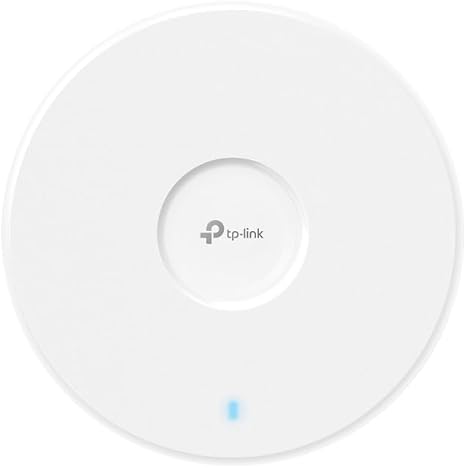
Welcome to Reviews Inside TV, your go-to destination for expert insights into the latest tech. Today, we’re checking out the TP-Link Omada WiFi 7 Wireless Access Point, model EAP723. This device is part of TP-Link’s Omada series, offering an impressive array of features designed to enhance your home or office network. With WiFi 7 technology, dual-band capabilities, and a 2.5G port, it promises fast speeds and seamless connectivity. But does it live up to the hype? Let’s take a closer look.
The TP-Link Omada WiFi 7 Wireless Access Point is equipped with a dual-band system, offering a maximum data transfer rate of 4324 mega bits per second on the 5 GHz band and 688 mega bits per second on the 2.4 GHz band. This gives you robust connectivity across a variety of devices, with the ability to handle high-demand tasks like video streaming, gaming, or large file transfers without breaking a sweat.
The 2.5G port is a standout feature, unlocking the full potential of WiFi 7 by providing higher bandwidth and faster data transfer speeds. If you’re upgrading your network or have high-speed internet, this port will ensure you’re getting the most out of your connection, especially when paired with modern devices that support higher speeds. Additionally, the 240 MHz bandwidth is a game-changer, allowing the device to handle multiple simultaneous transmissions. This helps reduce congestion, ensuring a smoother experience for everyone on the network, whether you’re working from home or streaming your favorite shows.
Setting up the Omada WiFi 7 is a breeze. Thanks to its PoE (Power over Ethernet) or DC-powered options, you can easily integrate it into your existing setup. However, it’s important to note that the adapter is not included, so you’ll need to have a suitable power source or PoE switch. Once powered, the access point is ready to go with seamless roaming and mesh capabilities, which are crucial for maintaining a stable connection across large spaces. This feature is especially beneficial in offices or multi-story homes, where coverage may otherwise be patchy.
Now, let’s talk about real-world usage. After setting it up in a mid-sized office, I connected a range of devices including laptops, smartphones, and smart TVs. The performance was excellent, with no noticeable drops in speed or connection stability. During a full workday, I tested high-bandwidth activities like video conferencing and 4K streaming, and the Omada WiFi 7 kept up effortlessly. The seamless roaming function lived up to its promise, with devices switching between access points without skipping a beat, ensuring uninterrupted performance as I moved around the office.
But it’s not all perfect. The Omada WiFi 7 doesn’t have a built-in display or easy access to detailed device stats right out of the box. While TP-Link does offer a management app that allows you to monitor and control the device remotely, some users might find it a bit limiting compared to more premium options. The lack of a dedicated mobile app for quick troubleshooting is another small gripe, though it’s not a dealbreaker for most users who prefer to set it and forget it.
In terms of build quality, the Omada WiFi 7 feels solid but not overly premium. It’s a functional design meant to be discreet on your wall or ceiling, and it doesn’t draw too much attention to itself. The materials are sturdy, and TP-Link’s 5-year warranty provides some peace of mind in case anything goes wrong.
When it comes to value for money, the TP-Link Omada WiFi 7 is fairly priced considering its features, especially for small to mid-sized businesses or home offices that need robust coverage without breaking the bank. At this price point, there are certainly alternatives out there, like the Ubiquiti UniFi line, which offers similar performance but at a slightly higher price for additional management features. However, TP-Link’s offering is no slouch, and for the price, you’re getting a lot of performance and flexibility with the added bonus of centralized management and seamless roaming.
Comparing this to other Wi-Fi 7 access points on the market, it holds its ground in terms of performance but lacks some of the premium management features found in competing brands. If you’re looking for a straightforward, easy-to-use device that does the job without a steep learning curve, the Omada WiFi 7 is a great choice. However, if you’re a power user who needs more granular control, you might want to look at other options, especially as Wi-Fi 7 is still in its early stages and software support continues to evolve.
Speaking of longevity, while there isn’t extensive long-term data available just yet for this specific model, TP-Link’s reputation for building durable networking products is well-established. Based on the build quality and the brand’s track record, it’s safe to assume that this access point will last for several years, especially with the 5-year warranty backing it up. The Wi-Fi 7 standard also ensures that this product is future-proof for at least a few years, as devices begin to support this faster standard.
Now, in terms of customer support, I haven’t had to contact TP-Link directly for any issues with this device, which is always a good sign. TP-Link generally has a solid reputation for providing good customer service, offering a range of online resources and a dedicated support team for troubleshooting. The brand also has a comprehensive community forum, which is helpful for resolving common issues quickly.
Finally, let’s wrap this up. The TP-Link Omada WiFi 7 Wireless Access Point delivers solid performance, seamless roaming, and excellent value for money, making it a great option for those looking to upgrade their network without spending a fortune. The lack of some premium features may leave advanced users wanting more, but for the average consumer or small business, it’s an excellent choice.
If you’re in the market for a reliable, future-proof wireless access point that offers fast speeds, great coverage, and ease of use, the Omada WiFi 7 is definitely worth considering. It might not be perfect for everyone, but it does a fantastic job at what it sets out to do. If you have any thoughts on this product or if you’ve already used it, feel free to leave a comment below—I’d love to hear your experience.
Thanks for watching, and don’t forget to hit that like button, subscribe, and ring the bell so you never miss out on more reviews from Reviews Inside TV. Good bye till next time—where tech meets simplicity, and connectivity is just a click away!
Available to buy here:


