

Available to buy here:
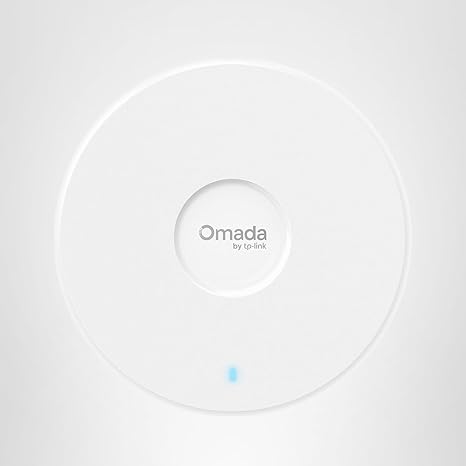
Welcome back to “Reviews inside tv”! Today, we’re talking about the TP-Link Omada WiFi 7 Wireless Access Point, specifically the model BE5000, a device designed to meet the demands of modern business environments. If you’re looking to elevate your network with seamless coverage, faster speeds, and future-proof technology, you might want to stick around. This access point offers a host of features, from dual-band support to advanced management options. Let’s explore what makes it stand out.
At its core, the TP-Link Omada WiFi 7 Wireless Access Point is a powerful, dual-band device that utilizes Wi-Fi 7 technology. With a maximum speed of 5.0 Gbps, the BE5000 delivers 4324 mega bits per second on the 5 GHz band and 688 mega bits per second on the 2.4 GHz band. This substantial bandwidth ensures that your network can handle multiple high-demand devices at once without sacrificing performance. Whether you’re streaming 4K video, handling large file transfers, or supporting multiple users in a busy office, the BE5000 is built to keep up.
One of the standout features of the Omada Access Point is its 2.5 Gigabit Ethernet port, a future-proof addition that allows you to take full advantage of high-speed networking. If you plan on upgrading to multi-gig internet in the future, this port ensures that you won’t need to replace your hardware to keep up with faster broadband speeds. So, whether you’re upgrading your office network now or in a few years, this access point has got you covered.
The Omada WiFi 7 Access Point also shines in its network management capabilities. It integrates with the Omada Cloud Management Platform, giving you centralized control over your network. With advanced features like network monitoring, remote configuration, and Zero Touch Provisioning (ZTP), managing your network becomes far more streamlined. This is a game-changer for businesses, as it lets you easily configure multiple devices remotely, without the need for manual setup on each one. Whether you’re managing a small office or an expansive enterprise, this platform makes network oversight and adjustments straightforward.
Real-world setup of the BE5000 is surprisingly simple, thanks to the inclusion of PoE (Power over Ethernet) and a DC power adapter. Whether you’re working in a location with a limited power supply or want a more flexible installation setup, you’ve got options. You can power it through PoE for a cleaner, simpler installation or use the DC adapter if that’s more convenient. The total power consumption when powered by PoE is just 17.83 watts, which is efficient considering the performance it delivers. The process is smooth, and the Omada SDN (Software-Defined Networking) system lets you set everything up with just a single click.
In terms of performance, the BE5000 does exactly what you need from a high-end business access point. The Wi-Fi 7 standard brings a significant boost to overall performance, especially in environments where there are numerous connected devices. Multi-Link Operation and Multi-RUs ensure that your network remains stable even in high-demand scenarios. And if you’re worried about dropped signals or lag during critical operations, the Omada system also offers seamless roaming and mesh capabilities, so your devices stay connected as you move around.
Now, let’s get into the pros and cons of this product. Starting with the pros, one of the most notable features is its speed and capacity. The 5.0 Gbps throughput allows it to handle high-bandwidth activities like 4K video streaming, large file transfers, and online meetings without issue. The 2.5 Gigabit Ethernet port is another excellent addition that ensures the device is future-proof, accommodating faster internet speeds as they become more common. The flexibility in power options—PoE or DC adapter—adds a layer of versatility, making this access point suitable for a variety of setups. Additionally, the Omada Cloud Management Platform is incredibly intuitive and allows for effortless control of your network, which is a huge bonus for businesses.
On the flip side, the BE5000 isn’t without its downsides. One potential downside is the price—while it’s built for business, that also means it’s geared towards enterprise-level networks, which might make it overkill for smaller setups. It’s a bit more expensive than some consumer-grade access points, so for home users or smaller offices, it may not be the best fit. Another minor issue is that it’s a bit more complicated than basic home routers. While the setup is straightforward, fully tapping into the features of Omada Cloud Management requires a bit of technical knowledge, so beginners might feel overwhelmed.
In terms of value for money, the TP-Link Omada WiFi 7 Access Point does offer a good return on investment if you’re running a medium-to-large business that demands robust Wi-Fi coverage and future-proof networking. For businesses that require fast speeds, extensive client support, and reliable performance, this product hits the mark. However, for personal or smaller-scale setups, it might feel a little too powerful—and expensive—for what’s needed.
If you’re considering alternatives, it’s worth comparing this access point to other high-performance devices in the market. The Ubiquiti UniFi 6 LR is a strong competitor in the same price range, offering similar speed capabilities with a focus on long-range performance. However, the TP-Link device stands out with its integration into the Omada platform, which adds a more business-focused suite of features, including network monitoring and advanced configuration tools. On the other hand, the TP-Link Omada BE5000 falls behind in certain areas like the more consumer-focused Linksys Velop or TP-Link’s own Deco series, which tend to offer simpler, more user-friendly setups at a lower price point.
As for build quality, the BE5000 is a solid piece of hardware. The materials used are durable, and the overall construction feels premium. There’s no need to worry about reliability here; it’s built to last and should hold up over time, especially in commercial environments where uptime is crucial. The 5-year warranty further adds peace of mind, ensuring you have support if anything goes wrong.
Lastly, if you’ve ever had to reach out to customer service, TP-Link’s support is known to be responsive. While I haven’t had to use it personally, TP-Link generally offers strong customer service, with the added benefit of free technical support from 6 AM to 6 PM PST on weekdays. That’s a nice touch for businesses that need quick solutions.
Wrapping up, the TP-Link Omada WiFi 7 Wireless Access Point is a fantastic product for larger-scale environments that demand reliable, high-speed Wi-Fi with advanced management capabilities. It’s ideal for businesses looking to future-proof their networks and maintain consistent performance across a large number of devices. For smaller or home setups, however, it might be more than what’s necessary, both in terms of price and features.
If you’re in the market for a robust, enterprise-grade access point that will keep your business running smoothly, the BE5000 is a solid choice. Just keep in mind that it’s designed for larger networks and might not be the best fit for everyone.
Thanks for watching! If you have any questions or thoughts about this product, drop a comment below. If you’ve already tried it, let us know what your experience has been like. Remember, you can find the link to the product in the comments box. Goodbye till next time, and keep your networks strong with “Reviews inside tv!”
Available to buy here:


