
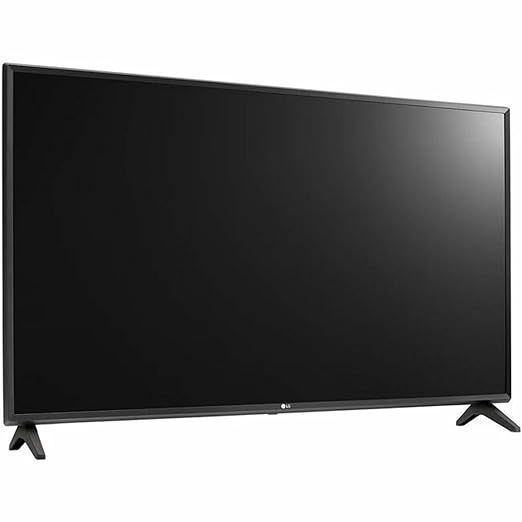

Available to buy here:
Welcome to “Reviews Inside TV.” Today, we’re taking a closer look at the LG 32LN340CBUD, a display that is designed to enhance how businesses, especially those in corporate environments, manage multiple screens with ease and efficiency. Let’s see if it lives up to the task and delivers the performance that could streamline operations in a variety of settings, from meeting rooms to larger commercial spaces.
The 32LN340CBUD is a smart display that combines a high-definition resolution of 1366 x 768 with some advanced management features, all designed with efficiency in mind. With a life span rated at 30,000 hours, this model is built for durability. One of the standout features is its compatibility with the SuperSign Control free version, which allows for the management of up to 100 displays from a single account or server. This is a huge asset for environments that need to control multiple screens without the hassle of setting them up individually. The display also offers USB data cloning, which means you can set up one display, copy its data onto a USB drive, and then send that configuration to other displays with just a plug-in. This feature makes managing large numbers of displays quicker and more efficient.
In terms of its connectivity, the 32LN340CBUD has Crestron Connected Certification, which is specifically geared toward meeting room environments. This makes it a great fit for conference rooms or large office spaces where seamless AV control is essential. Additionally, its Display Power Management (DPM) feature ensures the screen only powers on when a signal is present, helping to conserve energy when the display is not in use. And for those looking to improve audio throughout a larger space, an additional speaker can be added (sold separately), which can transmit audio to different rooms within a suite, ensuring guests or employees never miss a beat.
Setting up the LG 32LN340CBUD was relatively straightforward. The interface was easy to navigate, and getting it connected to my network was a simple process. The display powers on quickly, and the screen quality, while not as high as more premium models, still offers a crisp and clear image suitable for most business needs. I tested the display by using it in a few scenarios—primarily as a secondary screen for a conference room setup and for digital signage purposes in a small office. In both scenarios, it performed admirably. The picture was bright enough to be visible in well-lit spaces, and the 1366 x 768 resolution felt adequate for simple tasks. I didn’t expect stunning visual quality, and for what this product is designed to do, the picture clarity is more than enough.
But, as with most products, there are a few areas where it falls short. While the resolution is decent, it may not be ideal for more intensive uses, such as high-definition media presentations or gaming. The lack of 4K support could be a dealbreaker for those who need ultra-sharp image quality for detailed visuals. The sound quality from the internal speakers is serviceable, but not impressive, especially if you’re using the display in larger rooms where extra audio equipment is likely necessary. This isn’t a high-end consumer TV; it’s a commercial display, so its design and sound quality are suited for business applications, not home entertainment.
When considering the value for money, the 32LN340CBUD falls into a reasonable price range for a commercial display, especially one that offers the management features and power-saving options it does. If you’re in the market for a display to manage multiple screens, this offers solid performance at a price that is competitive with similar commercial models. The USB cloning feature alone makes it worth considering for businesses that need to deploy several screens quickly. However, if you’re looking for a display that can handle more demanding tasks, or if image and sound quality are your top priorities, this might not be the best option.
Compared to other products in this space, like the Samsung QB32R or the Philips BDL3230QL, the LG 32LN340CBUD holds its own in terms of management features and energy efficiency. However, when it comes to display quality, those other models edge it out with higher resolution and better color accuracy. The LG does excel in the management department, particularly in environments where multiple screens need to be controlled centrally, making it a strong choice for business use but less suitable for premium home setups.
As far as build quality goes, the 32LN340CBUD feels sturdy. The materials used are standard for business displays, and the frame is solid without feeling overly cheap. It’s clear that LG has designed this with long-term use in mind, though long-term reliability reports are limited. That said, LG is a trusted brand known for durable commercial displays, so I would expect this model to perform well over time, especially with proper maintenance.
Customer support hasn’t been an issue for this particular display in my experience, but LG is known for providing solid after-sales service, so if any issues were to arise, it’s likely that customer service would be responsive. The product comes with warranty coverage, which further adds peace of mind when making an investment in a commercial display.
In terms of software updates, the 32LN340CBUD doesn’t seem to have major firmware or software upgrades that impact its performance, and that’s not unexpected for a commercial display. The main updates users would be concerned about—such as firmware updates for better performance—are easily manageable through the SuperSign Control system.
To wrap up, the LG 32LN340CBUD is a reliable, functional display for businesses that need to manage multiple screens. It’s well-suited for environments like meeting rooms and corporate settings, where performance and efficiency take precedence over ultra-high-definition visuals or immersive sound. The price point is fair for what it offers, especially considering its energy-saving features and ease of management. If you’re in need of a budget-friendly, business-oriented display, this could be an excellent option for you. However, if you’re after a display for more entertainment-focused uses, there are other models that might offer better value. Thanks for watching, and remember, if you’re interested in purchasing this product, the link can be found in the comments box. Feel free to ask any questions or share your thoughts if you’ve already used this display. Good bye till next time, and remember, there’s always more to discover with “Reviews Inside TV.”
Available to buy here:


