

Available to buy here:
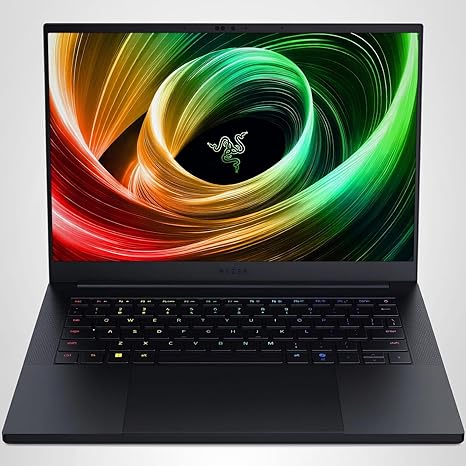
Welcome back to “Reviews inside tv”! Today, we’re taking a close look at the Razer Blade 14 (2025) Gaming Laptop, a sleek and powerful machine that promises an ultra-thin profile, impressive performance, and all the features you need for both work and play. Whether you’re a gamer, creator, or someone who just wants to get things done, this laptop claims to handle it all. But does it live up to the hype? Let’s find out.
First, let’s talk specs. The Razer Blade 14 is equipped with an AMD Ryzen AI 9 365 processor, offering up to 50 Tera Operations Per Second, which is a fancy way of saying it’s designed to handle demanding AI applications and multitasking with ease. In plain terms, it’s fast. Really fast. It also has a GeForce RTX 5060 GPU, delivering up to 115 watts of power. This means serious graphical performance, whether you’re gaming or working with high-resolution content. For gamers, the addition of NVIDIA’s DLSS 4 ensures that frames are rendered at higher quality, which means smoother, more immersive visuals. The 3K OLED display is a highlight, offering a 120Hz refresh rate and an ultra-low .2ms response time, making everything from movies to fast-paced games look stunning.
Now, for the performance in real-world use. Whether you’re managing a heavy workload at the office or playing the latest AAA games, the Razer Blade 14 offers solid performance across the board. During typical office tasks—like web browsing, working on documents, or hopping on video calls—it’s incredibly snappy. The 16GB of LPDDR5X RAM is lightning-fast, with a speed of 8000 MHz, ensuring multitasking is a breeze. If you’re into content creation, whether photo editing or video production, the high-speed memory and the RTX 5060 GPU make quick work of rendering and exporting tasks, providing both speed and quality. And, of course, gaming is where the Razer Blade 14 truly shines. You can expect top-tier performance in graphically demanding games like Cyberpunk 2077 and Call of Duty: Warzone, with frame rates pushing well beyond 60 FPS, even at 3K resolution.
When it comes to thermals and noise, the Blade 14 has a custom vapor chamber cooling system to keep temperatures in check. Under load, it does get a bit warm, especially on the keyboard deck, but the system is designed to maintain performance without too much throttling. As for fan noise, it’s noticeably louder under heavy gaming or rendering loads, but it’s not unbearable—definitely quieter than some other gaming laptops on the market. Still, if you’re planning on gaming for extended periods, you might notice it during those intense sessions.
Battery life is another key consideration. Despite the powerful internals, Razer managed to squeeze a large 72 Whr battery into the Blade 14. In terms of real-world use, you can expect around 8 to 11 hours depending on your tasks. Light productivity work will stretch it further, but if you’re gaming or working with graphics-heavy content, you’ll need to keep it plugged in. The charging speed is quick, so you won’t be waiting around long to get back to work or play.
As for portability, the Blade 14 is impressively thin at just .62 inches, making it 11% smaller than its predecessor. At 3.9 pounds, it’s light enough to carry around in a backpack, though it’s still a bit heavier than ultraportables. But considering the raw power packed into this machine, the portability is quite remarkable. You can easily throw it in your bag and take it to class, work, or a café without breaking your back.
When it comes to input and comfort, the keyboard is a pleasure to use for extended typing sessions. The key travel is solid, and the feedback is responsive without being overly loud. The trackpad is accurate and has no issues with palm rejection, making it easy to use for both casual and productivity tasks. If you prefer extra security, the Blade 14 features a fingerprint reader for quick log-ins.
Looking at connectivity, the Blade 14 doesn’t disappoint. You get a solid selection of ports including USB-A, USB-C, and Thunderbolt 4, so you can easily connect peripherals, external monitors, or docks. It also includes an HDMI port, which is great for plugging into larger screens. While there’s no SD card reader, the inclusion of Thunderbolt 4 ensures that you’ll have fast data transfer speeds for external storage. The Wi-Fi 6E support ensures that your internet speeds are lightning fast, and Bluetooth 5.2 gives you a stable connection to all your wireless accessories.
Now, let’s talk about the build quality. The Blade 14 features a durable aluminum unibody design that feels premium. It’s rigid and well-constructed, with no noticeable flex. The hinge is solid, and there’s no wobble in the screen when typing or adjusting the angle. The overall feel of the laptop is robust, and Razer’s engineering ensures that it’s built to last.
So, who is the Razer Blade 14 (2025) best for? Well, if you’re a gamer who wants a portable machine without sacrificing power, this laptop is an excellent choice. It also excels for creators who need a high-quality display and fast performance for editing and rendering. Business users or students who need a compact, all-around performer will also find a lot to love. However, if you’re looking for the most budget-friendly option, or if you don’t need a powerhouse, you might want to consider alternatives in the same price range.
In terms of value for money, the Blade 14 isn’t cheap, but for the price, you’re getting top-tier performance, a beautiful OLED display, and strong build quality. When you compare it to alternatives like the ASUS ROG Flow Z13 or the Alienware X14, it holds its own, especially when you factor in the build and display quality. The performance is top-notch, but it’s certainly a premium product, and that price reflects that.
In conclusion, the Razer Blade 14 (2025) offers an excellent balance of power, portability, and premium features. If you’re after a laptop that can handle gaming, content creation, and daily tasks with ease, while still being portable enough to take on the go, this is a solid option. It’s not the cheapest, but for the price, you’re getting a very capable, well-rounded laptop.
If you’ve enjoyed this review, don’t forget to like, subscribe, and hit that bell icon so you don’t miss our next deep dive into the latest tech. Thank you for watching, and as always, feel free to leave any questions or share your experiences in the comments. Catch you next time on “Reviews inside tv,” where we keep you in the know with all the best gadgets!
Available to buy here:


