

Available to buy here:
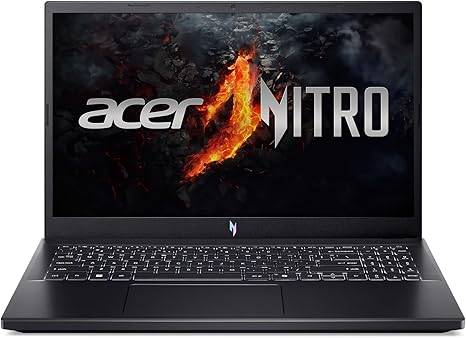
Welcome to “Reviews inside tv”! Today, we’re checking out the Acer Nitro V Gaming Laptop. This laptop promises to deliver solid gaming performance, powered by a combination of AMD Ryzen 5 7535HS and an NVIDIA GeForce RTX 4050 Laptop GPU. It’s designed to cater to gamers and creators who need power in a portable form. But how does it really perform when you put it through its paces? Let’s find out.
First, let’s take a quick look at the specs. Inside the Acer Nitro V, you’ll find an AMD Ryzen 5 7535HS Hexa-Core processor, which is part of the latest Ryzen 7000 series, offering solid power for multitasking and gaming alike. It’s paired with the NVIDIA GeForce RTX 4050 Laptop GPU, a capable graphics card that promises smooth gameplay, especially with AI-driven enhancements like DLSS 3. There’s also 8GB of DDR5 RAM, a step up from the previous DDR4 standard, providing faster speeds for improved overall performance. Storage-wise, the 512GB SSD offers fast read and write speeds, ensuring quick load times and plenty of space for games and projects. The 15.6-inch FHD display boasts a 144Hz refresh rate, perfect for fast-paced gaming, along with an 82.64% screen-to-body ratio for a more immersive experience. Finally, the Wi-Fi 6 support and backlit keyboard round out the key features.
When it comes to day-to-day use, the Nitro V shines in certain areas and leaves a bit to be desired in others. For everyday office work like web browsing, document editing, and multitasking, the Ryzen 5 processor handles it all with ease. You can keep multiple tabs open without seeing much slowdown, and the laptop doesn’t feel sluggish even when you’re hopping between apps. The 8GB of RAM is good for most users, but if you’re into heavy multitasking or content creation, you might want to upgrade it to 16GB for a more seamless experience.
For media consumption, this laptop is a solid choice. The 15.6-inch Full HD display looks crisp, with decent color accuracy. It’s not OLED, but for a gaming laptop at this price, it punches above its weight. Movies and shows look vibrant, though you might notice some slight color inaccuracies if you’re a content creator. The 144Hz refresh rate ensures that motion is smooth during gameplay, reducing blur and ghosting in action-packed scenes. When it comes to gaming, this is where the Nitro V really stands out.
With the RTX 4050 GPU, the Nitro V handles gaming very well. It’s capable of playing most modern titles at 1080p with high settings, and with DLSS 3, you get enhanced performance and visual fidelity without sacrificing too many frames. Titles like “Cyberpunk 2077” and “Call of Duty: Warzone” can run smoothly on medium to high settings with an average of 60–70 FPS. This is great for casual and competitive gamers who want high frame rates without breaking the bank. However, if you’re looking for ultra settings or 4K gaming, you might need to look at a higher-tier GPU. That said, the Nitro V excels in balancing price and performance for most gamers.
Now, let’s talk about thermals and noise. Acer has equipped the Nitro V with dual fans and an effective exhaust system, and while it does a good job at keeping temperatures in check during most tasks, things can get a bit warmer under heavy gaming loads. The keyboard and palm rest stay relatively cool, but the underside can get quite hot, especially when gaming for extended periods. The fan noise is noticeable under load, but it’s not overwhelmingly loud—it’s definitely more audible than quiet, though, which might bother those who prefer silence. The good news is that Acer’s NitroSense software allows you to adjust fan speeds, so you can fine-tune the cooling performance to suit your needs.
Battery life on the Nitro V is where we start to see some limitations. With a standard 4-cell battery, you can expect around 4–5 hours of light use like web browsing and media consumption. If you’re gaming or running intensive applications, that number drops significantly, closer to 2–3 hours. It’s not terrible for a gaming laptop, but it’s definitely not a long-lasting device if you need it to power through a full day without a charger. The 180W charger does its job in getting you back to full power relatively quickly, but it’s a bit bulky for travel.
When it comes to the keyboard and trackpad, Acer has provided a solid, comfortable experience. The keys have decent travel and feedback, making it comfortable for typing sessions. The backlighting is a nice touch for low-light environments, though it could be brighter. The trackpad, though responsive, might feel a bit cramped for users who do a lot of precision work, but it should suffice for gaming and casual use.
In terms of ports and connectivity, the Nitro V is well-equipped. You’ve got a solid selection of USB-A and USB-C ports, an HDMI 2.1 output for connecting to external displays, an Ethernet port, and an SD card reader—perfect for gamers who want to connect to peripherals or creators needing a quick data transfer. Wi-Fi 6 ensures stable and fast internet connections, even in crowded networks, and Bluetooth connectivity makes it easy to connect accessories like headphones and controllers.
As for build quality, the Acer Nitro V is made mostly of plastic, which gives it a bit of a budget feel compared to premium metal laptops. It’s not flimsy, but it doesn’t have that solid, premium heft that you might find in pricier gaming laptops. Still, the overall build is sturdy enough for daily use. At 5.07 pounds, it’s not the lightest gaming laptop, but it’s still portable enough to carry in a bag for gaming on the go.
So, who is this laptop best for? The Acer Nitro V Gaming Laptop is a great choice for casual gamers and content creators who want a balance between performance and price. If you’re someone who enjoys gaming at 1080p with high settings and doesn’t mind making a few compromises for battery life and build quality, this laptop will suit you well. However, if you’re looking for top-tier performance, a more premium build, or longer battery life, you might want to look at something like the Razer Blade or the ASUS ROG Strix.
In terms of value, the Nitro V offers excellent performance for its price. At this price point, it’s hard to beat the combination of the Ryzen 5 CPU, RTX 4050 GPU, and 144Hz display for gaming and general use. Compared to other models like the Dell G15 or MSI GF65, the Nitro V stands out for its performance, but you’ll get a more premium feel and better build quality with those competitors.
To wrap it up, the Acer Nitro V delivers on what it promises: solid gaming performance, a vibrant display, and good overall value for the price. If you’re after a laptop that can handle both gaming and productivity without breaking the bank, this one is definitely worth considering. Just keep in mind the battery life and build quality might not be up to the same standards as pricier competitors.
Thanks for watching, and don’t forget to like, subscribe, and hit the bell icon for more reviews. If you’re interested in the Acer Nitro V, check out the link in the comments box. If you’ve already tried it, feel free to share your experience below—I’d love to hear what you think! Until next time, keep gaming and stay cool!
Available to buy here:


