

Available to buy here:
Welcome to Reviews inside tv! Today, we’re looking at the ASUS Zenbook Duo, a unique laptop with some powerful features packed into a dual-display design. It combines cutting-edge OLED technology, the latest Intel Core Ultra 9 processor, and a high-performance GPU, all inside a sleek, compact chassis. But is this laptop truly the multitasking powerhouse it promises to be? Let’s take a closer look.
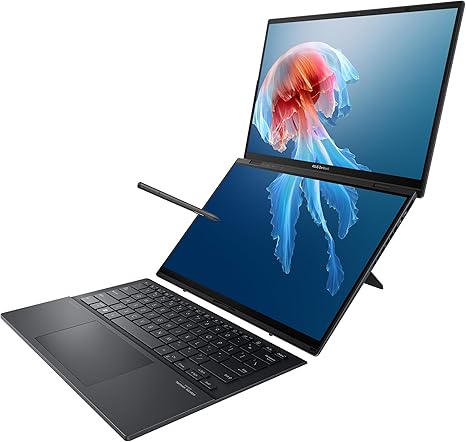
The ASUS Zenbook Duo is a dual-display laptop with a 14-inch OLED WQXGA+ touchscreen as its primary display. That’s a resolution of 2880×1800, which delivers stunning colors and sharpness. OLED means deeper blacks and more vibrant colors, perfect for creatives and media consumers. On top of that, it has a secondary 12.6-inch touchscreen, which offers plenty of room for multitasking or managing extra apps, making it ideal for productivity enthusiasts and content creators. The OLED screens also support a 120Hz refresh rate, which makes everything feel super smooth—whether you’re scrolling through your apps or gaming.
At the heart of this laptop is the Intel Core Ultra 9 185H processor. This 14-core, 20-thread chip offers top-tier performance for everything from office work to more intensive tasks like photo and video editing. The six performance cores make multitasking a breeze, while the 8 efficiency cores ensure that you don’t burn through battery unnecessarily when you’re doing lighter tasks. It’s paired with Intel Arc graphics, which offers an impressive upgrade over typical integrated solutions. While not quite at the level of dedicated GPUs like NVIDIA’s RTX series, Intel Arc handles light gaming, video editing, and creative workloads well enough, making it a great option for general use and casual gaming.
In terms of memory, the Zenbook Duo is loaded with 32GB of LPDDR5x RAM. This is more than enough for multitasking, creative workloads, and even some heavier applications like 3D modeling or large video exports. Having this much RAM also helps keep your system responsive when you’re running multiple applications or working with large files, giving you the freedom to switch between tasks without worrying about slowdowns.
For storage, you get a speedy 1TB SSD. This ensures ultra-fast boot times, quick file transfers, and plenty of space for your documents, projects, games, and media. The SSD also contributes to overall system responsiveness, so everything from launching apps to opening large files is nearly instantaneous.
Now, let’s talk about real-world usage. For productivity, this laptop is fantastic. Web browsing with dozens of tabs open, document editing, and spreadsheets all run without a hitch. The dual-screen design is a game-changer here, allowing you to keep apps or documents open across the two screens. Whether you’re writing, browsing, or working on presentations, the extra screen real estate makes the Zenbook Duo a dream for those who juggle multiple tasks at once.
When it comes to media consumption, the OLED display does not disappoint. Watching movies or streaming content on this laptop is an absolute treat, with vivid colors, deep contrast, and no issues with brightness even in well-lit rooms. The sound is also great for a laptop, with clear audio and reasonable bass. If you’re into content creation—whether it’s photo editing or video editing—the display is color-accurate and offers a professional level of detail, though we wouldn’t call it a full-blown creator workstation. It’s a great option for most creators, especially for those who need something portable without sacrificing too much display quality.
For gaming, while this laptop isn’t a dedicated gaming machine, it does handle casual gaming quite well. Expect good performance at 1080p in games like Overwatch or Fortnite, but it struggles with more demanding AAA titles like Cyberpunk 2077 or Red Dead Redemption 2. The Intel Arc GPU offers decent performance, but don’t expect ultra settings and smooth 120 FPS gameplay on more graphically intense titles. That said, for lighter gaming or older titles, the Zenbook Duo gets the job done. And with that 120Hz display, you’ll appreciate the smoothness even in casual games.
Battery life is another important factor, and the Zenbook Duo’s 70Wh battery holds up decently for such a powerful laptop. You’re looking at around 7 to 9 hours of light productivity—web browsing, video calls, and office tasks. It drops down significantly if you’re pushing it with heavy workloads or gaming, but it’s still reasonable considering the performance and dual-display setup. It charges via USB-C, and while it charges fairly quickly, the charger is a bit on the bulkier side, which could be a factor if you’re traveling a lot.
The build quality is solid. The Zenbook Duo is made from high-quality materials, with a magnesium alloy body that feels premium and durable. It’s lightweight enough to carry around, though the dual-screen setup adds some thickness to the laptop. At 1.6 kg (3.53 lbs), it’s not the lightest ultrabook out there, but it’s still portable enough for everyday use. The hinge mechanism for the secondary screen works well, lifting the secondary display at an angle that makes it easier to read and interact with.
The keyboard is another standout feature. It’s well-spaced, with decent key travel and a comfortable typing experience. The layout is great for productivity, and there’s even a number pad for those who need it. The trackpad is large, accurate, and responsive, making navigation a breeze. The dual-touchscreen setup does make the keyboard slightly cramped in the middle, but it’s a trade-off for that extra screen real estate. The trackpad supports palm rejection, so you won’t have to worry about accidental touches when you’re typing.
In terms of connectivity, the Zenbook Duo offers a solid selection of ports. You get two USB Type-A ports, two USB Type-C ports (one with Thunderbolt 4 support), an HDMI 2.1 port, and a microSD card reader. This makes it easy to connect external monitors, peripherals, or storage devices, though some users may miss a full-sized SD card slot. It also supports Wi-Fi 6E and Bluetooth 5.2 for fast wireless connections.
As for thermals, the Zenbook Duo does a pretty good job of keeping things cool under pressure, though it does get warm under heavy loads, particularly on the underside. During gaming or video rendering, you’ll notice the fans kick in, but they’re not overly loud. The keyboard area stays reasonably cool, but the underside can heat up to a level that’s uncomfortable for lap use. Still, the cooling system does a good job of maintaining stability and performance without excessive throttling, though there’s some performance drop during long sessions of heavy gaming.
Let’s now take a quick look at how the Zenbook Duo stacks up against its competitors. In terms of price and performance, you’re looking at a direct competitor to devices like the Dell XPS 13 2-in-1 or the HP Spectre x360 14. While those devices offer similar premium designs, the Zenbook Duo’s dual-screen setup sets it apart. If you need a laptop for multitasking or content creation, this extra screen is a real selling point. However, the competition tends to have better GPU options for gaming or video editing, so if that’s your priority, you might want to consider those alternatives.
To wrap things up, the ASUS Zenbook Duo is a highly capable laptop for power users who need a portable device that can handle multitasking with ease. The dual OLED displays are a real highlight, and the Intel Core Ultra 9 processor paired with 32GB of RAM ensures smooth performance across a wide range of tasks. While it’s not a dedicated gaming machine and does have some thermal limitations, it’s a great choice for students, office workers, creators, and anyone who values efficiency and portability. If you can live with the slightly higher weight and are looking for a versatile, multitasking machine, the Zenbook Duo is certainly worth considering.
Thanks for watching, and don’t forget to check the comments for the link to grab one for yourself! If you have any questions or already own the Zenbook Duo, drop a comment below—I’d love to hear about your experience. Until next time, happy computing!
Available to buy here:


