
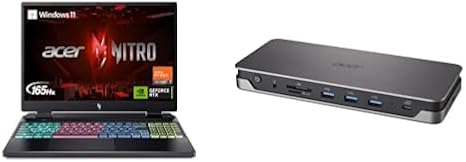

Available to buy here:
Welcome back to Reviews inside tv, your go-to place for in-depth and honest tech reviews. Today, we’re looking at the Acer Nitro 16, a powerhouse gaming laptop that promises to take your gaming and creative projects to the next level. With its sleek design, advanced cooling system, and some seriously high-end specs, let’s see if it lives up to the hype.
The Acer Nitro 16 is a gaming laptop built to handle anything from casual gaming to competitive online play. At the heart of it is the AMD Ryzen 7 7840HS processor, which boasts eight cores and can boost up to 5.1GHz when the pressure is on. That’s important if you’re running resource-heavy applications or need to squeeze every last drop of performance during a high-stakes gaming session. For graphics, you’ve got the NVIDIA GeForce RTX 4060, a GPU designed with the latest Ada Lovelace architecture to handle not only gaming but also creative tasks like 3D rendering or video editing, thanks to its AI-powered enhancements.
In terms of memory, this laptop comes with 16GB of DDR5 RAM, which is fast and efficient for multitasking. Whether you’re streaming content, editing photos, or having a dozen tabs open, this laptop has you covered without skipping a beat. For storage, you get a 1TB Gen 4 SSD—super fast read and write speeds, so you won’t be stuck waiting for your game or project files to load. The laptop also includes WiFi 6E for quicker and more stable internet connections, especially handy for online gaming or remote work.
The 16-inch WUXGA display is a standout feature. With a resolution of 1920 x 1200 and a refresh rate of 165Hz, it offers a smooth and vibrant visual experience. The high refresh rate is a game-changer for gaming, ensuring that your visuals are silky smooth during fast-paced action, which is critical if you’re aiming for competitive play. The display is also an IPS panel, so you get solid color accuracy and wide viewing angles—ideal for both gaming and creative work.
In terms of connectivity, Acer has packed this laptop with a range of useful ports. You’ve got USB Type-C, HDMI, DisplayPort, and a full set of USB 3.1 ports for peripherals. The inclusion of an Ethernet port is especially welcome if you’re into wired connections for ultra-stable internet during those critical online gaming sessions. There’s also an SD card reader for quick file transfers from cameras or other devices. The USB Type-C port even supports 85W PD charging, so you can top off your battery without a bulky charger.
Battery life on gaming laptops can be a concern, but the Acer Nitro 16 does fairly well considering its power-hungry specs. It’s equipped with a sizeable battery, and though gaming laptops are rarely known for amazing battery life, you can expect a few hours of light use—enough to handle some web browsing or document work without needing to plug in right away. Charging is pretty quick, too, especially with that USB Type-C PD support. For serious gaming sessions, however, you’ll probably want to stay near a power outlet.
When it comes to thermals, the Acer Nitro 16 uses next-gen cooling technology to ensure things stay cool under load. The laptop features a four-zone cooling system, which helps maintain a steady performance even during extended gaming sessions. Fans do ramp up, but they aren’t overwhelmingly loud, and you’ll probably only notice them under heavier loads. The keyboard and palm rest stay cool enough, though, so using the laptop on your lap during extended sessions is comfortable enough, especially with the upgraded cooling system in place.
Speaking of comfort, the keyboard on the Nitro 16 has some decent travel and feedback, making long typing sessions more pleasant. The four-zone RGB lighting is a nice touch for personalizing your setup, and it doesn’t distract during late-night gaming sessions. The trackpad is spacious, with smooth, responsive clicks and good palm rejection, though you might prefer using a mouse for gaming.
In terms of weight and portability, the Acer Nitro 16 is a bit on the heavier side, coming in at around 2.5 kg (5.5 lbs). It’s not the lightest option out there, but it’s manageable for a gaming laptop, and you won’t mind carrying it around if you’re mostly gaming or working at a desk.
Now, let’s talk about how this laptop performs in real-world usage. For office productivity, this laptop is more than capable. With its Ryzen 7 processor and ample RAM, switching between apps and handling spreadsheets, emails, and video calls feels snappy. Media consumption is where this laptop shines, with that gorgeous 16-inch display providing a fantastic experience for streaming movies or shows. The color accuracy is great, so whether you’re watching your favorite series or reviewing creative work, everything looks sharp and vibrant.
For content creators, this laptop’s specs make it an excellent choice. Video editing, photo editing, and music production all benefit from the fast processor, high RAM, and dedicated GPU. Export times are quick, and you can multitask without any major slowdowns. Gaming performance, of course, is stellar. The RTX 4060 paired with the Ryzen 7 7840HS can easily handle titles like Cyberpunk 2077, Fortnite, or Call of Duty: Warzone at high settings. You’ll see smooth, consistent frame rates, and the 165Hz display ensures that every game feels responsive.
But no laptop is perfect, and the Nitro 16 does have its drawbacks. While the cooling system works well, the laptop can still get hot under extended heavy loads, so it’s not the best for using in your lap during long gaming sessions. The weight might also be a dealbreaker if you’re looking for something more portable. But for gamers and creators who need raw performance, these aren’t major issues.
As for value for money, the Acer Nitro 16 offers solid performance for the price. It’s not the cheapest gaming laptop out there, but for the specs you’re getting—especially with that Ryzen 7 processor and RTX 4060 GPU—it’s a good investment. If you’re considering alternatives, you might look at the ASUS ROG Strix G16 or the Lenovo Legion 5i, both of which offer similar performance. However, the Nitro 16’s display and cooling system give it a distinct advantage in terms of gaming comfort.
In terms of build quality, Acer has done a solid job. The laptop feels sturdy, and the cooling vents are well-designed. The plastic chassis doesn’t feel as premium as some all-aluminum options, but it’s durable and functional. The hinge is strong, and the overall design is sleek, though not overly flashy.
So, who is the Acer Nitro 16 best for? If you’re a gamer who needs a high-performance laptop with a smooth display and excellent cooling, this is a great option. It’s also a solid choice for content creators who need something capable of handling video editing and 3D rendering. If you’re a casual user looking for a light laptop for office work or media streaming, you might want to look elsewhere, as this laptop is built more for power than portability.
Before we wrap up, don’t forget to like, subscribe, and hit that bell icon so you don’t miss any of our future reviews. If you have any questions or want to share your experience with the Acer Nitro 16, leave a comment below!
Thanks for watching, and I’ll see you in the next one. Stay sharp, and game on!
Available to buy here:


