
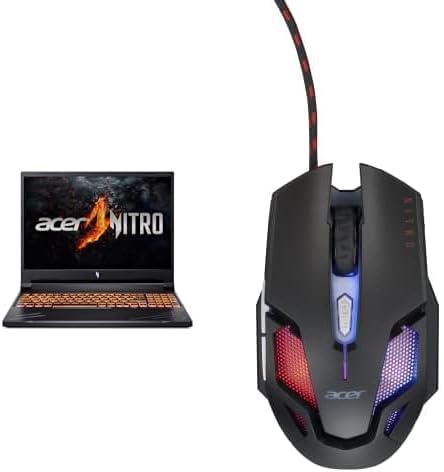

Available to buy here:
Welcome to “Reviews inside tv”! Today, we’re taking a close look at the Acer Nitro V, a powerful gaming laptop that promises to deliver exceptional performance, whether you’re deep into gaming, content creation, or multitasking. With cutting-edge technology like the AMD Ryzen 7 8845HS processor and the NVIDIA GeForce RTX 4060, it’s hard not to wonder: does this laptop live up to the hype?
Let’s break it down.
The Acer Nitro V is equipped with the AMD Ryzen 7 8845HS processor, a powerful chip designed for high-end gaming laptops. This octa-core processor can handle everything from heavy multitasking to demanding creative applications. Whether you’re running multiple applications at once or working on CPU-intensive tasks like video editing, this processor won’t hold you back. It’s paired with the NVIDIA GeForce RTX 4060, which is built for gaming performance but also offers excellent capabilities for content creation. With DLSS 3.5 technology, the RTX 4060 delivers smoother gaming experiences and enhanced visuals, even with ray tracing enabled. It’s a significant upgrade over previous GPUs and provides a noticeable difference in gaming performance and overall graphical fidelity.
RAM comes in at a robust 16GB of DDR5, which ensures smooth performance across all tasks, from light office work to running graphic-heavy software. DDR5 brings faster speeds and more bandwidth, which is especially beneficial when you’re juggling multiple programs at once. When combined with the laptop’s 1TB Gen 4 SSD, which offers lightning-fast read/write speeds, you’ll experience incredibly quick load times and file transfers. Whether you’re editing large media files or just working through a pile of spreadsheets, the responsiveness of this machine won’t disappoint.
Speaking of the display, Acer has chosen a 16-inch WUXGA 1920 x 1200 panel with a 165Hz refresh rate. If you’re a gamer, this is a dream setup. The 165Hz refresh rate ensures ultra-smooth motion, especially in fast-paced games like “Call of Duty” or “Cyberpunk 2077,” reducing motion blur and giving you a competitive edge. The 16:10 aspect ratio provides a little extra vertical screen space, which is perfect for productivity tasks like web browsing or video editing. Add in 100% sRGB color accuracy, and this screen becomes a great choice not just for gaming, but for creators who need sharp, vibrant visuals. The Mux Switch allows for a tear-free experience, ensuring that your visuals are consistently sharp without any stuttering.
On the performance front, the Nitro V doesn’t just excel in gaming. With the Ryzen 7 8845HS and RTX 4060 combo, the laptop can handle photo and video editing tasks with ease. Exporting large video files or processing heavy media won’t slow this machine down. For content creators, whether you’re into photography, video production, or 3D rendering, this laptop provides a solid platform for a smooth, efficient workflow. On top of that, the laptop’s large screen allows for comfortable multi-window setups, making it great for multitaskers.
Now, when it comes to gaming, the Nitro V really shines. Running graphically demanding AAA games like “Cyberpunk 2077” or “Alan Wake 2” at high settings is no problem for this machine. According to real-world benchmarks, with the RTX 4060, you can expect around 60-70 FPS on ultra settings in most AAA titles at 1080p, with higher FPS if you reduce settings or utilize DLSS for better frame rates. When playing “Call of Duty: Warzone,” for example, you can comfortably expect to play at high settings around 80 FPS, which is more than enough for a fluid and responsive gaming experience. That 165Hz display will also do its part to ensure that you’re getting the most out of your gaming sessions.
Thermals and fan noise are always a concern with powerful gaming laptops. Fortunately, the Acer Nitro V keeps temperatures under control pretty well. In light use, the laptop remains quiet and cool to the touch, but when the workload ramps up—whether you’re gaming or editing videos—the fans do ramp up. While they’re not exactly silent, they’re not overwhelmingly loud either, and the overall heat management system does a good job of keeping the keyboard deck and underside at comfortable temperatures, even under load. Extended gaming sessions or long work sessions won’t leave you with a hot lap or an uncomfortable typing experience.
Battery life is always a key consideration, and the Nitro V’s 90Whr battery holds up pretty well for a gaming laptop. Under lighter use, like web browsing or document work, you can expect around 6 to 7 hours of battery life, which is solid but not groundbreaking for a machine this powerful. For gaming, though, you’ll likely need to stay plugged in for the best performance. Charging speeds are pretty decent, and with the included charger, you can expect to top up the battery relatively quickly—ideal for when you’re on the go.
The keyboard and trackpad on the Nitro V are both comfortable and reliable. The keys have good travel, making long typing sessions more comfortable than on some other gaming laptops with shallower keyboards. The trackpad is responsive and large enough to navigate without issue, though for serious gaming or work, you might still prefer an external mouse. Speaking of mice, the Nitro V comes bundled with the 6D Optical Gaming Mouse III, which boasts a 125Hz polling rate, a symmetric design, and seven colorful LEDs for extra flair.
When it comes to ports and connectivity, the Nitro V is well-equipped. It features a solid mix of USB-A and USB-C ports, as well as an HDMI 2.1 port, which makes it perfect for external monitors or docking stations. The laptop also supports Wi-Fi 6E for faster and more stable internet connections, a huge plus for gamers who need a reliable online experience. Bluetooth 5.2 is also included for wireless peripherals, and there’s a full-size SD card reader for content creators who need to transfer files from their cameras.
So, what are the pros and cons of this machine? Let’s start with the good stuff. The performance is exceptional for gaming and content creation, with a powerful CPU and GPU combination that handles demanding tasks with ease. The 165Hz display is a real highlight, offering vibrant colors and ultra-smooth motion. The keyboard is comfortable, and the inclusion of the gaming mouse is a nice touch. The battery life is decent for a gaming laptop, and the overall build quality feels solid.
On the downside, it’s not the lightest laptop out there, so if you’re looking for something ultra-portable, you might want to look elsewhere. The fan noise can be noticeable under load, and while the battery life is solid for light tasks, you’ll need to stay plugged in during more demanding activities. Also, the laptop’s price might be a bit on the higher side compared to some of its competitors, but it justifies it with top-tier specs.
Now, for the value for money. At its current price, the Acer Nitro V is a solid choice for gamers and creators who want top-tier performance without breaking the bank. While there are cheaper options out there, few can offer the same level of power, display quality, and overall experience at this price point. If you’re looking for an all-around performer for both work and play, this laptop is tough to beat.
If we’re comparing it to some other laptops in the same range, like the ASUS ROG Zephyrus G14 or the Alienware m15, the Nitro V stands out with its excellent display and solid build quality. However, it’s a bit heavier and bulkier than those models, which could be a dealbreaker if portability is a top priority.
The build quality is impressive, with a sturdy chassis that feels premium without being overly heavy. Acer has done a good job of balancing performance and durability here, and while there isn’t much long-term data on reliability, Acer is generally known for making solid, dependable laptops.
As for customer support, Acer offers a standard warranty with the usual support options, but it’s always a good idea to check out reviews for the specific region you’re in, as support experiences can vary.
To wrap up, the Acer Nitro V is a fantastic option for gamers, content creators, and power users who need a machine that can handle just about anything. With its powerful CPU and GPU, stunning display, and solid build, it’s a laptop that delivers on its promises. If you don’t mind the slightly higher weight and fan noise, this is a top-tier choice at a reasonable price.
Thanks for watching! If you’ve got any questions about the Acer Nitro V, drop them in the comments below, or share your experience if you already own one. Don’t forget to like, subscribe, and hit the bell icon to stay updated with all our latest reviews here on “Reviews inside tv”!
Available to buy here:


