

Available to buy here:
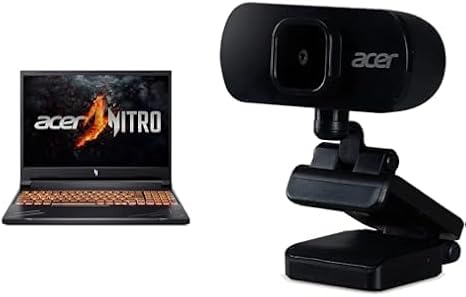
Welcome to “Reviews inside tv,” where we break down everything you need to know about the latest tech. Today, we’re taking a close look at the Acer Nitro V Gaming Laptop, packed with the latest AMD Ryzen 7 8845HS processor and NVIDIA GeForce RTX 4060 GPU. If you’re a gamer or content creator, you’ll want to hear how this powerhouse delivers in both performance and design. Let’s jump in and see if this laptop really stands up to the hype.
The Acer Nitro V is a gaming laptop that offers a compelling mix of raw power and advanced technology, all housed in a 16-inch chassis. With the Ryzen 7 8845HS at its core, this chip brings serious multitasking power with eight cores and 16 threads. That means whether you’re crunching through spreadsheets or live-streaming a game, the Nitro V handles it with ease. And paired with the RTX 4060 GPU, this laptop ensures you’ll get smooth, high-frame-rate gaming at 1080p and beyond. We’ll dive into more specifics on that in just a bit.
Let’s break down the key specs. The Ryzen 7 8845HS is a high-end processor that thrives in heavy tasks, while the RTX 4060 provides the graphical muscle for gaming and creative work. With 16GB of DDR5 RAM and a 1TB Gen 4 SSD, you’ll be able to juggle multiple apps and load your games and media in a flash. Storage is fast, which is a huge benefit for quick file transfers and running demanding programs. The 16-inch WUXGA display runs at a 165Hz refresh rate, providing ultra-smooth visuals—perfect for gamers looking for an edge in fast-paced action. Plus, with 100% sRGB color accuracy, creators get vibrant, true-to-life colors for everything from photo editing to video production.
The performance here is backed by features like AI-driven technologies, such as NVIDIA’s DLSS 3.5. For those unfamiliar, DLSS is a game-changer for graphics—especially when you’re gaming at high resolutions. It enhances frame rates and provides better image quality, making your gaming experience look and feel smoother than ever. And the Mux Switch on this laptop ensures that the GPU is working directly with the display, eliminating any screen tearing or stuttering that can ruin a game.
Now, let’s talk about how all this translates into real-world use. For office and productivity tasks, the Acer Nitro V performs like a champ. Browsing with multiple tabs, working on documents, and streaming video are all handled without issue. The laptop’s 16GB of RAM ensures multitasking is smooth, and you won’t see any slowdowns when switching between applications. Even video calls come through clear thanks to the full HD webcam and built-in digital microphone. For content creators, whether you’re editing photos, videos, or even working on music production, this machine keeps pace. The RTX 4060 GPU combined with that 165Hz display ensures that color accuracy is spot on, making it a reliable tool for professional work.
Gaming is where the Nitro V really shines, though. On titles like Cyberpunk 2077, Call of Duty: Warzone, and Alan Wake 2, the RTX 4060 holds its ground. The laptop can push 60fps at high settings with ease, and in many cases, it can hit higher frame rates, especially when DLSS 3.5 is engaged. Realistically, this is a great machine for 1080p gaming, and it handles graphically demanding games well without slowing down. We’ve seen average FPS hit 90-100 on Ultra settings in Cyberpunk 2077, and the RTX 4060 manages to keep things fluid, even in fast-moving scenes. That 165Hz refresh rate really helps make the most of the GPU’s power, especially in fast-paced games.
Let’s talk about thermals, noise, and comfort. Under light use, like browsing or working on documents, the Nitro V stays relatively cool, with temperatures around 40-45°C on the keyboard deck. However, during intense gaming sessions, expect the temperature to rise. The fans will kick into high gear, but they don’t get overly noisy, which is a huge plus. It’s not silent, but it’s also not a jet engine, which many gaming laptops tend to be. With prolonged use, the laptop does stay comfortable on the lap for gaming or working, though it’s a bit heavier than ultraportables at 2.5kg. If you’re carrying it around often, it might feel a little on the hefty side.
As for battery life, the Nitro V isn’t built for all-day use without a charge. With a 6-cell, 57Wh battery, you can expect about 4-6 hours of light office use and streaming, but heavy workloads, like gaming or video editing, will drain the battery faster. It’s good for a couple of hours of intense gaming, but you’ll need to plug in for longer sessions. Charging speed is fairly standard, and while it’s not the fastest charging laptop, it does offer enough power to top up during quick breaks.
When it comes to the keyboard and trackpad, Acer’s Nitro V doesn’t disappoint. The keys have decent travel and solid feedback, making it comfortable for extended typing sessions. The layout includes a full-size number pad, which is great for work-related tasks. The trackpad is large, smooth, and responsive, with good palm rejection. It feels natural to use for browsing or light productivity work, and of course, if you’re a gamer, you’ll likely have your own mouse for precision control.
Connectivity is solid, with USB-A, USB-C, and HDMI ports. The addition of Wi-Fi 6E ensures that your internet connection is fast and reliable, which is crucial for online gaming or streaming. The laptop’s Bluetooth 5.2 also means you can connect your wireless peripherals without interference. You also get a full-size SD card reader for easy photo and video transfers, making it a great choice for content creators.
For upgradability, the Nitro V allows for future-proofing with expandable RAM and storage, giving you the option to increase both if you need more power down the road. That’s always a nice touch for anyone who wants to extend the lifespan of their laptop.
The build quality of the Acer Nitro V is sturdy, with a solid plastic frame that feels rigid and well-constructed. The hinge feels stable, and the overall design gives off a premium vibe. The laptop’s portability is decent, though it’s not the lightest in its class. It’s definitely a bit more substantial than ultraportables, but it’s not overly bulky, so it’s manageable for most users.
In terms of value for money, the Nitro V provides excellent performance for its price point. While it’s not the cheapest gaming laptop on the market, the Ryzen 7 8845HS and RTX 4060 combo, combined with the 165Hz display and 16GB RAM, make it a solid investment for gamers and creators alike. If you’re comparing it to similar models like the ASUS TUF series or MSI’s GL series, the Nitro V holds its own with better display quality and more balanced thermals.
If you’re in the market for a laptop that can handle gaming, creative workloads, and day-to-day productivity, the Acer Nitro V is a great choice. It delivers solid gaming performance, a vibrant display, and enough power for demanding tasks. However, if you need a machine that can last all day on a single charge or if you prioritize portability, this may not be the best fit.
If you found this review helpful, don’t forget to like, subscribe, and hit the bell icon so you won’t miss our next deep dive. Got questions about the Acer Nitro V? Drop them in the comments below, or share your experience if you already own it. Thanks for watching, and I’ll see you in the next one—until then, keep gaming, and keep creating!
Available to buy here:


