

Available to buy here:
Welcome to “Reviews inside tv,” your go-to spot for honest, in-depth tech reviews. Today, we’ve got the Acer Aspire 3 A315-58-74KE, a laptop that promises a slim design without compromising on power. If you’ve been searching for a budget-friendly laptop for productivity, media consumption, or even light gaming, you might be wondering if this laptop can handle all that—and more. Let’s find out.
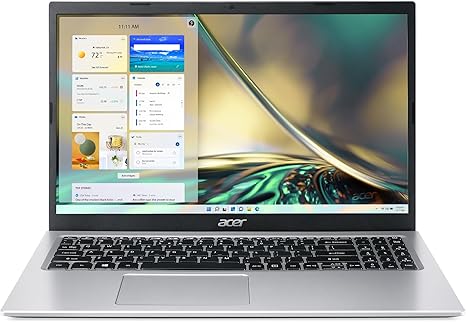
The Acer Aspire 3 A315-58-74KE boasts a clean, purpose-driven design, weighing in at just a shade over 3.5 pounds and measuring only 0.78 inches thick. The 15.6-inch Full HD IPS display offers sharp details and vivid colors, perfect for daily tasks like browsing, streaming, and office work. But more importantly, how does this design translate into real-world usage?
Under the hood, the Aspire 3 is powered by Intel’s 11th Gen Core i7-1165G7 processor, featuring a quad-core setup with eight threads running at up to 4.7 GHz. This is a great pick for anyone juggling a bunch of tabs, documents, or spreadsheets. You’ll feel that responsive performance whether you’re multitasking or diving into more demanding tasks like photo editing or light video rendering. Pair that with 8GB of DDR4 RAM, and you’ve got a system that can handle most everyday workloads without hiccups. If you’re into more memory-hungry activities like video editing or running virtual machines, though, an upgrade to 16GB might be worth considering.
For graphics, the Aspire 3 leans on Intel’s Iris Xe GPU. It’s not a powerhouse for gaming, but it can handle casual titles like “League of Legends” or “Minecraft” at medium settings. If you’re a gamer looking for serious performance, you may want to look elsewhere, but for everyday entertainment and light gaming, the Iris Xe delivers decent visuals and smooth performance. In terms of storage, you’re getting a 512GB PCIe Gen4 SSD. This means you’ll benefit from fast boot times, rapid file transfers, and a much snappier experience compared to older SATA drives. All your files and media will load quickly, so you won’t be waiting around.
Now, let’s talk about real-world usage. Whether you’re working from home or just browsing the web, the Acer Aspire 3 shines in everyday tasks. Opening multiple tabs on Chrome, streaming Netflix, or hopping on video calls is a smooth experience. The 15.6-inch display offers clear, sharp visuals, and while it’s not the brightest screen out there, it does hold its own with good color accuracy for media consumption and office work. If you’re working in a well-lit room, it won’t be a struggle to see.
Content creators and media enthusiasts might not be as impressed, though. While the display is decent, it’s not going to deliver the color vibrancy you’d expect from higher-end laptops with OLED or even better IPS panels. But for the price, it’s a solid offering for daily tasks.
When it comes to thermals and fan noise, things are fairly balanced. The Aspire 3 doesn’t get uncomfortably hot during regular use, but you might notice the fan kicking up a little when the system is under heavy load, like during gaming or long video renders. The fan noise is on the quieter side compared to other budget laptops, but it’s still noticeable when the workload gets intense. On the plus side, the Aspire 3 doesn’t seem to suffer from thermal throttling, so performance remains steady even during extended tasks.
Battery life is another strong point here. Acer claims up to 8.5 hours, and in everyday usage—light browsing, streaming, and word processing—that seems about right. Of course, heavier tasks will drain the battery faster, but this laptop holds up well for an entire day’s work without needing to plug in. Charging is pretty standard, and it doesn’t take forever to top up, though it won’t charge as fast as some premium models.
Now, let’s talk about the keyboard and trackpad. Acer has done a good job with the keyboard layout—no cramped keys here, and the key travel offers just the right amount of feedback for comfortable typing sessions. It’s perfect for working on documents, emails, and all those long office sessions. The trackpad is responsive and accurate, and palm rejection is solid, so you won’t accidentally move the cursor while typing. It’s a nice touch for productivity-focused users.
In terms of connectivity, you’ve got a solid selection of ports: a USB-C port, two USB-A ports, an HDMI output for external displays, an SD card reader, and a headphone jack. You also get Wi-Fi 6, which means faster internet speeds if you’re working in a Wi-Fi 6-equipped environment. The inclusion of Wi-Fi 6 is a nice upgrade, ensuring the Aspire 3 remains relevant as more devices start supporting faster networks.
On the portability front, the Aspire 3 stands out for its light weight and slim profile. If you’re carrying it around all day, it’s not going to weigh you down. It’s not ultrabook-level light, but for a laptop with a 15.6-inch screen, it’s pretty impressive.
The build quality here is decent for the price. The body is made of plastic, which keeps the weight low, but it still feels solid enough for everyday use. It’s not the most premium-feeling laptop, but it’s definitely not flimsy either. The hinge works smoothly, and the screen stays in place even when you’re typing or using the laptop on your lap.
So, what’s the verdict? The Acer Aspire 3 A315-58-74KE is a great option for anyone who needs a budget-friendly laptop for everyday tasks like office work, web browsing, and media consumption. It’s got a powerful CPU, decent graphics, and good battery life—all in a sleek, portable package. However, if you’re a heavy gamer or a professional content creator, you might want to look at something with more GPU muscle and a better display.
For students, office workers, or casual users, this laptop is an excellent choice, especially if you value portability and battery life. The price is justifiable for what you get, and you won’t feel like you’re sacrificing too much in terms of performance or build quality. Just know that it’s not going to blow you away with top-tier graphics or stunning display quality—this is a solid, workhorse laptop, not a showstopper.
If you’re interested in picking up the Acer Aspire 3, you can find the link in the comments below. Feel free to ask any questions or share your own experiences if you already own one. Thanks for watching, and remember—keep reviewing from the inside out! See you next time!
Available to buy here:


