
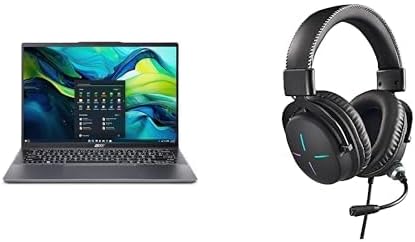

Available to buy here:
Welcome to “Reviews inside tv,” where we bring you the most honest and thorough laptop reviews. Today, we’re looking at the Acer Swift Go 14, a laptop that combines power, portability, and cutting-edge AI features. The big question is, how does it perform in real-world use, and is it worth your attention? Let’s find out.
The Acer Swift Go 14 is a compact, 14-inch laptop designed for those who need powerful performance on the go. It’s equipped with the AMD Ryzen 7 8845HS, a high-performance processor designed to handle demanding tasks while maintaining efficiency. Paired with AMD Radeon 780M graphics, this laptop is built to deliver smooth visuals for both work and play. It also boasts 16GB of LPDDR5X RAM, which is a great boost for multitasking, as well as a spacious 1TB PCIe Gen 4 SSD, ensuring fast boot times and plenty of storage for your files. The 14-inch WUXGA (1920 x 1200) touch display offers 100% sRGB color coverage, providing vibrant and accurate visuals, which is ideal for creators and casual media consumption. It’s also touch-enabled, adding an extra layer of functionality.
The laptop’s design is sleek and portable, making it an excellent choice for students, professionals, or anyone who needs a light, but capable machine. It weighs in at just under 3 pounds, which is impressive considering the powerful internals, and its thin profile makes it easy to carry around all day. On top of that, it runs on Windows 11, providing a familiar and user-friendly interface for both personal and professional tasks.
When it comes to performance, the Swift Go 14 shines with the Ryzen 7 8845HS processor. It delivers exceptional power for both productivity and more demanding applications. Whether you’re working on spreadsheets, browsing the web with dozens of tabs, or video conferencing, this laptop handles it with ease. The 16GB of LPDDR5X memory ensures smooth multitasking, while the 1TB SSD provides quick access to your files and faster load times for applications. The AMD Radeon 780M graphics offer solid performance for light gaming and media consumption, though it’s not built for heavy-duty gaming or 3D rendering.
Now, let’s talk about how it performs in everyday use. For office and productivity tasks, the Swift Go 14 is more than capable. It can handle web browsing with multiple tabs open, document editing, and video calls without any noticeable slowdowns. The 14-inch display provides a clear and sharp view, perfect for working on spreadsheets or watching videos during breaks. The touch capability is a nice bonus for navigating through apps or swiping between documents. For media consumption, the WUXGA display with its 100% sRGB color gamut ensures that videos and images look vibrant and detailed, making it a solid choice for watching your favorite shows or editing photos. If you’re into content creation, this laptop can handle photo editing in Adobe Lightroom or even video editing in Premiere Pro without issue, though export times may be a bit slower than on a machine with a dedicated GPU.
When it comes to gaming, the Acer Swift Go 14 is not a powerhouse, but it can handle light gaming well. Titles like Fortnite or Overwatch should run smoothly at medium settings, though more demanding games like Cyberpunk 2077 might require settings to be dialed down for a smooth experience. It’s important to note that this laptop isn’t intended for serious gamers but can still handle casual gaming and light graphics work just fine.
In terms of thermals, the Swift Go 14 performs well under typical workloads, like web browsing and office tasks. However, when pushed with more demanding applications like video editing or gaming, the laptop can heat up, especially on the underside. The fans can get noticeably louder under load, though they aren’t overly intrusive. If you’re working on more demanding tasks for extended periods, it’s something to keep in mind, as prolonged heavy use might lead to some thermal throttling, which can cause a slight dip in performance. This could be a minor inconvenience if you’re relying on it for intense gaming sessions or long video exports.
Battery life is another strong suit for this laptop. With its 58Wh battery, you can expect around 8 to 10 hours of light usage, including office work and streaming. If you’re doing something more demanding like video editing, you might get closer to 6-7 hours. Charging is fast thanks to the USB-C charging port, and the charger itself isn’t overly bulky, making it easy to take with you when you’re on the go.
The keyboard and trackpad are both quite comfortable for extended typing sessions. The key travel is decent, and the feedback is responsive, making it comfortable for long work hours. The trackpad is smooth and accurate, with great palm rejection, so you won’t have to worry about errant clicks when typing. The laptop also includes a number of input features, like a fingerprint reader for quick logins, which is a nice touch for those who prioritize security and convenience.
As for connectivity, the Swift Go 14 is well-equipped with two USB-A ports, two USB-C ports (one of which supports Thunderbolt 4), an HDMI 2.1 port, and a microSD card reader. You also get Wi-Fi 6E, which ensures fast and stable internet connections, even in crowded networks, and Bluetooth 5.3 for wireless peripherals. The inclusion of Thunderbolt 4 is especially important for those who want to hook up an external GPU, multiple monitors, or fast data transfer devices. The 1TB PCIe Gen 4 SSD ensures that the laptop has fast storage for games, files, and apps, though the RAM is soldered, meaning you won’t be able to upgrade it in the future.
In terms of build quality, the Swift Go 14 feels premium, with a solid aluminum chassis that’s both durable and sleek. There’s little flex in the keyboard deck, and the hinge feels strong, with no noticeable wobble when typing or interacting with the screen.
Now, let’s talk about the competition. The Swift Go 14 faces stiff competition from other thin-and-light laptops, particularly the Dell XPS 13 and the Lenovo ThinkPad X1 Carbon. Both offer similar performance, but the Acer Swift Go 14 edges out with a slightly larger screen, higher color accuracy, and better GPU integration. The XPS 13, however, offers a more premium feel with its carbon fiber design. The ThinkPad X1 Carbon, on the other hand, has a more business-focused design with top-notch keyboard and build quality, but it’s more expensive for similar performance.
So, is the Acer Swift Go 14 worth it? If you’re after a lightweight, powerful laptop with excellent performance for office work, light gaming, and content creation, this is a fantastic option. It offers a premium display, solid build quality, and enough power for most everyday tasks, all at a competitive price point. However, if you need more serious gaming or content creation capabilities, or if you plan on upgrading the RAM in the future, you might want to look at other options.
Thank you for watching today’s review! If you have any questions or already own the Acer Swift Go 14, feel free to drop a comment below. Don’t forget to hit like, subscribe, and ring the bell for more reviews from “Reviews inside tv.” See you in the next one!
Available to buy here:


