
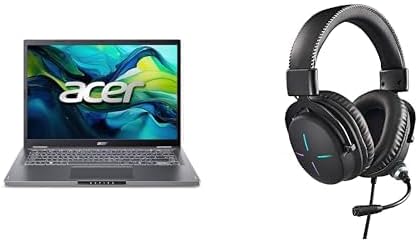

Available to buy here:
Welcome to Reviews inside tv, where we get into the details that matter most when choosing your next laptop. Today, we’re taking a look at the Acer Aspire 14, a mid-range laptop designed for productivity, multimedia, and some light gaming. It comes with a solid set of specs, so let’s break it down and see how it performs in real-world use.
The Acer Aspire 14 packs an Intel Core i5-1200U processor, a mid-tier chip designed for everyday tasks and light creative work. It’s paired with Intel integrated graphics, which will get the job done for most office work and light media consumption, but don’t expect it to handle anything demanding, like modern AAA games or heavy video editing. The laptop also has 16GB of LPDDR5 RAM, which is more than enough for multitasking, web browsing with dozens of tabs open, and handling office suites like Word or Excel. And with a 512GB M.2 SSD, you get fast storage, which will make booting up, loading apps, and transferring files much quicker than traditional hard drives or SATA SSDs. It’s also worth mentioning the 16:10 aspect ratio of the 14.0-inch WUXGA IPS display. This gives you a little more vertical screen space compared to a standard 16:9 screen, which can be great for productivity, especially when working on documents or multitasking. The screen resolution, at 1920 x 1200, isn’t quite full HD, but it still offers good clarity for everyday tasks, and the narrow bezels give it a modern, sleek look. Acer’s BluelightShield is a nice addition if you spend long hours in front of the screen, as it reduces eye strain.
Now, let’s talk performance in real-world scenarios. If you’re primarily going to use the Aspire 14 for productivity—office work, emails, browsing the web, and video calls—this laptop handles those tasks with ease. Switching between apps is smooth, and the 16GB of RAM ensures that even with several browser tabs open, you won’t experience much slowdown. If you’re a student, this laptop will do a great job handling your research, assignments, and video streaming without breaking a sweat. For media consumption, the IPS display is bright and sharp, though it won’t have the contrast or vibrancy of an OLED or mini-LED panel. It’s still quite good for watching videos or browsing photos, though if you’re a creator, you may find the color accuracy lacking for professional work.
When it comes to gaming, the Intel integrated graphics won’t win any awards, but this laptop can handle casual gaming or older titles at lower settings. You can expect to run games like League of Legends or Fortnite at medium settings, but more demanding games like Cyberpunk 2077 will likely struggle, even at low settings. So, if gaming is a priority, this laptop won’t be the one you want to choose for high-end gaming sessions. The performance is generally solid for everyday work, but keep your expectations in check for heavier workloads like 4K video editing or high-end gaming.
Thermals and noise are important to note, especially in a laptop that might see a lot of hours of work. Under light workloads, the Aspire 14 stays relatively cool, but once you push it with multiple tabs or heavier applications, the fans will kick in. They’re not particularly noisy, but you’ll definitely hear them when the laptop is under load. The laptop’s underside does get warm during longer sessions, though it’s not uncomfortable for lap use. The cooling system seems adequate for the type of tasks this laptop is built for, though I wouldn’t recommend it for extended gaming or video rendering sessions, where thermal throttling could be a concern.
Battery life is another key consideration for laptops in this category, and the Aspire 14 holds up reasonably well here. With a battery size that’s not enormous, you can expect around 7 to 8 hours of typical use, like browsing the web, working on documents, or streaming media. For heavier use, like running multiple apps or light gaming, expect it to drop closer to 5 hours. It charges decently quickly, though the charging cable is a bit bulky, which might be a downside for travel-heavy users.
When it comes to the keyboard and trackpad, the Aspire 14 doesn’t disappoint. The keyboard offers good key travel and solid feedback, making it comfortable for long typing sessions. The trackpad is smooth and responsive, with good palm rejection, so you shouldn’t have trouble with accidental clicks while typing. If you need extra features, there’s also a fingerprint reader for quick login, though it’s not a game-changer for most users. It’s the small conveniences like these that elevate the overall experience.
The port selection is pretty standard for a laptop in this category, including USB-A, USB-C, and HDMI, making it easy to connect to external monitors or other devices. There’s also Wi-Fi 6E support, ensuring faster wireless speeds and better connectivity, especially in crowded environments. The laptop does have a 3.5mm audio jack and a USB-C port, but you won’t find Thunderbolt here, which is a shame for anyone looking for faster data transfer or external GPU support. The M.2 SSD is a nice touch for speed, but unfortunately, the RAM is soldered, meaning you won’t be able to upgrade it in the future.
One thing worth mentioning is the inclusion of the Nitro Gaming Headset II with 50mm drivers and a retractable noise-canceling mic. While this is more of an extra for gamers or people who participate in online meetings, the audio quality is good for basic use. If you’re not a gamer or content creator, you might not find this headset essential, but it’s a thoughtful addition for anyone who wants to get more immersive audio without additional purchases.
In terms of build quality, the Aspire 14 has a solid, no-frills design. It’s mostly made of plastic, but the chassis feels rigid and doesn’t flex when you apply pressure, giving it a nice level of durability. It’s not as premium as some metal laptops, but it feels sturdy and will hold up well for everyday tasks. At 3.5 pounds, it’s not the lightest laptop around, but it’s still fairly portable and easy to carry in a backpack or bag without feeling like a burden.
When you look at the price of this laptop, it’s well positioned for students or office users who need a solid all-around laptop without going for high-end specs. It’s not going to compete with ultra-premium models or gaming laptops, but for its price range, the Acer Aspire 14 offers solid performance, a good display, and decent build quality. If you’re a student or someone who needs a reliable work laptop, this one is a good option. For casual gaming or media use, it’ll also perform decently, but don’t expect to run the latest games at high settings.
At its price point, the Aspire 14 is a good value. It doesn’t offer everything that more expensive laptops bring, but it delivers enough performance for most casual users. If you’re looking for more power or a better display, there are alternatives in the $700-$900 range, but the Aspire 14 should meet the needs of most everyday users who prioritize productivity over heavy gaming or content creation.
So, who is this laptop for? If you need a laptop for light office work, study, media consumption, or casual gaming, the Aspire 14 will serve you well. If you’re a heavy gamer or professional creator who needs high-end performance, you might want to look elsewhere.
Thanks for watching, and if you’re interested in the Acer Aspire 14, be sure to check out the link in the comments box. Let me know if you have any questions or if you already own this laptop—share your thoughts below. Don’t forget to like, subscribe, and hit the bell for more honest tech reviews. Until next time, happy computing!
Available to buy here:


