

Available to buy here:
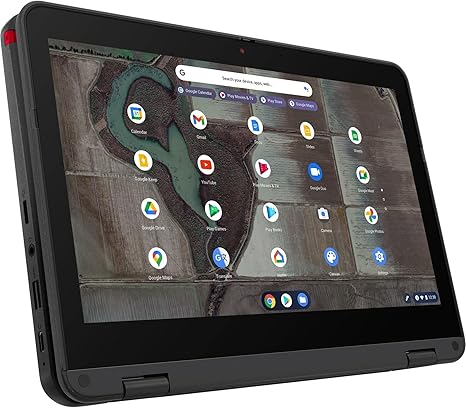
Welcome to “Reviews inside tv,” where we break down everything you need to know about the latest tech gadgets and laptops. Today, we’re taking a close look at the Lenovo 500e G3, a budget-friendly Chromebook designed for everyday use. Whether you’re a student, a casual user, or someone who needs a lightweight laptop for browsing, this one could be right up your alley. But does it actually live up to the hype? Let’s find out.
The Lenovo 500e G3 comes with an Intel Celeron N5100 processor, running at 1.10GHz, paired with Intel UHD graphics. It’s got 8GB of RAM, which is decent for the price range, along with 64GB of eMMC storage. The display is an 11.6-inch multi-touch screen, with a resolution of 1366 x 768. While this isn’t going to win any awards for pixel density, it’s more than enough for most basic tasks. This laptop runs Chrome OS, which should feel fast and responsive, especially considering the low-end processor it’s working with. It’s also got Bluetooth 5.1 for good wireless connectivity, and an Intel AX201 wireless card for decent Wi-Fi speeds.
When it comes to the everyday usage experience, this Chromebook is best suited for basic tasks like web browsing, word processing, and light media consumption. For students or casual users, the 500e G3 offers solid performance without getting bogged down by unnecessary bloatware, as Chrome OS keeps things light and efficient. The 8GB of RAM helps with multitasking, so you can keep a few tabs open at once without feeling too much slowdown, though it’s not the kind of machine you’d want to use for more intensive tasks like video editing or gaming.
The 11.6-inch display, while not the sharpest out there, does a decent job for everyday tasks. The resolution of 1366 x 768 is a bit dated by today’s standards, especially with Full HD being the norm, but it’s sufficient for casual web browsing and watching videos. The multi-touch support is a nice touch, making navigation smooth when using apps or browsing the web. Colors aren’t as vibrant as you’d find on more expensive displays, but for a budget laptop, it does the job.
Battery life on the Lenovo 500e G3 is surprisingly good. With its 42Wh battery, you can expect around 8 to 10 hours of light usage, depending on how much you’re browsing or streaming. It’s perfect for a day of schoolwork or light office tasks. Charging is decent too, and the fact that it’s using a 3-cell Li-Pol battery helps it maintain a good balance between battery life and weight.
Speaking of weight, this laptop is light, coming in at just around 4.24 pounds. It’s compact, making it easy to carry around in a backpack or tote without feeling too heavy. The 11.6-inch size also adds to its portability, making it a great option for students or anyone who needs to take their laptop on the go.
Now, let’s talk about the keyboard and trackpad. The keyboard is comfortable enough for typing up papers or emails, though the key travel could be better for long typing sessions. The trackpad, while functional, isn’t the smoothest I’ve used. But again, considering the price, it’s not a dealbreaker. The fact that the laptop is also equipped with a 720p HD camera and mic means that video calls are clear enough, making it a great option for online meetings or virtual classes.
Connectivity is pretty basic but functional. You’ve got Bluetooth 5.1 for wireless devices, Wi-Fi 6 via the Intel AX201 card, which is great for stability and speed when browsing or streaming, and a standard selection of ports, though don’t expect Thunderbolt or anything fancy. There’s no SD card slot or HDMI, so you’ll be relying on USB ports for most external connections. It’s got USB-A ports, but keep in mind there’s only one USB-C port, which limits some of the versatility you’d find on higher-end models.
In terms of thermals, the 500e G3 doesn’t heat up much under normal usage, but it does get a little warm if you’re running multiple tabs or media apps for a while. The fan is quiet for the most part, but under heavy load, you might hear it kicking in. Thankfully, the fan noise isn’t overwhelming, and it’s not likely to bother you during light tasks.
For the performance section, you won’t be running heavy applications on this Chromebook, but the Celeron N5100, coupled with 8GB of RAM, is more than capable of handling light workloads. Expect smooth performance when using Google Docs, spreadsheets, web browsing, and light video streaming. As for media consumption, streaming videos in HD is not an issue, and while the speakers aren’t the loudest, they get the job done for a casual movie night.
If you’re hoping to do any gaming on this Chromebook, it’s not designed for that. The integrated Intel UHD Graphics won’t be running demanding games like Cyberpunk or even something as basic as Fortnite. It’s strictly a device for lighter tasks and media, which is perfectly fine given the price point.
When it comes to the overall value, the Lenovo 500e G3 is a solid choice for students, casual users, or anyone who needs a Chromebook for basic tasks like browsing, word processing, and media consumption. It’s lightweight, easy to use, and offers good battery life, making it great for on-the-go usage. However, if you’re looking for more power or a better display, you’ll need to look elsewhere in the mid-range or premium categories.
Pros? It’s compact, affordable, and reliable for everyday tasks. The battery life is great, the build quality is solid, and it does everything you expect a Chromebook to do. But, the low-resolution screen and limited storage could be dealbreakers if you’re looking for a bit more flexibility.
As far as value for money goes, the Lenovo 500e G3 is very reasonable for what it offers. At its price, you’re not going to find a better balance of performance, portability, and battery life for light tasks. If you’re considering options like the HP Chromebook 11 or Acer Chromebook Spin, this one definitely holds its ground for basic needs.
If you’re in the market for a basic Chromebook that won’t break the bank, the Lenovo 500e G3 is a solid option. But if you need more performance, a sharper screen, or extra storage, you might want to explore options at a slightly higher price point.
Thanks for watching “Reviews inside tv”! If you’re considering picking up the Lenovo 500e G3, you can find the link in the comments box. Feel free to share your thoughts or ask any questions if you already own one. Until next time, keep it techy!
Available to buy here:


