

Available to buy here:
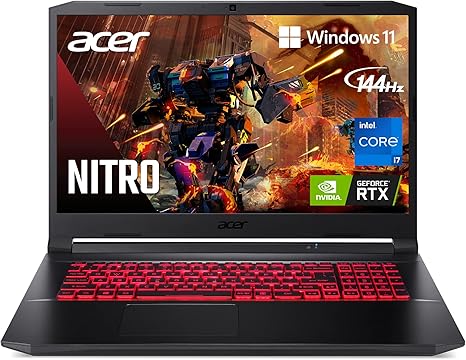
Welcome to Reviews inside tv! Today, we’re taking a closer look at the Acer Nitro 5 AN517-54-79L1, a gaming laptop that brings powerful performance to the table. With its 17.3-inch screen, Intel Core i7 processor, and NVIDIA RTX 3050 Ti GPU, it’s designed to cater to gamers who demand solid performance without sacrificing portability or battery life. But, does it live up to the hype? Let’s break it down.
The Acer Nitro 5 packs some serious hardware. At its heart is the Intel Core i7-11800H processor, a chip that’s perfect for multitasking, heavy gaming, and even demanding creative work. With 8 cores, 16 threads, and a max turbo boost of 4.6GHz, this CPU can handle just about any task you throw at it, whether it’s gaming, video editing, or running multiple applications. Pair that with the 16GB of DDR4 RAM, running at 3200MHz, and you’ve got a machine that’s capable of smooth multitasking and speedy performance for both work and play. If you want to push it further, there’s room to expand to 32GB.
When it comes to storage, the Acer Nitro 5 offers a 1TB NVMe SSD, which is a huge plus. NVMe drives are a lot faster than SATA SSDs, so this means you’ll get faster load times for your games and apps, as well as quicker boot times. Plus, you’ve got two PCIe M.2 slots and an additional 2.5″ hard drive bay, so there’s plenty of room for expansion down the line.
One of the standout features here is the display. With a 17.3-inch Full HD IPS screen, you get vibrant colors, wide viewing angles, and a smooth experience for gaming and media consumption. The 144Hz refresh rate is a big win for gamers who want a more fluid experience, reducing motion blur and providing smoother visuals during fast-paced action. The display’s brightness levels are decent, making it usable in most lighting conditions, though it could be brighter for outdoor use. Overall, the color accuracy and sharpness are on point for most users, though creators who rely on absolute color precision might want to check out other options.
Gaming performance is where this laptop truly shines, thanks to the NVIDIA GeForce RTX 3050 Ti GPU. This dedicated graphics card is powered by NVIDIA’s new Ampere architecture, complete with Ray Tracing and Tensor Cores. For modern titles like Cyberpunk 2077 or Call of Duty: Warzone, expect playable frame rates at high settings, though for ultra settings, you might need to dial it back a bit for smoother performance. In terms of benchmarks, this GPU will give you solid FPS numbers for mainstream games at 1080p resolution, though it’s not built for 4K gaming. The 144Hz refresh rate on the display matches up well with this GPU, so you won’t see any frame stuttering during gameplay.
In real-world use, the Acer Nitro 5 performs admirably in multitasking scenarios. Web browsing with multiple tabs, office work, and media consumption like streaming video are all seamless. For content creators, the 16GB RAM and fast SSD make it easy to handle photo and video editing, though you might notice a bit of lag with complex projects or 4K video exports. For gamers, the real-world performance is smooth, but under prolonged gaming sessions, expect some heat buildup.
Speaking of heat, this is where Acer’s CoolBoost technology comes in handy. Under heavy loads, the Nitro 5 boosts the fan speed by 10%, which helps keep temperatures in check, especially during long gaming sessions. However, it’s not entirely silent. You’ll hear the fans rev up, particularly when the laptop is under stress, but it’s not unbearable. During casual use, the fans are quieter, though you may notice some warmth around the keyboard area after extended use.
Battery life is another important factor. With a 59Wh battery, Acer claims up to 8 hours of battery life, but this will vary depending on usage. For light office work or media consumption, you might get close to that 8-hour mark, but expect more like 4-5 hours with gaming or heavier workloads. It’s not the best battery life in the market for a gaming laptop, but considering the performance you’re getting, it’s not bad at all. Charging speeds are pretty standard, so you can expect it to top up in about two hours with the included charger.
As for the build, the Nitro 5 has a fairly standard gaming laptop design. It’s not the lightest machine out there, weighing in at 5.95 lbs and measuring 0.98 inches thick, but it’s still portable for a laptop with a 17.3-inch display. The plastic build feels sturdy enough, though it’s not as premium as some higher-end models. The keyboard features a full-size layout with a numeric keypad, and while the key travel is decent, it’s not the most tactile experience for long typing sessions. The trackpad is responsive and accurate, though not as large or as smooth as some premium models.
Connectivity is another strength, with USB 3.2 ports, including a Type-C port with DisplayPort support, as well as HDMI 2.1, Ethernet, and Killer Wi-Fi 6. This makes it great for connecting to external displays, docks, and peripherals. The addition of Wi-Fi 6 ensures fast and stable internet connections, whether you’re gaming online or working remotely.
In terms of durability, the Acer Nitro 5 feels like it will last, but it’s not immune to the typical issues that plague gaming laptops, like fan wear and tear after extended use. Acer’s reputation for support is generally solid, though it’s always good to check local warranty options for peace of mind.
Now, let’s talk value. At its price point, the Acer Nitro 5 offers a solid gaming experience, especially for 1080p gaming. The 144Hz screen and RTX 3050 Ti GPU are strong for this price range, though there are some competitors with slightly better screens or more powerful GPUs if you’re willing to spend a bit more. If you’re a gamer on a budget who wants solid performance without breaking the bank, this laptop definitely delivers. However, if you need more power for heavy video editing or 4K gaming, you might need to look elsewhere.
So, who’s this laptop best for? The Acer Nitro 5 is perfect for gamers who want a big screen, solid performance, and a smooth experience at 1080p without paying top dollar. It’s also a good choice for students or office users who need a machine that can handle work, light content creation, and casual gaming. However, if you need a laptop for ultra-fast video editing or high-end AAA gaming, this may not be the right choice for you.
Thank you for watching Reviews inside tv! If you want to grab the Acer Nitro 5, check the comments for the link. Feel free to share your thoughts if you’ve tried this laptop or ask any questions you might have. Until next time, keep on gaming, keep on working, and keep it real!
Available to buy here:


