

Available to buy here:
Welcome to “Reviews inside tv,” where we take a deep dive into the latest tech, breaking down specs, performance, and everything you need to know before making a purchase. Today, we’re looking at the Acer Nitro V Gaming Laptop, a powerful machine designed to cater to gamers and creators alike. With a sleek design, cutting-edge hardware, and a host of features to match, is this the laptop you’ve been waiting for? Let’s find out.
The Acer Nitro V is built for performance with a robust Intel Core i5-13420H processor. This 13th Gen chip is a quad-core powerhouse designed for multi-tasking, from gaming to creative workloads. Whether you’re editing photos, streaming, or running resource-intensive applications, this CPU delivers solid performance. Paired with the NVIDIA GeForce RTX 4050 Laptop GPU, you’re looking at AI-powered graphics that bring games to life with DLSS 3.5 and improved ray tracing. This combination ensures smooth gameplay and impressive visual fidelity, even on more demanding titles. You’ll be able to game at high frame rates and tackle heavy workloads without breaking a sweat.
The Nitro V comes equipped with 8GB of DDR5 RAM, which provides a noticeable performance boost over older DDR4 memory, especially in multitasking and creative work. This laptop has two memory slots, allowing for an upgrade to 32GB, which is ideal if you plan on doing more intensive tasks like video editing or 3D rendering. For storage, the 512GB PCIe Gen 4 SSD is fast, offering quick boot times and swift file transfers. This will make loading heavy games or large media files feel nearly instantaneous.
The 15.6-inch Full HD IPS display is another standout feature. At 165Hz, the high refresh rate offers ultra-smooth visuals, making it perfect for fast-paced gaming where every millisecond counts. The wide 16:9 aspect ratio maximizes screen real estate, while the 82.64% screen-to-body ratio gives you more screen and less bezel. Color accuracy is good, but it’s worth noting that for professional creators who need precise color grading, you might want to explore a higher-end option. For most gaming and general content consumption, though, this display holds up exceptionally well.
Battery life is always a key consideration, especially in a gaming laptop. With a battery that offers solid longevity, you can expect around 4-6 hours of moderate use, depending on your tasks. For gaming, expect this number to drop as power-hungry tasks kick in. Charging is efficient, thanks to the Thunderbolt 4 port, which also supports fast data transfer and video output. The inclusion of Wi-Fi 6 and Killer Ethernet ensures fast, stable connectivity for online gaming, no matter where you’re playing.
When it comes to usability, the keyboard on the Nitro V is backlit, with good key travel and feedback for typing or gaming. While the layout is fairly standard, the arrow keys are full-size, which is great for gamers who need precision. The trackpad is responsive, and palm rejection works well, though gaming users will likely prefer an external mouse for optimal control. The cooling system, featuring dual fans and an innovative exhaust design, keeps the laptop running cool even during extended gaming sessions. However, during heavy gaming, the fans can get noticeably loud, which could be distracting during long sessions.
Now, let’s talk about thermals and overall performance. In terms of real-world gaming, the Nitro V does well, but it’s not necessarily a top contender for ultra-demanding AAA titles at max settings. When running something like Cyberpunk 2077 at high settings, you can expect around 50-60 FPS at 1080p, which is playable but not perfect. For a competitive gaming experience, lowering the settings or resolution a bit will ensure smoother gameplay. The laptop’s thermal management is quite impressive, but expect some heat buildup on the keyboard deck during intensive tasks. While the laptop never feels dangerously hot, the fan noise does ramp up under load, making it more noticeable in quieter environments.
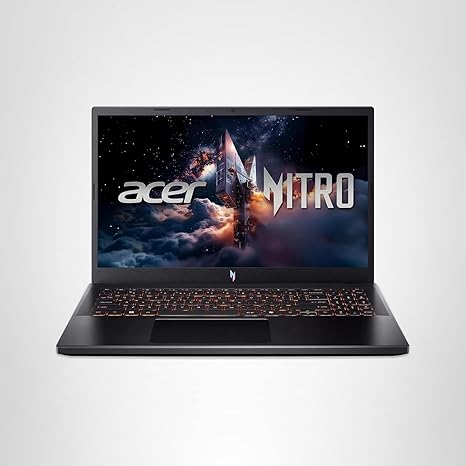
In terms of build quality, the Acer Nitro V has a sturdy yet fairly lightweight chassis, weighing in at just 4.66 lbs. It’s not the lightest gaming laptop out there, but it strikes a good balance between portability and durability. The keyboard and trackpad are comfortable for extended use, and the overall design is sleek, with a futuristic, neon-inspired gradient pattern that adds a touch of style.
Ports and connectivity are robust, with two USB 3.2 Gen 1 ports, a USB Type-C with Thunderbolt 4 support, an HDMI 2.1 port, and even an Ethernet jack for those who prefer wired connections. The presence of Wi-Fi 6 ensures strong, fast connections for online play. If you’re planning on connecting external monitors or docks, the Nitro V has you covered. The Thunderbolt 4 port is especially useful for quick charging and data transfer, offering up to 65W of charging power.
For those considering the price, the Nitro V is well-priced for the features it offers, especially considering the power of the RTX 4050 and the fast SSD. However, it’s important to note that there are competitors in this price range, like the Lenovo Legion 5 or the ASUS TUF series, which offer similar gaming performance but may have some advantages in cooling or display brightness.
The laptop’s build quality feels solid, with a combination of plastic and metal materials. Acer has a decent reputation for reliability, and while long-term user data on this specific model is limited, it’s safe to say that the Nitro V should offer good durability, especially with Acer’s international warranty offering some peace of mind.
In conclusion, the Acer Nitro V is a solid mid-range gaming laptop that balances power and portability. It’s perfect for gamers who want to play modern titles at 1080p with high settings, and its solid design and performance make it a great option for multitaskers and creators. If you’re looking for a laptop that can handle gaming, video editing, and general productivity without breaking the bank, this is an excellent choice. However, if you’re focused on ultra-competitive gaming or need a top-tier display for professional content creation, you might want to look at something with higher-end specs.
Thanks for tuning in to “Reviews inside tv.” If you found this helpful, don’t forget to like, subscribe, and hit the bell icon so you won’t miss out on more in-depth reviews. If you’ve already used the Acer Nitro V, drop a comment below with your thoughts, or if you have any questions, feel free to ask!
Available to buy here:


