

Available to buy here:
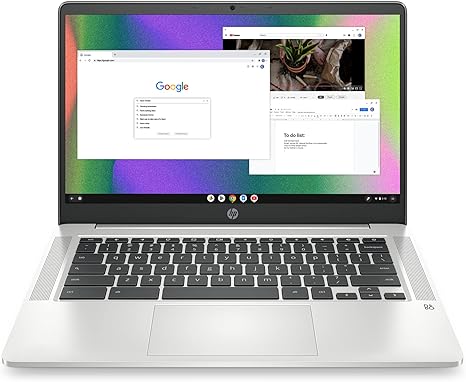
Welcome to “Reviews inside tv.” Today, we’re looking at the HP Chromebook 14, a lightweight and affordable option for those who need a reliable device for home, work, and school. With a 14-inch HD display, Intel Celeron N4120 processor, and up to 14 hours of battery life, this Chromebook seems like a solid contender for users who want everyday performance without breaking the bank. But how does it really hold up in the real world? Let’s find out.
The HP Chromebook 14 comes with a quad-core Intel Celeron N4120 processor, a chip designed for efficiency, not necessarily raw power. It’s perfect for basic tasks like web browsing, document editing, and video streaming. This processor, paired with 4GB of RAM, is great for light multitasking but may struggle with more demanding applications or heavy multitasking. For day-to-day tasks, though, you’ll find that it handles everything smoothly, as long as you don’t push it too hard.
Storage is another area where this Chromebook keeps things simple. You get 64GB of eMMC storage, which is enough for basic file storage and a few apps. But if you plan on keeping a lot of media or large files, you might hit a wall quickly. The good news is that eMMC storage is faster than traditional HDD storage, so it should feel snappy in everyday use. That said, the 4GB RAM and the eMMC storage aren’t going to set the world on fire, but they do provide a responsive experience for basic needs. For those who like to work in the cloud, this setup should suffice, though.
The 14-inch HD display (1366 x 768 resolution) is decent for most tasks. The anti-glare coating ensures it performs well in brighter environments, but don’t expect the vivid colors and sharpness of higher-end models. It’s not the best for detailed design work or media consumption, but it gets the job done. If you plan to stream 4K content, the Intel UHD Graphics 600 provides a smooth experience for watching movies or browsing video services, although this isn’t a powerhouse for gaming or high-res graphics-intensive tasks.
When it comes to real-world performance, the HP Chromebook 14 shines in its battery life. With up to 14 hours of use, it’s well-suited for a full day of work or school without needing to be plugged in. The inclusion of HP Fast Charge is a nice touch, bringing you from 0 to 50% in just 45 minutes. In terms of portability, the Chromebook is lightweight and easy to carry, making it ideal for students or anyone on the go.
Now, let’s talk about connectivity. With Wi-Fi 5 (802.11a/b/g/n/ac) and Bluetooth 4.2, you’re covered for basic internet browsing, video calls, and streaming. While it doesn’t support the faster Wi-Fi 6, the connectivity is solid enough for most people’s needs. The selection of ports includes USB-A, USB-C, and a microSD card reader, giving you some options for expanding your storage or connecting to peripherals. There’s no HDMI port, though, so if you plan on hooking this up to an external display or TV, you’ll need to rely on USB-C or a wireless connection.
The keyboard on the HP Chromebook 14 is comfortable for typing, even for extended sessions. The keys offer decent travel, and the multi-touch touchpad is responsive, supporting gestures like scrolling, zooming, and navigating with ease. If you’re doing a lot of typing, the keyboard layout works well, and there’s enough space around the trackpad for comfortable use.
When it comes to thermals, the HP Chromebook 14 is impressively cool under normal use. You won’t notice the laptop heating up during web browsing or word processing, but under heavy use—like streaming or longer sessions—the cooling system keeps it fairly quiet. While it’s not a high-performance machine, it manages to stay comfortable for lap use even during extended sessions.
As for build quality, the Chromebook feels sturdy but lightweight. It’s made of plastic, which keeps the weight down, but it doesn’t feel as premium as some aluminum laptops. It’s a durable, practical design, though not a showstopper. The thin profile and light weight make it easy to slip into a bag and take with you anywhere, but it might not feel as robust as some pricier options.
Now, let’s talk about who this laptop is really for. If you’re a student or a casual user who just needs something for browsing the web, watching videos, and doing light office work, the HP Chromebook 14 offers great value for money. It’s also a solid option for anyone who needs an affordable, lightweight laptop with good battery life for everyday tasks. However, if you need a more powerful laptop for content creation, gaming, or heavy multitasking, you’ll need to look elsewhere.
In terms of value for money, the HP Chromebook 14 stands out for its price point. It delivers solid performance for the essentials and offers excellent battery life, which is often a top priority for users on the go. The display and storage may not be mind-blowing, but for its class, it offers a practical balance of features for users who just need a reliable laptop.
In conclusion, the HP Chromebook 14 is a great option for people who prioritize portability, long battery life, and simple everyday tasks. It’s not going to wow you with high-end performance or cutting-edge features, but it’s a solid choice for its intended audience. If you’re looking for an affordable, no-frills laptop for browsing, work, or school, it’s a reliable pick.
If you’re interested in learning more about the HP Chromebook 14, you can find the link to get it in the comments box. Thanks for watching, and don’t forget to like, subscribe, and hit that bell icon so you never miss a review from “Reviews inside tv.” See you next time, and happy laptop hunting!
Available to buy here:


