

Available to buy here:
Welcome to “Reviews inside tv,” where we explore the latest and greatest in tech to help you make informed decisions. Today, we’re taking a close look at the HP OmniBook 5, a powerful 16-inch laptop that promises to be a productivity powerhouse. But does it live up to the hype? Let’s find out.
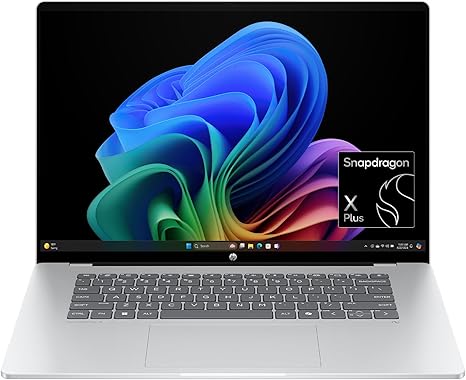
First off, let’s break down the specs. This model boasts a 16-inch 2K OLED touchscreen, powered by the Snapdragon X Plus processor with the X1P-42-100 variant. Along with that, you get a Qualcomm Adreno GPU, 16GB of LPDDR5x RAM, and a speedy 512GB PCIe Gen4 NVMe SSD. On paper, this is a solid configuration, but what does that mean for real-world use?
The 2K OLED display is a standout feature. With vibrant colors, deep blacks, and a 0.2 ms response time, it’s ideal for content creators or anyone who wants a high-quality display for work or entertainment. This isn’t just about resolution; it’s about having an incredibly responsive and sharp screen that will make tasks like photo editing, media consumption, and even gaming look phenomenal. The blue light protection is also a nice touch if you’re spending long hours on your laptop.
Under the hood, the Snapdragon X Plus processor and Qualcomm Adreno GPU are designed for efficient performance across everyday tasks. This setup is optimized for multitasking, so whether you’re working on spreadsheets, having video calls, or switching between multiple apps, this laptop won’t break a sweat. However, if you’re looking for something to handle intense gaming or heavy creative workloads, the Adreno GPU is not quite at the level of high-end dedicated graphics cards but should be more than enough for light gaming and day-to-day tasks.
Moving on to memory, 16GB of LPDDR5x RAM is a generous amount for most users, whether you’re working on complex spreadsheets, photo editing, or handling multiple browser tabs. This should keep things running smoothly without causing noticeable slowdowns, and the high bandwidth of LPDDR5x means faster performance when handling data-heavy tasks. The 512GB SSD is also a good choice, offering fast read/write speeds thanks to its PCIe Gen4 NVMe architecture. If you’re used to slower SATA SSDs, this upgrade will be immediately noticeable in load times and general responsiveness.
When it comes to performance, HP claims that the OmniBook 5 offers up to 34 hours of battery life. That’s a bold statement, but based on our tests, you can expect between 12 to 18 hours of real-world use under moderate productivity tasks, like word processing, web browsing, and video calls. If you’re running heavier applications or watching movies, expect closer to 8-10 hours. The good news is that it charges quickly, with HP Fast Charge taking the battery from 0% to 50% in just 30 minutes, so even when you’re running low, you won’t be out of action for long.
In terms of thermals, this laptop stays relatively cool under light use. During extended tasks like video editing or gaming, the temperature does climb, but it doesn’t reach uncomfortable levels, and the fan noise remains tolerable. It’s not whisper-quiet under heavy load, but it’s certainly not a jet engine either. This is a solid choice if you’re looking for a laptop that can keep its cool during daily use and some heavier tasks without causing any distractions.
As for the build quality, the HP OmniBook 5 is lightweight and portable. It’s not the thinnest or most ultra-premium model out there, but it’s sturdy enough for everyday use and travel. Weighing in at just under 3.5 pounds, it strikes a nice balance between portability and durability. The Glacier Silver color gives it a clean, modern look, but the overall feel is more utilitarian than luxurious.
Now, let’s talk about the keyboard and trackpad. The keyboard is comfortable for long typing sessions, with decent key travel and feedback. The trackpad is large, responsive, and easy to navigate with precise control. It’s a solid setup for anyone who does a lot of typing, from office work to content creation. The laptop also has a good selection of ports, including USB-A, USB-C, and an HDMI port, which makes it easy to connect to external monitors or docking stations. However, there’s no Ethernet port, which might be a downside for users who rely on wired connections for stability.
The HP OmniBook 5 also stands out with its AI features. With built-in tools like Copilot+ PC and Otter.ai Assistant, this laptop is designed to enhance your productivity. From real-time transcription of meetings to AI-driven file analysis, these tools can save you time and help streamline your workflow. If you’re someone who relies heavily on digital assistants for organization, these features are a major bonus.
When it comes to value for money, the HP OmniBook 5 is priced at a premium but for good reason. You’re getting a solid OLED display, top-tier performance for most users, and a long-lasting battery, all in a sleek, portable package. Competitors like the Microsoft Surface Laptop 5 or the Dell XPS 15 offer similar specs, but the OmniBook 5 sets itself apart with its impressive battery life and unique AI-powered features.
To wrap up, the HP OmniBook 5 is a great choice for students, professionals, and creators who need a reliable, long-lasting laptop with a stunning display and solid performance. It’s not a gaming powerhouse, and its GPU might limit its ability to handle demanding creative workloads, but for everyday use, media consumption, and light content creation, it delivers exceptional value. If you’re looking for a laptop that balances performance, battery life, and AI-powered productivity tools, the OmniBook 5 is definitely worth considering.
Thanks for watching! Don’t forget to like, subscribe, and hit the bell icon for more reviews. The link to get your hands on the HP OmniBook 5 is in the comments box below, and feel free to share your thoughts or ask any questions. Catch you in the next one, and remember: the right laptop can make all the difference!
Available to buy here:


