

Available to buy here:
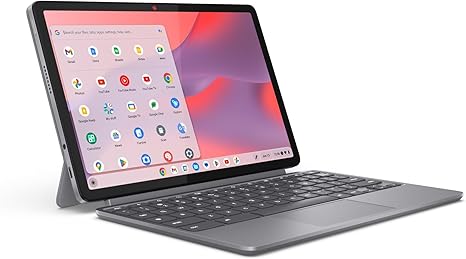
Welcome back to Reviews inside tv, where today we’re taking a closer look at the Lenovo Chromebook Duet 2025 model. A 2-in-1 convertible laptop that promises versatility and portability, it’s designed for anyone who needs a compact, functional device for everyday use. But, does it live up to its promises? Let’s find out.
The Lenovo Chromebook Duet comes equipped with a 10.95-inch WUXGA IPS touch display, which is perfect for on-the-go productivity. This display is designed to give you a crisp, clear picture with a resolution of 1920 x 1200 pixels, offering a solid visual experience whether you’re browsing the web, working on documents, or watching videos. With narrow bezels on all sides, it’s not only functional but visually appealing as well. The touch capability is smooth, adding a layer of interactivity that can make multitasking or casual browsing more enjoyable.
Inside, the Duet is powered by the MediaTek Kompanio 838 processor, paired with 4GB of RAM and 64GB of storage. While the 4GB of RAM is on the lower end, it’s adequate for lighter tasks like web browsing, video streaming, or document editing. The MediaTek chip, an octa-core processor, performs surprisingly well for a Chromebook at this price point. You can expect smooth day-to-day use, especially on ChromeOS, where the lightweight operating system helps offset the relatively modest hardware. However, multitasking with a lot of tabs open or running more demanding applications could show some signs of struggle. For media consumption, the Duet is certainly up to the task, streaming videos or movies with minimal hiccups, thanks to its fluid display and good sound.
Speaking of sound, the Chromebook Duet comes with SmartAMP and Waves MaxxAudio, ensuring you get a richer, fuller sound, which is a nice touch for a compact device. The speakers are decent for casual listening, but don’t expect earth-shattering bass or volume. They’re more than adequate for video calls, music, or streaming media, but might not satisfy audiophiles or those using the device for serious entertainment.
Now, let’s talk about the keyboard and trackpad. The Duet features a detachable folio keyboard, which is perfect for typing on-the-go. The key travel is minimal, but the keys are well-spaced, providing a decent typing experience for short sessions. The trackpad is small but responsive, making it ideal for casual navigation. However, if you’re used to larger, more responsive trackpads, this one may feel a bit cramped.
When it comes to connectivity, the Chromebook Duet doesn’t disappoint. It’s equipped with two USB Type-C ports, which allow for fast data transfers, charging, and connection to external monitors or accessories. While this may seem minimal, it’s important to remember the Duet’s focus on portability. With ChromeOS, the device seamlessly integrates with cloud storage and Google services, so local storage isn’t as critical unless you plan on keeping a large library of files.
Battery life is one of the Duet’s standout features. With its lightweight design and efficient MediaTek processor, the Duet promises all-day battery life, which holds true in practice. You can expect around 8 to 10 hours of moderate use—perfect for a full workday or a few hours of streaming.
In terms of thermals, the Duet doesn’t really heat up even during extended use. The cooling is efficient enough that it stays relatively cool, even when you’re streaming videos or doing some light multitasking. The fan, if it ever kicks on, is almost inaudible, making this laptop great for quiet environments like libraries or cafes.
On the downside, the 4GB of RAM may limit your ability to handle more intensive workloads, and the 64GB of storage is on the lower side, especially when considering modern apps and media. Fortunately, the device offers expandable storage via Google’s cloud services, so those looking for more storage space can take advantage of the free cloud storage that comes with your purchase.
Build quality is solid, with the Duet featuring a full-metal chassis that feels sturdy. It’s durable enough for everyday use, and the Corning glass protection ensures that your screen stays safe from minor scratches. The overall weight is impressively light, making it easy to toss in a bag or carry around all day without a second thought.
Now, let’s talk about real-world performance. In typical office and productivity tasks like browsing the web, emailing, and document creation, the Duet excels. It’s responsive, with fast boot times thanks to ChromeOS’s efficient system and the MediaTek processor’s snappy performance. For media consumption, the WUXGA display offers a solid experience, especially for Netflix or YouTube videos. If you’re a creator looking to do any intensive photo or video editing, though, the Duet won’t be able to keep up with more powerful laptops designed for content creation.
For gaming, this isn’t the machine to pick up. While ChromeOS supports a variety of games via the Google Play Store, the Duet isn’t built for heavy gaming. Casual mobile games or web-based games are fine, but you’ll need a more powerful machine for anything graphically demanding.
When we look at value for money, the Lenovo Chromebook Duet offers solid performance for its price. It’s an affordable 2-in-1 that’s ideal for students, casual users, or anyone who needs a portable device for light work and media consumption. Compared to other models in the same price range, the Duet holds its own, with its quality display, solid build, and reliable battery life. But for those who need more power, better multitasking capabilities, or larger storage, there are other options out there, such as the HP Chromebook x360 or the Lenovo IdeaPad Duet 5, which offer slightly better specs.
To wrap it up, the Lenovo Chromebook Duet is a great choice if you’re after a portable, affordable, and versatile 2-in-1 device. It’s perfect for students or casual users who prioritize portability and ease of use. If you need more power or plan on doing more demanding tasks like gaming or content creation, though, you might want to look elsewhere. But for the price and the features, it delivers a solid overall experience.
Thanks for watching! If you’re interested in the Lenovo Chromebook Duet, check the comments below for more information. And if you already own one, let us know how it’s been working for you. Don’t forget to like, subscribe, and hit that bell icon for more reviews like this. Until next time, take care, and keep reviewing!
Available to buy here:


