

Available to buy here:
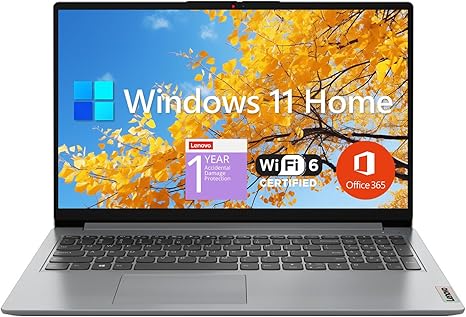
Welcome to Reviews Inside TV! Today, we’re taking a close look at the Lenovo IdeaPad 1, a budget-friendly student laptop that promises solid performance for everyday tasks without breaking the bank. Packed with a 15.6-inch Full HD display and a 12GB RAM setup, it’s designed to handle the basics like web browsing, document editing, and streaming. But, how well does it really perform in the real world? Let’s dive in.
First, let’s run through the specs to give you a clear picture of what this laptop brings to the table. Under the hood, it’s powered by an Intel Celeron N4500 processor, which offers dual cores and a base clock of 1.1 GHz, boosting up to 2.8 GHz when needed. Now, this processor is far from high-end, but it’s not meant to be. The Celeron N4500 is designed for light tasks like word processing, web browsing, and handling video calls. If you’re planning to run heavy applications or game on this machine, you might hit its limits pretty quickly. But for students or anyone who needs a basic, reliable system for day-to-day computing, it should be more than enough.
In terms of memory, the Lenovo IdeaPad 1 comes with 12GB of high-bandwidth RAM, which is more than sufficient for smooth multitasking. You’ll be able to run multiple browser tabs, keep a few apps open, and switch between tasks without lag. When combined with the 512GB PCIe NVMe M.2 SSD, you’ll get fast boot times and speedy file transfers, which significantly enhance the overall experience. Plus, there’s a 128GB eMMC storage drive, adding some extra space for documents or light media storage. While not as fast as the SSD, the eMMC storage is still a decent addition at this price point.
Let’s talk about the display: it’s a 15.6-inch Full HD panel, which is standard at this price. It has a resolution of 1920 x 1080 pixels, offering crisp images and clear text. The 250 nits of brightness might not be ideal for outdoor use under direct sunlight, but it should be more than enough for indoor use, whether you’re studying, watching videos, or browsing the web. The anti-glare IPS-level display helps with viewing angles, so you can work comfortably from different positions.
On the connectivity side, the IdeaPad 1 has a decent selection of ports. There’s a USB-C 3.2 port for data transfer, a USB 3.2 port for faster devices, and a legacy USB 2.0 port for older peripherals. You also get an HDMI 1.4b port for external displays and a headphone/microphone combo jack. The inclusion of Wi-Fi 6 is a nice touch, giving you faster internet speeds and more reliable connections, especially if you’re in a crowded network environment. Bluetooth is also included for connecting wireless peripherals like headphones or a mouse. For those who still need physical storage options, there’s a card reader too, which is great for quickly transferring files from a camera or other devices.
Now, moving on to real-world performance. If you’re using the Lenovo IdeaPad 1 for general office tasks—web browsing, working with documents, spreadsheets, or video calls—this laptop does just fine. The Celeron N4500 processor won’t win any speed races, but it handles these tasks without much issue. You can open multiple tabs in your browser, type out reports, and join Zoom calls without noticeable lag. However, don’t expect smooth performance with more demanding applications, like video editing or running virtual machines. It’s simply not built for that.
For media consumption, the IdeaPad 1 does an acceptable job. The Full HD screen is decent for streaming videos, and the integrated speakers provide passable sound for casual viewing. It’s not going to blow you away with booming audio, but it’s good enough for watching movies or YouTube. If you’re an audiophile, you’ll want to use headphones or external speakers.
Now, when it comes to thermals and noise, the Lenovo IdeaPad 1 is a quiet performer. It’s not a powerhouse, so the fan rarely kicks in unless you’re doing something more intensive, like a prolonged video call or a large file transfer. Under light usage, the laptop stays cool, and there’s little to no fan noise. It’s ideal for a quiet workspace, especially for students or anyone working in a library or café.
Battery life is another area where the IdeaPad 1 shines. With a 38Wh battery, you can expect around 6 to 8 hours of use with normal workloads like web browsing, working on documents, or streaming videos. It’s not going to last all day under heavy use, but for typical student tasks, it’s a solid performer. The laptop charges relatively quickly, and the included charger isn’t bulky, making it easy to carry around for long days on campus or at work.
On the topic of the keyboard and trackpad, Lenovo’s made sure this laptop is comfortable for extended typing sessions. The key travel is decent for a budget laptop, and the feedback is light but responsive. It’s not the most luxurious typing experience, but it’s certainly functional. The trackpad is smooth and accurate, and palm rejection works well, even during longer use.
When it comes to portability, the Lenovo IdeaPad 1 is fairly lightweight, weighing in at around 1.6 kg (3.5 pounds). It’s not the lightest laptop around, but it’s manageable for daily commutes or carrying around campus. At 19.9mm thickness, it’s slim enough to fit in most bags without taking up too much space.
In terms of value, the Lenovo IdeaPad 1 offers a lot for its price. While it’s not the most powerful laptop out there, it provides solid performance for the essentials—productivity tasks, media consumption, and light use. If you’re looking for a laptop for school, work, or general use, it’s hard to beat the performance and features at this price point. The inclusion of Windows 11 Home is another nice touch, offering a fresh interface and updated features that make the overall experience feel modern.
If you’re considering alternatives, laptops like the HP Stream 14 or the Acer Aspire 5 might be worth checking out. They offer similar specs and price points, but the Lenovo stands out with its large display and solid build. The HP Stream, for instance, has a smaller display and less RAM, while the Acer Aspire 5 comes with more powerful CPUs at a slightly higher price.
So, who’s this laptop for? The Lenovo IdeaPad 1 is ideal for students, casual users, or anyone who needs a reliable, budget-friendly laptop for everyday tasks. It’s not the right choice for heavy workloads like gaming, video editing, or 3D modeling, but for light productivity, web browsing, and media consumption, it hits the mark. If you’re after a laptop that balances performance with portability and price, this one is definitely worth considering.
Thanks for watching! Be sure to check out the link in the comments box to grab the Lenovo IdeaPad 1 for yourself. If you already own this laptop, let us know in the comments how it’s working for you! Don’t forget to like, subscribe, and hit that bell icon for more reviews on Reviews Inside TV. Until next time, happy computing!
Available to buy here:


