
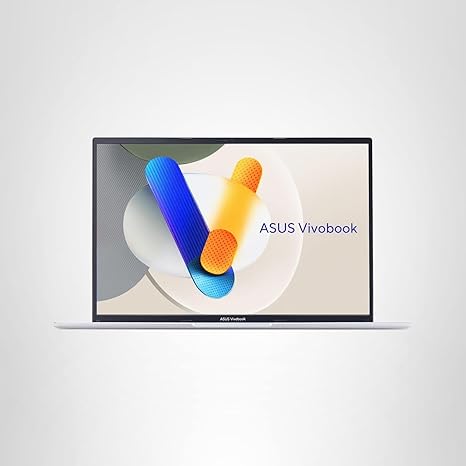

Available to buy here:
Welcome to “Reviews inside tv,” where we take an in-depth look at the latest tech products. Today, we’re reviewing the ASUS Vivobook 16, a laptop designed to offer a balance of performance, display quality, and portability, all wrapped up in a sleek and stylish package. But does it live up to the hype? Let’s find out.
The ASUS Vivobook 16 is a laptop that targets users looking for a capable everyday device without breaking the bank. With a 16-inch WUXGA display, an Intel Core i5-13420H processor, and 16GB of RAM, it promises to handle everything from work to light gaming with ease. But before we dive into the specifics, let’s look at the specs to see what this laptop brings to the table.
At the heart of the Vivobook 16, we’ve got an Intel Core i5-13420H processor, a 12-core CPU that’s part of Intel’s 13th-generation lineup. This chip is built to handle everything from web browsing and productivity tasks to light gaming and content creation. It strikes a good balance between power and efficiency, and with its boost speeds up to 4.6 GHz, it should be able to manage multiple apps running simultaneously without significant lag.
Paired with the i5 processor is Intel’s Iris Xᵉ integrated graphics. While this isn’t going to run the latest AAA games at high settings, it should be more than enough for day-to-day tasks, video streaming, photo editing, and even some light gaming. If you’re looking to play more demanding titles, don’t expect smooth gameplay on high settings, but it’ll handle older games and less graphically demanding ones just fine.
The Vivobook 16 comes with 16GB of RAM, which is a sweet spot for most users, especially those who multitask. Whether you’re working in multiple tabs, running productivity software, or editing light photos and videos, 16GB will ensure you don’t hit performance bottlenecks. The 512GB PCIe 4.0 SSD offers fast storage, ensuring that boot times are quick and file transfers are speedy. Having that extra storage space will be beneficial if you’re working with larger files or want to store a decent amount of media.
The 16-inch WUXGA display on this model offers a 1920×1200 resolution with a 16:10 aspect ratio, giving you extra vertical space compared to the typical 16:9 screens you usually see in this price range. The 300 nits of sustained brightness is adequate for most indoor environments, though it may struggle a bit in direct sunlight. The color accuracy is decent for casual users, but if you’re a professional content creator who relies on true-to-life colors, you may want to look for a more color-accurate display, such as one with higher sRGB or DCI-P3 coverage.
Now, let’s talk about real-world usage. For office work and productivity, this laptop shines. Opening multiple browser tabs, working in Microsoft Office, and attending video calls is a breeze, thanks to the ample 16GB of RAM and the solid performance of the Intel Core i5 processor. I didn’t notice any major slowdowns even with several programs running at once, which is exactly what you want in a work laptop. Wi-Fi 5 and Bluetooth 5.1 ensure you’ll have stable connections to the internet and your peripherals, though keep in mind that Wi-Fi 6 would be a nice upgrade if you’re in an area with a Wi-Fi 6 network.
For media consumption, the Vivobook 16 holds its own. Streaming movies or shows looks good on the WUXGA display, and while the speakers aren’t going to blow you away, they’re perfectly fine for casual media use. If you’re someone who enjoys immersive audio, you might want to pair this with external speakers or headphones.
When it comes to content creation, the Vivobook 16 is solid but not spectacular. Photo and video editing are feasible thanks to the 16GB of RAM and the decent performance of the Core i5. However, exporting large files or working with high-resolution footage could be a bit slow, especially since the Iris Xᵉ graphics won’t be able to leverage GPU acceleration in most creative apps.
As for gaming, this laptop isn’t going to be a powerhouse. While it can handle some older games or light indie titles, more demanding AAA games like Cyberpunk 2077 or Call of Duty: Warzone won’t run smoothly on high settings. Expect to play these games at lower settings or resolutions if you want an acceptable frame rate.
In terms of thermals and noise, the Vivobook 16 does a good job under light workloads. The fans are generally quiet during regular use, but they can get a bit louder under heavier loads like gaming or video editing. The chassis stays relatively cool in the areas where you’d rest your hands, but the underside can get warm during intensive tasks. It’s not a dealbreaker, but something to be aware of if you plan to use it on your lap for extended periods.
Battery life is decent, with up to 8 hours of use on a single charge, depending on your tasks. I found that for lighter tasks like browsing and word processing, it lasted pretty close to the 8-hour mark. However, if you’re doing more power-intensive activities like video editing or gaming, expect that to drop significantly. Charging is pretty quick with FastCharge, topping up the battery to 50% in just under 40 minutes and fully charging in around 1 hour and 20 minutes.
The keyboard is comfortable for typing, with good key travel and decent feedback, making it a good choice for longer typing sessions. The full-sized layout, complete with a numeric keypad, is practical, especially if you work with numbers regularly. The trackpad is smooth and responsive, with accurate palm rejection, though it’s slightly smaller than some high-end models. Still, for day-to-day use, it’s more than adequate.
In terms of ports and connectivity, the Vivobook 16 has a solid selection. You get USB-A ports, USB-C for faster data transfer, an HDMI port for external displays, and an SD card reader, which is a nice touch for creators who need to transfer files from cameras. The laptop also supports Wi-Fi 5 and Bluetooth 5.1, ensuring you have reliable connections for all your devices. However, it lacks Thunderbolt support, which would have been great for future-proofing and faster data transfers with compatible devices.
When it comes to build quality, the Vivobook 16 is made of plastic but still feels solid and durable. It’s a bit bulky compared to some ultraportables, but it’s still light enough to carry around in a bag without much hassle. It’s not the most premium-feeling laptop on the market, but it’s built to last and holds up well against the MIL-STD 810H military standard tests, including temperature, shock, and vibration tests.
So, who is this laptop for? If you’re a student, an office worker, or a casual user who needs a solid, affordable laptop for everyday tasks, the ASUS Vivobook 16 is a great option. It offers a large screen, solid performance, and decent battery life at a competitive price. However, if you’re a gamer or content creator looking for higher-end graphics performance or color accuracy, you might want to look elsewhere.
The price is fairly reasonable for what you get. It offers good value for the money, but if you’re willing to spend a bit more, you could get a laptop with better graphics and a more color-accurate display. Still, for the price, the Vivobook 16 is a reliable, versatile option for everyday use.
Before you go, don’t forget to like, subscribe, and hit the bell icon so you don’t miss any future reviews. The link to grab the ASUS Vivobook 16 is in the comments box. If you have any questions or you already own this laptop, feel free to drop a comment below and share your thoughts. Thanks for watching, and we’ll see you next time on “Reviews inside tv!”
Available to buy here:


