

Available to buy here:
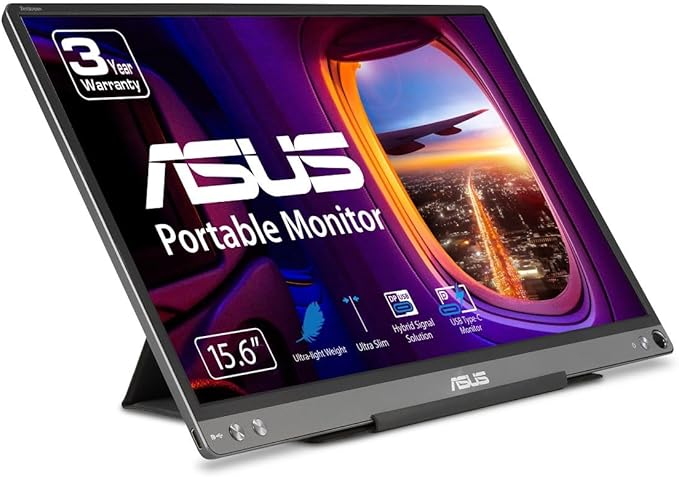
Today, we’re looking at the ASUS ZenScreen 15.6” 1080P Portable USB Monitor, model MB16ACE. This portable display is designed with productivity and convenience in mind, offering a sleek, compact solution for those who need extra screen real estate on the go. Whether you’re a professional on business trips or a student needing a second screen for multitasking, the ZenScreen promises a lot with its slim profile and versatile features.
This 15.6-inch Full HD display boasts a resolution of 1920 x 1080, making it ideal for working on spreadsheets, presentations, or even catching up on your favorite shows during a break. The IPS panel ensures good color accuracy and wide viewing angles, so you can work or watch from almost any angle without losing image quality. The anti-glare surface is a standout feature, especially in bright environments, making it easier on the eyes during those long hours of work or study.
One of the key selling points of this monitor is its ultra-slim, lightweight design, which makes it a breeze to carry around. It’s barely thicker than most smartphones, so slipping it into your bag next to your laptop isn’t going to add much weight or bulk. For someone constantly moving between meetings or needing extra screen space for client calls, this portability is a big plus.
Now, let’s talk about its hybrid-signal solution. This is a neat bit of tech that allows the ZenScreen to transmit both power and video through a single cable. It uses a USB Type-C connection for power and video, but it also comes with a USB Type-A adapter for wider compatibility. This is a huge convenience for those who might have a laptop or device without a Type-C port. You can plug it into almost any modern laptop, making it a versatile addition to your setup without needing to worry about cables and compatibility issues.
The display features auto-rotation, which means it can sense its orientation and automatically adjust between landscape and portrait modes. This is an excellent feature for anyone who likes to work with documents in portrait view or needs to rotate the screen quickly for presentations. The ability to adjust to your needs on the fly helps streamline your workflow and adds flexibility to your work setup.
The foldable lite smart case is another nice touch, not just for protection during travel, but also for function. It doubles as a stand, letting you prop the monitor up in both portrait and landscape modes. Whether you’re on a cramped desk or a coffee shop table, it’s easy to set up your workspace and get to work. Plus, it keeps the display protected when it’s not in use.
In terms of extra perks, you get a 3-month subscription to Adobe Creative Cloud with your purchase, which is a nice bonus if you’re someone who works in creative fields and already uses Adobe tools. It’s a limited offer, but it adds real value if you’re looking to dive deeper into creative projects on the go.
When it comes to performance, the ZenScreen delivers what you’d expect from a portable monitor. While it won’t replace your primary 4K display for intensive work, it provides ample screen space for day-to-day tasks like web browsing, document editing, and streaming. The screen’s 60Hz refresh rate is standard for portable monitors, so it’s not geared toward gaming or anything with high-motion content, but it works well for static and moderately dynamic tasks.
Battery life is pretty good, considering it’s powered via USB. It doesn’t have a large internal battery, but it’s designed to draw power from your laptop, so you’ll need to keep an eye on your laptop’s battery when using it for extended periods. For light use, it should be fine, but for more demanding tasks, you may need to keep your laptop plugged in.
One thing to keep in mind is that while the monitor’s ultra-slim design is great for portability, it does mean that the screen lacks some of the premium features of higher-end displays. It’s not the brightest or most color-accurate monitor out there, but it strikes a solid balance between performance and portability, making it ideal for people who just need a second screen for general work or media consumption.
In terms of connectivity, the inclusion of both USB-C and USB-A adapters ensures you won’t be left stranded without the right cable. You can plug it into a variety of devices, from ultrabooks to older laptops, and even smartphones that support USB-C display output. It’s a convenient all-in-one solution that eliminates the need for multiple cables or dongles.
Looking at the overall design, the ASUS ZenScreen is impressively lightweight and slim. It doesn’t feel flimsy, but it also doesn’t have the heavy, industrial build of larger desktop monitors. For the price and what it offers, it feels solid, and the smart case is a clever, functional addition that elevates the product’s value.
In terms of downsides, the lack of any significant brightness or color accuracy adjustments could be an issue if you’re doing color-sensitive work like photo editing. However, for everyday productivity, media consumption, and casual use, this isn’t a dealbreaker.
The ZenScreen is a solid, budget-friendly portable monitor that delivers good value for anyone who needs an extra screen for work or entertainment. Its portability, ease of setup, and wide compatibility make it an excellent choice for frequent travelers, students, or professionals who need to expand their screen space without carrying around a bulky device.
If you’re considering adding a second monitor to your laptop setup, but you don’t want to break the bank or sacrifice portability, the ASUS ZenScreen is definitely worth considering. Its sleek design, ease of use, and solid performance make it a practical choice for those who need extra screen space but don’t want to carry an extra piece of equipment that’s heavy or cumbersome.
And with that, thank you for tuning into this review. If you’ve used the ASUS ZenScreen or are thinking about picking one up, let us know your thoughts or questions in the comments below. Don’t forget to like, subscribe, and hit that bell icon for more reviews like this. Catch you in the next one, and happy screen expanding!
Available to buy here:


