

Available to buy here:
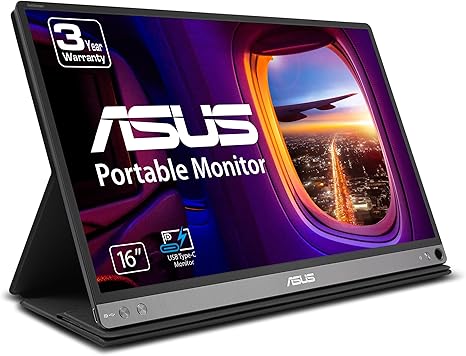
The ASUS ZenScreen 15.6” Portable USB Monitor is designed to be a lightweight and versatile companion for those who need an extra screen on the go. Whether you’re a student, office worker, or content creator, its ultra-portable size and impressive display quality make it a tempting choice. At just 1.7 pounds and 0.3 inches thick, it’s easy to carry around and set up almost anywhere. With a Full HD resolution of 1920 x 1080 on a 15.6-inch IPS display, the ZenScreen promises sharp images and vibrant colors, ideal for work and media consumption.
One of the standout features of the ZenScreen is its hybrid signal solution, which works with both USB Type-C and Type-A connections. This flexibility makes it easy to connect to a wide variety of devices, although if you’re using a Type-A connection, you’ll need to install the DisplayLink driver. For most users, the USB Type-C option is the way to go for simple plug-and-play functionality, which is great for modern laptops and tablets. The intuitive ASUS DisplayWidget software makes adjusting display settings easy, allowing you to toggle between landscape and portrait orientations with just a few clicks. The smart case included is not just protective but doubles as a stand, offering multiple viewing angles, and there’s even a hole for a pen, which can be useful if you’re working in portrait mode.
When it comes to eye comfort, ASUS has equipped the ZenScreen with Eye Care technology, including a TUV Rheinland-certified flicker-free backlight and a blue light filter. These features help reduce eye strain during prolonged use, making it a good choice for those long work or study sessions. The display’s IPS panel ensures that color accuracy and viewing angles are up to par, delivering consistent visuals no matter your position.
In terms of real-world performance, the ZenScreen does exactly what it’s supposed to do – it adds a secondary display that’s easy to carry and set up. It’s perfect for those who frequently find themselves working in coffee shops, on airplanes, or in cramped spaces where having more screen real estate can improve productivity. Whether you’re working on spreadsheets, writing documents, or browsing the web with multiple tabs open, this monitor provides the extra screen real estate that can make a big difference.
For content creators, especially those working with design software, the color accuracy and display quality of the ZenScreen hold up well for basic editing tasks, but for more professional photo and video work, you might want to consider a more dedicated, color-accurate display. However, for most casual creators, this portable monitor will suffice, especially given its compact form factor and portability.
Where the ZenScreen excels is in portability. It’s slim and lightweight, which makes it incredibly easy to pack in a bag or even carry in a larger laptop sleeve. The display itself is bright enough for indoor use and handles typical office tasks and media consumption with ease. However, if you plan to use it outdoors or in direct sunlight, you may find the brightness a bit lacking.
As for the battery life, it draws power directly from the connected device, so you won’t have to worry about charging it separately. This is a huge convenience for anyone who’s constantly on the go, but it does mean that it will eat into your device’s battery. That said, with the low power consumption of this monitor, it won’t have a massive impact unless you’re already working with a low battery on your laptop.
Now, onto the build quality: the ZenScreen feels solid for its size, with a sleek, modern design that fits right in with ASUS’ other laptop products. The smart case is well-designed, offering both protection and functionality without adding bulk. It provides adequate stability when in use and keeps the monitor protected when not in use, which is something often overlooked in portable monitors.
As for downsides, the main limitation of the ZenScreen is its reliance on software for full functionality, particularly with the DisplayLink driver required for Type-A connections. For some, this may add an extra step, and it might be inconvenient if you’re frequently switching between devices that don’t support USB Type-C. Additionally, while the display is solid, its brightness and color accuracy may not meet the demands of professional designers or video editors who need the most precise image quality.
When it comes to the value for money, the ASUS ZenScreen offers a great deal of functionality and portability for a reasonable price, especially with the bonus of a 3-month Adobe Creative Cloud subscription. For those in need of a secondary screen for everyday tasks, media consumption, or light content creation, this portable monitor is a solid choice.
If you’re looking at alternatives, there are similar portable monitors like the Lenovo ThinkVision M14 or the AOC I1659FWUX, but the ZenScreen has the edge when it comes to build quality and display features, especially with its inclusion of Eye Care technology.
To wrap things up, the ASUS ZenScreen 15.6” Portable USB Monitor is an excellent choice for anyone looking to add a portable, easy-to-use secondary display to their setup. It’s lightweight, compact, and packed with useful features for everyday work, casual media consumption, and light creative tasks. While it’s not the brightest or most color-accurate screen out there, it hits the sweet spot for most users who need portability and convenience.
Thanks for watching! If you’re considering this monitor, check the link in the comments box for more details. Let me know your thoughts, or if you already own one, share your experience with us! Until next time, keep working smart and enjoying your tech.
Available to buy here:


