
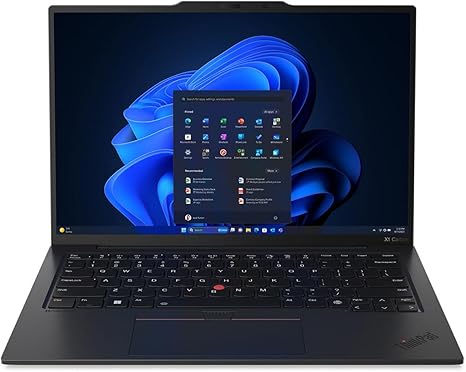

Available to buy here:
Welcome to Reviews inside tv! Today, we’re taking a look at the Lenovo ThinkPad X1 Carbon Gen 12, a powerful, ultra-portable laptop that’s built to cater to professionals, creators, and anyone who needs top-notch performance in a sleek, lightweight package. This laptop is aimed at those who prioritize productivity, security, and quality, all wrapped up in a premium design. But does it live up to the hype? Let’s find out.
At the heart of the Lenovo ThinkPad X1 Carbon Gen 12 is the Intel Core Ultra 7 155U, part of Intel’s latest Evo platform. This chip brings impressive multi-core performance to handle everything from day-to-day tasks like browsing and email to more demanding applications such as light video editing or coding. With 32 GB of RAM, this machine can easily handle multitasking—whether you’re running multiple apps or working with large files, you won’t see any slowdowns. And with 512 GB of SSD storage, there’s more than enough room for your documents, photos, and even a few movies for on-the-go entertainment. Speaking of entertainment, the 14″ WUXGA touchscreen display (1920 x 1200 resolution) offers sharp visuals that are perfect for movie watching, video calls, or even detailed spreadsheets. While it may not be as high-res as a 4K screen, this display still provides vibrant colors and decent brightness, making it ideal for most everyday users.
When it comes to real-world usage, the Lenovo ThinkPad X1 Carbon Gen 12 shines. For office productivity, it’s a dream—whether you’re juggling numerous browser tabs, working on documents, or hosting video calls, everything runs smoothly. The performance is noticeably snappy, thanks to the Intel Core Ultra processor and 32 GB of RAM. For content creators, the higher RAM capacity means you can tackle larger projects, such as editing 1080p video or photo manipulation, with relative ease. While this laptop might not be the first choice for 4K video work or hardcore gaming, it’s more than capable for lighter creative tasks. And when it comes to media consumption, the display performs well, with enough sharpness for streaming movies or shows.
Now, how does it handle gaming? Well, gaming on the ThinkPad X1 Carbon Gen 12 isn’t really its forte—don’t expect to run the latest AAA games at high settings. It’s not equipped with a dedicated GPU, but with integrated graphics, it can handle casual gaming or older titles at lower settings. For instance, you can play games like “Stardew Valley” or “Minecraft” with ease, but for graphically intense games like “Cyberpunk 2077” or “Call of Duty: Warzone,” you’ll need to lower the settings significantly. In terms of FPS, if you’re using it for non-gaming purposes, you’ll enjoy a solid performance experience for most day-to-day tasks without worrying about heating or fan noise.
Speaking of heating, the thermal performance of this ThinkPad is excellent. The fan rarely kicks in, and when it does, it’s not obnoxiously loud. This makes it an ideal laptop for working on long projects or presentations without the distraction of a noisy fan. The keyboard feels solid with a good amount of key travel and feedback, making long typing sessions comfortable. The trackpad is responsive, and the touchscreen, while not a must for everyone, adds an extra layer of flexibility, especially for those who like to tap, swipe, or draw.
Battery life on the Lenovo ThinkPad X1 Carbon Gen 12 is impressive, even with the power of the Core Ultra processor and 32 GB of RAM. Under light office tasks, you’ll easily get between 8 to 10 hours of use, depending on how demanding your work is. If you’re watching videos or streaming content, you can expect the battery to last a bit longer. The 65W charging speed is quite fast too, meaning you can get a substantial charge in just 30 minutes—perfect for those quick pit stops during meetings or travel.
In terms of build quality, the X1 Carbon Gen 12 is rock-solid. Lenovo continues to impress with the design of the ThinkPad series, which combines carbon fiber and magnesium alloy, making this laptop both durable and incredibly lightweight. At just 2.49 pounds (1.13 kg), it’s easy to carry around all day, whether you’re commuting, heading to a meeting, or working from a café. The chassis feels premium, and the screen doesn’t wobble much during use. The hinge holds up well, allowing you to adjust the screen with one hand, which is a nice touch for a business laptop.
When it comes to ports, the X1 Carbon offers a decent selection for its size. You’ll find two Thunderbolt 4 USB-C ports, two USB-A ports, HDMI 2.0, and a headphone jack. For business users, it’s great to see the HDMI port included, so you won’t need to worry about adapters during presentations. The Wi-Fi 6E support and Bluetooth 5.2 ensure that your connections are fast and stable, especially important if you’re working remotely or in a co-working space. However, one potential downside is the lack of an SD card slot, which might be a dealbreaker for photographers or videographers who need quick, easy file transfers.
So, what are the pros and cons of the Lenovo ThinkPad X1 Carbon Gen 12? On the positive side, this laptop is lightweight, powerful, and offers impressive battery life for the business professional or creator on the go. The display is more than sufficient for most work and media tasks, and the overall build quality is top-notch. On the downside, it’s not built for heavy gaming or high-end creative workloads like 4K video editing. The lack of an SD card slot might also be an inconvenience for certain professionals. But for the majority of users, this is an exceptional, well-rounded laptop.
When it comes to value for money, the ThinkPad X1 Carbon Gen 12 sits at a premium price point. However, its performance, design, and battery life make it worth the investment if you’re looking for a lightweight, reliable workhorse. Compared to other laptops in the same range, such as the Dell XPS 13 or the HP Spectre x360, the X1 Carbon stands out with its superior build quality and enterprise-level security features, although the others might offer slightly better displays or graphics performance for creative users.
If you’re in the market for a business ultraportable or a reliable productivity laptop, the Lenovo ThinkPad X1 Carbon Gen 12 is an excellent choice. It’s fast, portable, and well-built, offering great value for professionals who need something that looks sharp and performs well under pressure. It might not be the best pick for gamers or heavy-duty creators, but for most other users, it delivers everything you need in a premium, durable package.
Thanks for watching! If you’re considering the Lenovo ThinkPad X1 Carbon Gen 12, you can find the link to grab one in the comments box below. If you already own one, share your experience with us in the comments. Don’t forget to like, subscribe, and hit the bell icon so you don’t miss out on future reviews. Catch you next time, and remember—reviews inside tv brings you the real deal!
Available to buy here:


