

Available to buy here:
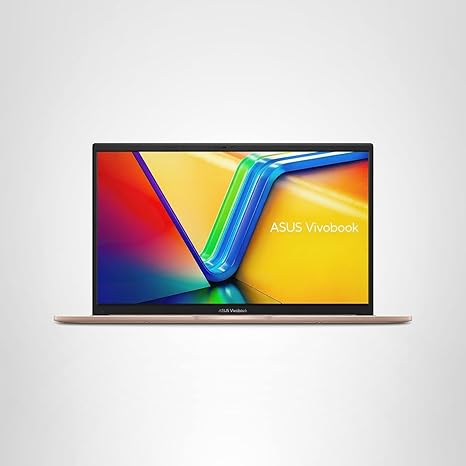
Welcome to “Reviews inside tv,” where today we’re taking a look at the ASUS Vivobook 15, a laptop that promises to tackle a variety of everyday tasks without breaking the bank. It combines a sleek design, decent performance, and some thoughtful features, but does it really hit the mark for casual users, students, and light creators? Let’s find out.
This model, the F1504VA-AB56-PK, comes with a 15.6-inch Full HD touch display, making it an appealing option for those who want a larger screen but don’t need the premium price tag of more high-end models. The resolution sits at a standard 1920 x 1080, with a 60Hz refresh rate that’s typical for this price range. The 250-nit brightness is fine for indoor use but might feel a little dim in direct sunlight. It’s certainly good for streaming movies, working on documents, or browsing the web. The touch functionality is smooth, but you won’t get that ultra-responsive feel of more premium devices. Still, for the budget-conscious user, it’s a decent display for day-to-day tasks.
Under the hood, the Vivobook 15 is powered by the Intel Core i5-1334U processor. It’s part of Intel’s latest 13th-gen series, which means it’s designed for efficient performance across regular tasks like web browsing, word processing, and even some light creative work. The 10nm architecture helps keep things cool while delivering solid performance, but don’t expect it to handle intensive gaming or heavy video editing with ease. For multitasking—like having multiple tabs open while working on spreadsheets or hopping between video calls and emails—it performs admirably.
Graphics are handled by Intel’s integrated Iris Xe GPU. While it’s not going to let you play the latest AAA titles at high settings, it’s more than capable of handling casual gaming or light creative workloads like photo editing or video streaming. If you’re into more demanding games or content creation, you’ll want to look elsewhere, but for the average user, the Iris Xe will get the job done.
The 16GB of RAM and 512GB SSD storage are a big win here. With 16GB, multitasking is practically seamless. You won’t experience noticeable slowdowns even with several programs running in the background. The 512GB SSD storage provides plenty of space for most users, with the added bonus of speedier load times for applications and files compared to traditional hard drives. The SSD also contributes to faster boot times and overall snappier performance, which is a big plus for anyone who’s tired of waiting around for programs to load.
For connectivity, you get Wi-Fi 6E and Bluetooth 5.3. That means faster, more reliable wireless connections, whether you’re working from home or streaming media from your favorite service. It also helps keep you ready for future devices, thanks to the newer Bluetooth standard.
Battery life on this one is rated for up to 8 hours, which is pretty good for a budget laptop. Keep in mind, real-world usage might be a bit lower depending on what you’re doing. Light office work or web browsing will likely get you through a full workday, but gaming or streaming will definitely eat up that battery quicker. The FastCharge feature is a nice touch, allowing you to get a full charge in just over an hour. It’s not the fastest we’ve seen, but it’s definitely convenient for those on the go.
Let’s talk about the keyboard. ASUS has equipped this laptop with its ErgoSense keyboard, which is quiet and comfortable to type on for extended periods. The key travel is decent, and the addition of a numeric keypad is useful for those who do a lot of number crunching. The trackpad, while not the largest, is accurate and responsive, with good palm rejection, which should help avoid accidental clicks while typing. Overall, the input experience is solid, but nothing groundbreaking. It gets the job done.
Now, let’s move on to the thermals and noise. The Vivobook 15 stays relatively cool under normal workloads like typing or browsing the web. However, when you start pushing the processor with heavier tasks, like media editing or running multiple programs, you’ll notice the fans ramping up. Fan noise isn’t intrusive during light use, but it becomes noticeable under load, which might be distracting if you’re working in a quiet space. The laptop doesn’t get uncomfortably hot, but the keyboard deck and underside can get warm, especially if you’re gaming or doing heavy content creation for extended periods.
When it comes to ports and connectivity, the Vivobook 15 has a good selection for its category. You’ll find USB-A and USB-C ports, an HDMI port for external displays, and a microSD card reader. It’s a solid setup for those who want to connect external devices or monitors, but it’s lacking in some areas, like Thunderbolt support or an Ethernet port, which could have been handy for those with more demanding networking needs. Still, for the price, it’s a decent array of options.
The build quality is standard for the price range—lightweight and functional but not particularly premium. The chassis is made from plastic, so you won’t get the rigidity or premium feel of a metal body, but it’s still sturdy enough for everyday use. At just over 3.5 pounds, it’s reasonably portable, and you won’t mind carrying it in a backpack or bag for most of the day.
In terms of value, the ASUS Vivobook 15 provides solid performance for the price. It’s not a powerhouse by any means, but it handles typical daily tasks and casual creative workloads well. The combination of a decent display, solid performance, and long battery life makes it an excellent option for students, office workers, or anyone who just needs a reliable laptop for everyday tasks. If you’re a gamer or professional creator, this might not be the best fit, but for those on a budget, it offers a well-rounded experience.
For competitors, the Acer Aspire 5 is a similar option, often coming in at a comparable price point. The Acer offers a similar performance level, but the display quality and battery life may vary, so it’s worth considering based on your specific needs.
To wrap it up, the ASUS Vivobook 15 is a solid choice for casual users, students, and professionals looking for a budget-friendly laptop. It doesn’t excel in any one area but offers a good balance of performance, battery life, and build quality. If you need a laptop for web browsing, office work, or light media consumption, it’s a great option. If you’re looking for something that can handle heavy gaming or content creation, though, you’ll want to look for something with a more powerful GPU.
Thanks for watching, and don’t forget to like, subscribe, and hit the bell icon for more reviews like this one. If you’re interested in the ASUS Vivobook 15, check the comments below for the link. Have any questions, or already own one? Let us know your thoughts in the comments—we’d love to hear from you. See you next time!
Available to buy here:


