

Available to buy here:
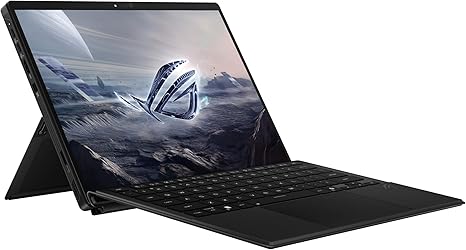
Welcome to “Reviews inside tv”! Today, we’re looking at the ASUS ROG Flow Z13, a sleek 13-inch 2-in-1 gaming laptop that’s got a lot to prove. With its powerful AMD Ryzen AI MAX+ 395 processor, RDNA 3.5 graphics, and an eye-catching 180Hz display, it’s clear that ASUS is aiming to offer top-tier performance in a portable package. But does it deliver, or is it all just hype? Let’s find out.
At the heart of the ASUS ROG Flow Z13 is the AMD Ryzen AI MAX+ 395 processor, featuring 16 cores and an impressive NPU power of up to 50 TOPS. This chip is designed to provide exceptional performance across a variety of tasks, from intense gaming to productivity and content creation. Coupled with RDNA 3.5 graphics, it promises to handle AAA games and demanding applications with ease. Now, the integration of 128GB LPDDR5X 8000MHz RAM is nothing short of impressive. This dynamic memory setup ensures that the CPU and GPU work together efficiently, offering smooth multitasking and enhanced performance in both gaming and creative workloads. Whether you’re editing high-resolution videos or gaming at high frame rates, the memory has your back.
The 1TB PCIe Gen 4 SSD is another highlight here, delivering incredibly fast read and write speeds. This results in snappy system performance, quick file transfers, and near-instant loading times for applications and games. You won’t be left waiting for long loading screens—whether you’re booting up or jumping into your next gaming session.
Now, let’s talk about the display, because this is where the ROG Flow Z13 really shines. The 13-inch ROG Nebula 2.5K touchscreen is a showstopper. With a 16:10 aspect ratio and 180Hz refresh rate, this screen offers buttery-smooth visuals, especially in fast-paced games or when multitasking. The PANTONE validation ensures that colors are accurate and vivid, which is fantastic for creators who rely on precise color reproduction. The 100% DCI-P3 coverage makes this an excellent option for photo and video editors, as it brings out rich, true-to-life colors.
But how does it perform in real-world scenarios? Let’s start with productivity. The ASUS ROG Flow Z13 is built for multitaskers. Web browsing with a dozen tabs open, working in multiple documents, or jumping between video calls is no issue. The large touchpad adds to the experience, offering smooth, responsive navigation, and the keyboard, while compact, is comfortable for typing out long documents or emails. It’s the perfect companion for students, office workers, or anyone who needs a portable powerhouse for day-to-day tasks.
When it comes to media consumption, the ROG Flow Z13 excels. Streaming 4K video looks fantastic, with deep blacks and vibrant colors. The audio isn’t left behind either—while not the loudest, the speakers do a solid job of delivering clear sound with good balance.
As for gaming, the 180Hz refresh rate and RDNA 3.5 graphics work together to deliver fluid performance. You can comfortably play demanding titles like Cyberpunk 2077, Call of Duty: Warzone, and Alan Wake 2. For example, at 1080p, you should see frame rates easily hitting the 120 FPS mark, with lower settings possibly even pushing it above 150 FPS. However, the 2.5K resolution does limit your ability to hit max settings in some of the most graphically intense titles, especially at ultra settings. In terms of thermal performance, the laptop does a commendable job of staying cool under load. ASUS has integrated a lightweight stainless steel vapor chamber that dissipates heat efficiently, and liquid metal helps keep the CPU temperature in check. The result is quiet performance even under load, with the fans only becoming noticeable during extended gaming sessions.
Battery life is another area where the ROG Flow Z13 manages to impress. With up to 10 hours of battery life, it can handle a full day of light office work, media streaming, or general use without needing a recharge. Of course, gaming will drain the battery faster, but that’s typical for high-performance laptops. Charging speeds are reasonable, and the charger is compact enough for easy travel.
The build quality of this laptop is top-tier, with a lightweight yet sturdy chassis that’s made of durable materials. The compact 13-inch form factor makes it highly portable, which is great for anyone who needs to take their laptop on the go. Whether you’re a gamer, creator, or professional, this laptop can easily fit into most bags without feeling too heavy.
The ports are pretty versatile as well. You get two USB 4.0 Type-C ports, HDMI 2.1, a micro-SIM card reader, and a dedicated ROG key for system functions. This ensures that you’re well-equipped for connecting to external monitors, docks, and other peripherals. Wi-Fi 7 ensures fast and reliable wireless performance, while Bluetooth makes it easy to connect all your accessories. The memory and storage are non-upgradable, so keep that in mind if you’re thinking about future-proofing.
In terms of real-world comfort, the keyboard layout is well-designed, but the smaller form factor does mean that the keys are more compact than some larger laptops. However, the key travel is comfortable, and you can type for hours without feeling fatigue. The trackpad is responsive and accurately registers input without any palm rejection issues.
Now, what about the competition? At this price point, the ASUS ROG Flow Z13 faces some stiff competition from other high-end gaming laptops and ultrabooks. The Microsoft Surface Laptop Studio and the Dell XPS 13 are two strong alternatives, but they don’t offer quite the same level of gaming performance or raw power that the Flow Z13 delivers. However, they do boast better battery life and more premium builds.
So, what are the pros and cons? The ROG Flow Z13 offers incredible performance, an exceptional display, and impressive portability for a 2-in-1. The cooling system is efficient, and the battery life is solid. However, its higher price point might be a hurdle for some, and it doesn’t hit the absolute maximum potential for 2.5K gaming at ultra settings. Additionally, the lack of upgradability in RAM and storage could be a concern for future-proofing.
Ultimately, if you’re someone who needs a versatile, portable powerhouse for gaming, content creation, or heavy multitasking, the ASUS ROG Flow Z13 is a compelling option. It may not be the best for those on a tight budget or looking for the absolute best performance in every area, but it strikes a solid balance of power, portability, and design.
Thanks for watching today’s review! If you’ve got questions or want to share your experience with the Flow Z13, leave a comment below. Don’t forget to hit that like button, subscribe, and ring the bell to stay updated with all our latest reviews. See you next time—happy gaming!
Available to buy here:


