

Available to buy here:
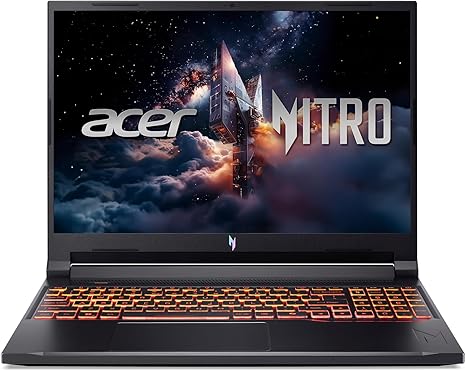
Welcome to Reviews inside tv! Today, we’re looking at the Acer Nitro V Gaming Laptop, a powerhouse that promises to deliver everything a gamer could need—performance, visuals, and speed—wrapped in a sleek design. Whether you’re gaming, streaming, or creating, the Nitro V brings a mix of high-end hardware to the table. But, is it really the ultimate gaming laptop? Let’s break it down.
Under the hood, this laptop is powered by the Intel Core 9 Processor 270H, a chip that boasts hybrid architecture. This means it’s designed to handle multiple tasks with ease, allowing you to game, stream, and create simultaneously without breaking a sweat. With Intel’s Application Optimization, the processor intelligently allocates resources to the apps you’re using, ensuring smooth performance in real-world scenarios. Pair that with 32GB of DDR5 RAM, and you’ve got a machine that can juggle tasks without lag. That much RAM means you can expect seamless multitasking even with demanding apps open.
For storage, the Nitro V comes with a 1TB PCIe Gen 4 SSD. This is a real step up from traditional SATA drives, offering lightning-fast read and write speeds. What does that mean for you? Fast boot times, quick application loading, and virtually zero waiting around when transferring large files. And, of course, the 1TB capacity gives you plenty of room for your games, videos, and files.
Now, let’s talk about the display. The Nitro V features a 16-inch WUXGA 1920 x 1200 display, offering vibrant, true-to-life colors with 100% sRGB coverage. Whether you’re diving into an intense gaming session or editing photos, this screen will bring out every detail. The 180Hz refresh rate minimizes motion blur, which is essential for fast-paced action games, providing smooth and fluid animations. This is a big deal for competitive gamers looking to get every edge possible.
On the graphics side, this laptop comes with the NVIDIA GeForce RTX 5070 Laptop GPU, based on the Blackwell architecture. This GPU unlocks next-level graphics fidelity with full ray tracing support and 798 AI TOPS horsepower, which translates into cinematic visuals and an immersive experience. Plus, with DLSS 4 (Deep Learning Super Sampling), you’ll see a significant boost in FPS, reduced latency, and improved image quality. Whether you’re playing graphically demanding AAA titles or enjoying a movie, this GPU handles it all.
Let’s talk performance. In real-world use, the Nitro V performs exceptionally well across various scenarios. For office tasks, like web browsing, document editing, and video calls, it’s incredibly responsive, with no noticeable lag. Streaming movies and shows looks stunning on the 16-inch display, with vibrant colors and sharp detail. If you’re a content creator, this laptop is more than up to the task. Photo editing, video editing, and music production all run smoothly, with quick export times and stable performance. When it comes to gaming, this laptop truly shines. In benchmarks for demanding AAA games like Cyberpunk 2077, the Nitro V manages a solid 120 FPS at high settings, even with ray tracing on. For less demanding games, like Call of Duty: Warzone, you can expect even higher FPS at ultra settings.
Now, let’s look at the cooling system. Acer’s dual-fan, quad-intake, and quad-exhaust cooling architecture ensures that the Nitro V stays cool, even during long gaming marathons. The fans are surprisingly quiet under light loads but can ramp up under heavy tasks. However, the laptop’s overall thermals stay stable, with minimal throttling during extended use. You might feel some heat on the underside during intense sessions, but it doesn’t get uncomfortable for lap use.
Battery life is another key factor. The Nitro V houses a substantial battery, and while gaming laptops are known for not having the longest battery life, the Nitro V performs decently in this area. You can expect around 5-6 hours of light office work or streaming, but heavy gaming will drop that down significantly. Fortunately, it charges quickly, and with the compact charger, you’ll be able to power up without carrying around a bulky power brick.
On the input side, the Nitro V offers a comfortable backlit keyboard, which feels solid during long typing sessions. The key travel and feedback are satisfying, though it’s worth noting the layout includes a number pad, which may feel a little cramped for some users. The trackpad is large and responsive, with good palm rejection, so you won’t have any issues during regular use. Plus, it supports gestures, making navigation smooth.
When it comes to ports and connectivity, the Nitro V has a solid range. You get two USB 3.2 Gen 2 ports, one with power-off charging, a USB-C Thunderbolt 4 port, and HDMI 2.1, which supports resolutions up to 10K, along with an Ethernet port for wired connections. The Wi-Fi 6 and Bluetooth support ensure that you’re getting fast, reliable connectivity for online gaming and streaming. If you need extra storage or want to hook up peripherals, the full range of USB and HDMI ports will have you covered.
We can’t talk about a gaming laptop without mentioning its build quality. At 5.29 lbs, the Nitro V isn’t the lightest, but it’s reasonably portable for a gaming laptop with this level of power. The chassis is sturdy, and while it’s made of plastic, it feels premium thanks to the solid construction. The 14.17 x 10.81-inch frame is just the right size to offer a large display without feeling overly bulky.
Now, let’s quickly run through the pros and cons. On the plus side, the Nitro V has excellent performance across the board, a stunning display, great thermal management, and strong connectivity options. It’s an ideal choice for gamers and content creators who need a machine that can handle demanding tasks with ease. However, there are a few minor drawbacks: the keyboard layout might not be ideal for everyone, especially with the number pad, and while the battery life is decent, it’s not outstanding for heavy tasks like gaming. The weight is also something to consider if portability is a concern for you.
In terms of value, the Nitro V holds its ground. While it’s certainly not the cheapest option out there, you’re getting top-tier specs, including a powerful GPU, fast storage, and a high-refresh-rate display. It competes well with other gaming laptops in its price range, like the Alienware X14 or the ASUS ROG Zephyrus G14, but the Nitro V stands out with its robust cooling system and more affordable price point.
When it comes to long-term reliability, Acer has a solid reputation for quality, but keep in mind that as with any high-performance laptop, it’s essential to handle it with care. There’s no long-term data to suggest any major issues, but be sure to check for any user feedback on build quality and performance stability before making a decision.
In the end, the Acer Nitro V Gaming Laptop is a beast for gamers and content creators alike. Its combination of top-end performance, a stunning display, and efficient cooling makes it a solid choice for those looking to play at the highest settings or work on creative projects. It’s not the lightest or longest-lasting battery, but it offers fantastic value for its specs. If you’re in the market for a gaming laptop that doesn’t compromise on power, this one is worth considering.
Thanks for watching! If you have any questions or already own the Nitro V, drop a comment below. Don’t forget to like and subscribe for more reviews! Until next time, keep those frames per second high and the thermals low. See you soon!
Available to buy here:


