

Available to buy here:
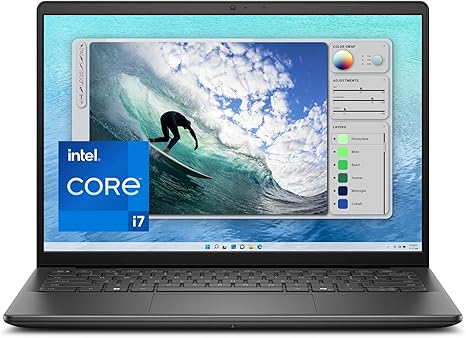
Welcome to “Reviews inside tv,” where we break down the latest in tech to help you make the smartest buying decisions. Today, we’re taking a close look at the Dell Inspiron 5440 Laptop, a 14-inch powerhouse designed to offer portability, productivity, and a great overall user experience. Whether you’re a student, a business professional, or someone who values a smooth, hassle-free computing experience, this laptop promises to deliver the essentials without the excess. But does it truly live up to the claims? Let’s find out.
The Dell Inspiron 5440 packs a 14-inch, 16:10 FHD+ display, offering a resolution of 1920 x 1200. That extra vertical real estate on the screen is an excellent perk for multitasking, making this laptop a great option for anyone who juggles multiple windows or tabs. Coupled with a feature called ComfortView Plus, it reduces harmful blue light without compromising on color accuracy. This makes it a solid choice for long hours of web browsing, reading, or video calls, as it helps keep your eyes comfortable while still providing sharp visuals. Now, when it comes to the hardware, the Inspiron 5440 is powered by an Intel Core i7-150U processor and backed up with 16GB of DDR5 RAM and a 1TB SSD. This combination ensures smooth performance for everyday tasks like word processing, email management, and light media consumption.
But, what does that mean for you in real-world use? Well, for those tackling office tasks, working with spreadsheets, or managing multiple browser tabs, the Inspiron 5440 should feel quite responsive. The 16GB of RAM allows for some serious multitasking without much of a lag, and the 1TB SSD means there’s plenty of room for files, apps, and media with fast read and write speeds that make boot-ups and file transfers snappy. For business users, this laptop includes built-in Trusted Platform Module (TPM) for data protection, which is a nice touch for security-conscious professionals.
When it comes to media, the Inspiron 5440 is geared up with Dolby Atmos spatial sound, which delivers a more immersive audio experience whether you’re watching a movie or attending a video call. The FHD camera further enhances your video quality, providing clear visuals with minimal noise, even in low-light conditions. That’s crucial for remote workers or anyone who often joins online meetings. And speaking of meetings, if privacy is important to you, this laptop has a mechanical privacy shutter for the camera, ensuring you have complete control over when you’re visible.
Now, let’s talk about gaming. While the Dell Inspiron 5440 isn’t a gaming laptop per se, it does come with integrated Intel graphics. This means you’re not going to be running the latest AAA titles on high settings, but you’ll still get decent performance for lighter games or casual gaming experiences. Titles like Fortnite or Minecraft should run just fine at medium settings. It’s important to understand that this machine isn’t built for heavy gaming, but for casual gaming or cloud-based services like Google Stadia or Xbox Cloud Gaming, it will perform adequately.
Thermals and noise are another key consideration. The Inspiron 5440 comes with adaptive thermal management that adjusts based on how you’re using it. Under light workloads like web browsing or office work, the laptop stays cool to the touch and doesn’t produce noticeable fan noise. However, when you push the laptop for tasks like streaming or handling larger file sizes, you might hear the fan spin up, but it doesn’t get overly loud, which is a good thing for those who need to focus in a quiet environment.
When it comes to portability, the Inspiron 5440 is quite light, weighing in at just over 3 pounds. That’s ideal for students or professionals who need to carry their laptop around all day without feeling burdened by the weight. Whether you’re heading to class, commuting, or just moving between meetings, this laptop won’t slow you down. The 14-inch display strikes a nice balance between screen real estate and portability, so you won’t have to sacrifice either one. Battery life is another solid point for this laptop. With its energy-efficient design and the 51Whr battery, you can expect around 8–10 hours of real-world use, depending on your workload. Light tasks like web browsing or working in Office apps will get you through a whole day without needing a charge, making it great for travel or long work sessions away from the outlet. And if you do need to plug it in, the charger is fairly compact and gets the job done in a reasonable amount of time.
Now, let’s take a closer look at the keyboard and trackpad. The keyboard is full-sized with a decent key travel and tactile feedback. It’s comfortable for long typing sessions, which is important for anyone who does a lot of typing throughout the day. The trackpad is responsive with good palm rejection, though it may not be the largest in its class. Still, it’s more than sufficient for everyday use. The laptop also includes a fingerprint reader for quick and secure login, which is a nice addition for convenience and security.
In terms of ports, the Inspiron 5440 has a good selection. You get two USB-A 3.2 ports, one USB-C port, an HDMI 1.4 output, a microSD card reader, and a headphone jack. It’s not overloaded with ports, but it covers the essentials. You also get Wi-Fi 6 for fast and reliable wireless connectivity, along with Bluetooth 5.1 for connecting peripherals like wireless headphones or a mouse. The fact that this laptop doesn’t have Thunderbolt is something to consider if you rely on high-speed external drives or need to connect multiple peripherals through a single port, but for most users, the available connectivity will be more than enough.
So, what about the competition? The Inspiron 5440 faces off against laptops like the Lenovo ThinkPad X1 Carbon and the HP Spectre x360 14. While those models are certainly more premium and come with additional features like higher-end displays or better performance for creative workloads, the Inspiron 5440 delivers solid value for the price, offering reliable performance, a great screen, and a decent range of features without pushing the budget too far.
As for build quality, the Inspiron 5440 uses a plastic chassis that feels solid without being too flimsy. While it might not have the premium feel of an aluminum body, it’s sturdy enough for everyday use and stands up well to the wear and tear of daily life. Dell has also passed this model through military-grade testing, which should give you some peace of mind when it comes to reliability and durability.
When it comes to customer support, Dell is known for offering strong service options, and with the 1-year Onsite Service, you can expect help coming to you should something go wrong. That’s a great perk, especially if you’re working in a business environment where downtime is a hassle.
Overall, the Dell Inspiron 5440 is a solid option for anyone looking for a laptop that balances performance, portability, and value. It excels in everyday tasks, from office work to media consumption, and offers a comfortable user experience with a bright, clear display, strong privacy features, and efficient thermals. While it’s not a powerhouse for gaming or creative tasks, it hits the sweet spot for general productivity, light media editing, and casual gaming. If you’re looking for a reliable, no-frills laptop that offers great performance for the price, this one is worth considering.
Thanks for watching! Be sure to like, subscribe, and hit the bell icon to stay updated on all our latest reviews. If you’ve already got the Dell Inspiron 5440 or have any questions, leave a comment below. The link to get yours is in the comments box. Until next time, take care, and remember—good tech doesn’t have to cost a fortune!
Available to buy here:


