

Available to buy here:
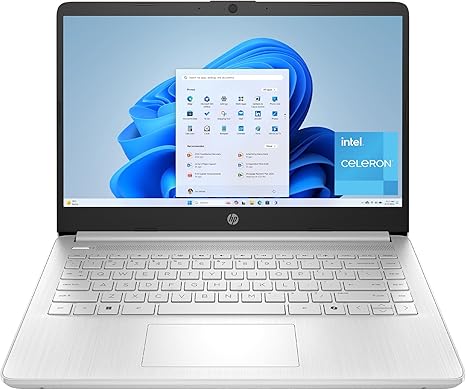
Welcome back to “Reviews inside tv,” where we bring you the latest and greatest in tech. Today, we’re checking out the HP 14-inch Laptop, a budget-friendly option that packs a few surprises for casual users, students, or anyone who needs an everyday laptop. The model we’re looking at is the HP 14-dq3550nr, featuring an Intel Celeron processor, 4GB of RAM, and 64GB of storage, along with a touch-enabled HD display. But does it really stack up in today’s competitive market? Let’s break it down.
First, let’s talk specs. At the heart of this HP laptop is the Intel Celeron N4500 processor, a dual-core CPU that runs at 1.1 GHz with burst speeds up to 2.8 GHz. This processor is designed for basic tasks like web browsing, document editing, and light multitasking. While it’s not going to handle heavy workloads or demanding applications like video editing or gaming, it’s sufficient for day-to-day tasks and productivity work. You’ll also find Intel UHD Graphics, which can handle light media streaming, casual gaming, and even a bit of 4K video content—just don’t expect high-end performance for gaming or graphic-heavy applications.
As for memory and storage, this laptop comes with 4GB of DDR4 RAM. Now, 4GB is on the lower side for modern computing, but it’s adequate for light multitasking—think a few browser tabs, office apps, and email. The 64GB eMMC storage, though, is where this laptop shows its budget nature. While it’s fast and energy-efficient for light use, you’ll quickly run out of space if you’re working with larger files or need to store lots of media. That said, eMMC storage does help with speed in day-to-day tasks like booting up and accessing files. If you’re willing to use cloud storage or external drives, it’s not a dealbreaker, but it does limit long-term storage flexibility.
Now, the 14-inch display is where this laptop shines a bit brighter. It’s an HD touchscreen with a micro-edge design, offering a virtually bezel-less experience. The screen looks clean and sharp for its size, perfect for streaming videos, browsing, or working on documents. While it’s not a 4K or OLED screen, the color accuracy and brightness levels are decent for casual use, and the touch functionality adds an extra layer of convenience for navigating Windows 11, especially with the intuitive multitouch gestures.
Speaking of Windows 11, this laptop comes with Windows 11 Home in S Mode, which means it’s locked to only run apps from the Microsoft Store, offering a more secure and streamlined experience. You can switch out of S Mode if you want to install apps outside the store, but for many users, this feature is beneficial for peace of mind and ease of use.
In terms of real-world performance, this laptop handles light office work well. Web browsing with a few tabs open, document editing, and video calls are all smooth. The 4GB of RAM might limit multitasking if you have too many applications running simultaneously, but for most users, it’s fine for simple tasks. If you’re a student, casual office worker, or someone who just needs a laptop for web surfing, email, and video streaming, this device will serve you well. However, for content creation or more intensive work like video editing or gaming, this is not the laptop you want.
On the topic of gaming, the Intel UHD Graphics are certainly capable of running some light games, but don’t expect to play anything too demanding. Titles like “Minecraft” or “Fortnite” on lower settings might run decently, but for anything more graphically intense, this laptop will struggle. It’s not a gaming laptop by any stretch of the imagination, but casual gamers looking for something to pass the time might find it sufficient for lower-end titles.
One of the standout features of the HP 14 is its fast charging. With HP Fast Charge, you can go from 0 to 50% charge in about 45 minutes, which is incredibly handy if you’re someone who’s constantly on the go. This is a great feature for students or business travelers who need a quick battery top-up between classes or meetings. Speaking of battery life, you can expect around 6-7 hours of use with light to moderate workloads. It’s not a laptop that’s built for all-day use without a charge, but for a device in this price range, it’s pretty solid.
As for thermals and noise, the HP 14 does stay relatively cool during light use, but when pushed harder, like during media consumption or longer work sessions, the fan noise does pick up. It’s not overwhelming, but it’s noticeable when you’re pushing the laptop beyond basic tasks. The keyboard and trackpad are both usable, though not necessarily premium. The keys are responsive, but the travel is a bit shallow, which might be uncomfortable for longer typing sessions. The trackpad is decent, offering good accuracy and palm rejection, but it’s not the best you’ll find in more expensive models.
When it comes to ports and connectivity, the HP 14 keeps it simple. You get a couple of USB-A ports, a USB-C port, an HDMI port, and an SD card reader—everything you need for basic peripherals. It supports Wi-Fi 5, which is reliable for most tasks, though not the latest standard (Wi-Fi 6), and Bluetooth 4.2. The laptop’s design is thin and lightweight, making it easy to carry around, though it’s a bit plasticky, which is common at this price point.
In terms of build quality, the HP 14 is made of plastic, but it feels sturdy enough for everyday use. It’s not going to withstand any drops, but the chassis feels solid for light use and daily carrying. It’s also quite portable, weighing just under 3 pounds, so it’s easy to slip into a backpack and take anywhere.
So, who is this laptop for? The HP 14 is best suited for those who need a budget-friendly, reliable machine for basic tasks like web browsing, office work, media consumption, and light gaming. It’s perfect for students, casual users, or anyone who just needs a laptop for simple day-to-day activities. However, if you’re a power user or someone who needs more performance, more storage, or a better display, you might want to look elsewhere.
Now, if you’re interested in learning more about the HP 14, or maybe even picking one up for yourself, the link is in the comments below. Let us know if you have any questions or if you already own this laptop—what’s your experience been like? Thanks for tuning in, and don’t forget to like, subscribe, and hit the bell icon so you won’t miss out on our next review. Until next time, happy tech hunting!
Available to buy here:


