

Available to buy here:
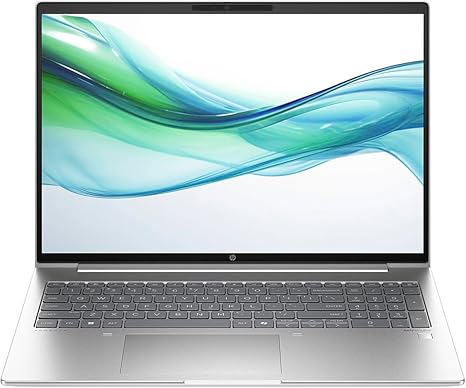
Welcome to “Reviews inside tv.” Today, we’re looking at the HP ProBook 465 G11, a 16-inch notebook that’s designed to balance power and portability for professionals on the go. Packed with an AMD Ryzen 5 7535U processor, this model targets office workers, business professionals, and those who need reliable multitasking without breaking the bank. But does it live up to the demands of modern workflows? Let’s find out.
Starting with the basics, this HP ProBook comes equipped with AMD’s Ryzen 5 7535U—a hexa-core processor that’s part of the Ryzen 7000 series. This CPU offers solid performance for multitasking, making it suitable for everything from word processing and spreadsheet management to video calls and light creative tasks. You won’t be running complex video edits or heavy gaming, but for day-to-day productivity, it’s more than capable. With six cores, it handles web browsing with multiple tabs, document editing, and even media streaming without a hitch.
The integrated AMD Radeon 660M graphics offer basic GPU performance, so while you won’t be pushing 3D renders or playing AAA games at high settings, it’s decent for casual media consumption or light photo editing. For most office tasks, this chip will serve you well, but don’t expect miracles in graphics-intensive workloads.
When it comes to memory, the HP ProBook packs 16GB of RAM. This is the sweet spot for business laptops, offering enough headroom for multiple programs running at once. You can have your email open, a browser full of tabs, and a few office applications without seeing any major slowdowns. Combined with 256GB of SSD storage, this setup means quick boot times and fast file access. The SSD is faster than traditional SATA storage, which is great for keeping everything responsive. That said, 256GB might feel a bit tight if you work with large files, but it’s still plenty for typical office use.
The display is a 16-inch WUXGA screen, offering a resolution of 1920 x 1200. It’s a bit higher than Full HD, giving you a bit more vertical space for documents and spreadsheets. The panel uses in-plane switching (IPS) technology, which means you get better color consistency and wider viewing angles than standard TN displays. The brightness is good for indoor use, but it won’t blow you away in direct sunlight. If you’re working in a bright office, you might have to adjust your position a bit to avoid glare. As for color accuracy, this isn’t an OLED or mini-LED display, so if you’re into color-critical work like design or photography, you may want to look elsewhere. But for most users, this screen will get the job done.
Battery life is where we start to see the ProBook’s practicality. It has a decent capacity, and under typical use—think office apps, web browsing, and media streaming—you can expect it to last around 8 to 10 hours. Heavy workloads like large spreadsheet processing or video calls will naturally drain the battery faster, but for a full workday, it should hold up. When it does need charging, the ProBook charges up reasonably fast, so you won’t be tethered to your desk for long.
One area where this laptop stands out is its keyboard and trackpad. The keys have decent travel, and typing is comfortable over long periods—important for those who write a lot. The layout is standard, but the power button placement is a bit awkward—it’s next to the delete key, which could be frustrating if you’re used to pressing it without thinking. The trackpad is responsive, with good palm rejection, though it could be a little larger for users who prefer more space to navigate. If you’re in the habit of using an external mouse, that’s easily accommodated, thanks to the solid array of ports.
In terms of ports and connectivity, the HP ProBook offers a solid selection. You get USB-A and USB-C ports, an HDMI output, and an SD card reader. Wi-Fi 6 ensures fast, stable internet connections, while Bluetooth allows for wireless accessory connections. These ports are practical for connecting external monitors, docks, and other peripherals, making the laptop a good choice for professionals who need to work in a desk setup. Unfortunately, there’s no Thunderbolt, so you’re limited to regular USB-C speeds, but for most business users, that won’t be an issue.
Thermals and noise are generally well-managed. Under light loads, the laptop stays cool, with minimal fan noise. However, under heavier tasks—such as large Excel files or media streaming—the fans kick in, but they’re not loud enough to be distracting. The underside can get a bit warm, especially in the middle, but it’s nothing that would make it uncomfortable to use on your lap.
When you think about portability, this laptop is fairly light for a 16-inch model, weighing just under 1.8 kg. It’s not the lightest in its class, but it’s certainly portable enough to carry around for a day of meetings or classes. The build quality feels solid, with a matte silver finish that resists fingerprints, giving the ProBook a sleek, professional look.
Now, let’s talk about value for money. At its price point, the HP ProBook 465 G11 offers a lot of solid features, especially for business users and students. It delivers reliable performance for everyday tasks, a good display, and decent battery life, all while keeping the weight manageable. It’s not the flashiest option out there, nor does it have the horsepower for gaming or intensive creative workloads. But for its target audience—office workers, students, and casual users—it strikes a good balance between performance and price. Compared to some competitors in this space, like Lenovo’s ThinkPad series or Dell’s Latitude range, the ProBook offers a slightly more affordable alternative without sacrificing too much in terms of build quality and performance.
The main downside? The ProBook isn’t a powerhouse for creative work or gaming. If you need more GPU muscle or a brighter display, there are better choices out there. But if you’re looking for a reliable, well-built laptop for everyday business tasks, this could be a perfect fit.
In conclusion, the HP ProBook 465 G11 is a solid, dependable business laptop that offers good value for money. It’s perfect for students or professionals who need a reliable machine for office tasks, media consumption, and light creative work. However, if you’re after a more powerful machine for gaming or intensive design work, you might want to explore other options. But for those who prioritize portability, comfort, and solid all-around performance, this HP ProBook is certainly worth considering.
Thanks for watching! Be sure to check out the link in the comments box for more details on the HP ProBook 465 G11, and feel free to drop any questions or share your experience with this laptop if you already own one. Until next time, keep on reviewing!
Available to buy here:


