

Available to buy here:
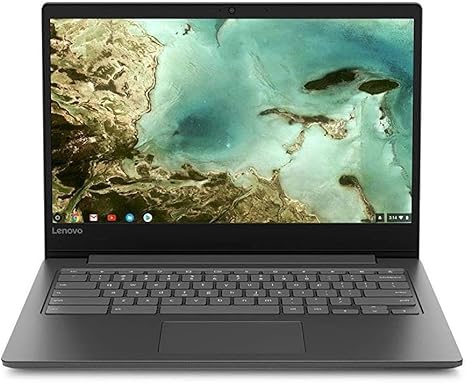
Welcome back to “Reviews inside tv”! Today, we’re checking out the Lenovo Chromebook S330, a sleek, no-fuss Chromebook designed for everyday computing. If you’re after a budget-friendly laptop for basic tasks, this might just be the one you’re looking for, but let’s dig into the details to see if it really holds up in the real world.
The Lenovo Chromebook S330 comes packed with a MediaTek MT8173C processor, paired with 4GB of LPDDR3 RAM and 64GB of eMMC storage. This is a Chromebook, so the focus here isn’t on high-end gaming or heavy video editing but more on delivering smooth, responsive performance for everyday tasks like web browsing, document editing, and streaming. This configuration is perfectly suited for students, office workers, or anyone looking for a reliable machine for light use without breaking the bank.
Let’s talk display—this Chromebook sports a 14-inch Full HD screen with a 16:9 aspect ratio. While it’s not an OLED or high-refresh rate panel, the resolution is sharp enough for everyday use, and the brightness is decent for indoor work. The screen performs well for casual media consumption, whether you’re watching videos or browsing photos, though it might not satisfy professional creators or gamers who need higher color accuracy or brightness for more demanding tasks.
When it comes to day-to-day usage, the Chromebook S330 holds its own. Whether you’re typing up reports, browsing multiple tabs, or catching up on your favorite shows, the 4GB of RAM keeps things running decently well, but if you plan to multitask with a dozen or more tabs open, things can start to feel a little sluggish. The 64GB eMMC storage isn’t the fastest option, but it does the job, and the quick boot-up times and software loading are a nice touch. Plus, the extra 100GB of cloud storage from Google Drive makes sure you won’t run out of space too quickly.
In terms of connectivity, the Lenovo Chromebook S330 covers all the basics. It features USB-C, USB 3.0, and a microSD card slot for additional storage. The Wi-Fi ac support is solid, and the Bluetooth 4.1 is more than enough for connecting peripherals. While it’s not packed with every port under the sun, it’s still versatile enough for most casual users. There’s also a 720p webcam, which gets the job done for video calls, and two 2W speakers for audio, which are fine for casual listening but won’t blow you away if you’re looking for rich sound.
Now, let’s talk about performance. For everyday tasks like email, web browsing, or word processing, the Chromebook S330 performs just fine. It doesn’t lag, and with Chrome OS, everything runs smoothly—most of the time. However, if you push it with more demanding tasks, like heavy multitasking or using resource-intensive apps, it starts to show its limitations. Chrome OS is lightweight and efficient, but this laptop isn’t meant to handle professional-grade software like Adobe Photoshop or video editing suites.
Thermals and noise are not a major concern here. The S330 stays relatively cool even when in use for extended periods, and the fan noise is barely noticeable. This makes it a comfortable laptop for work in a quiet environment, whether at a desk or in a coffee shop.
In terms of portability, the Lenovo Chromebook S330 is impressively lightweight, tipping the scales at just 3.3 pounds. It’s slim, too, coming in at less than an inch thick. It easily slips into a bag, making it a great choice for those who need something easy to carry around all day.
Battery life is another strong point. Lenovo promises long-lasting power, and in practice, you’ll get around 8 to 10 hours of use on a single charge, depending on your tasks. For lighter activities, like browsing or document editing, it can last even longer. Plus, the charging speed is reasonable, so you won’t have to wait too long to get back to work.
The keyboard and trackpad are functional, though not particularly luxurious. The keyboard offers a comfortable typing experience with decent key travel and feedback. It’s not the most responsive for heavy typists, but it’s fine for casual use. The trackpad is smooth, responsive, and supports multi-touch gestures, though it might feel a bit small for some users.
As for value, the Lenovo Chromebook S330 is a solid option if you’re looking for a budget-friendly, lightweight laptop for everyday tasks. At its price point, it competes well against other entry-level Chromebooks but does lag behind higher-end models when it comes to performance or display quality.
There are a few things to note. For one, the eMMC storage might feel a little restrictive if you plan on installing a lot of apps or storing heavy files. Also, the 4GB of RAM is fine for basic tasks but might not be enough for heavy multitaskers. While this laptop excels in ease of use and portability, power users or those with more demanding software needs should probably look elsewhere.
In terms of build quality, the S330 feels solid enough for the price. The materials are lightweight but not flimsy, and the hinge seems sturdy enough to withstand daily opening and closing. It’s not the most premium laptop out there, but it doesn’t feel cheap either.
For anyone who needs a lightweight, reliable laptop for casual tasks, this Chromebook is a great pick. If you’re a student, a light office worker, or just need something for browsing and media consumption, you’ll find it more than capable. However, if you’re into content creation or need a machine for more intensive work, you might want to look at something with more power under the hood.
If you’re interested, you can find a link to the Lenovo Chromebook S330 in the comments box below. Let us know your thoughts or if you’ve already given this Chromebook a try. Thanks for watching, and I’ll catch you in the next one. Stay sharp, stay productive!
Available to buy here:


