

Available to buy here:
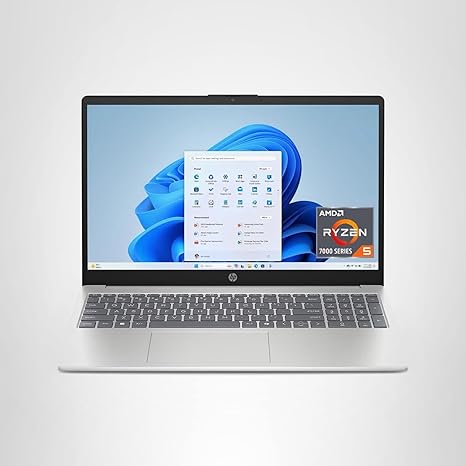
Welcome to “Reviews inside tv,” where we break down the latest in tech and gadgets. Today, we’re checking out the HP 15.6-inch Laptop with a touchscreen display. With a budget-friendly price tag, it aims to offer solid performance for students, office users, and casual creators. But how well does it really stack up in real-world use? Let’s find out.
The HP 15 comes with an AMD Ryzen 5 7520U processor, which is an entry-level chip designed to handle everyday tasks with ease. It’s paired with 8 GB of LPDDR5 RAM, which is enough for smooth multitasking in basic productivity apps like Microsoft Word, Excel, or even light media editing. But don’t expect to push it too hard with demanding workloads like video editing or 3D rendering. The 512 GB SSD provides plenty of space for your files, and it’s PCIe NVMe, so you get super fast data transfer speeds—about 15 times faster than traditional hard drives. This is great for quick boot-ups, fast file access, and efficient multitasking. When it comes to graphics, it’s equipped with AMD Radeon integrated graphics. These won’t win any awards for gaming, but it should handle casual games and video playback just fine, especially at 1366×768 resolution on the HD touchscreen display.
Now, the screen. It’s a 15.6-inch HD touch display with a 1366×768 resolution, which is decent for casual browsing and media consumption but doesn’t offer the sharpness or clarity of Full HD or higher resolutions. The touchscreen is responsive, allowing you to interact with apps and webpages through taps and swipes, which can be a nice touch for navigating. However, keep in mind that the resolution may feel a bit cramped if you’re working with multiple windows or detailed graphics, especially compared to Full HD screens you’ll find in slightly higher-end models.
As for battery life, HP claims that this laptop offers impressive longevity. Expect around 8 to 10 hours under typical use, including web browsing, document editing, and media streaming. The Ryzen 5 processor, combined with the energy-efficient LPDDR5 RAM, helps extend the battery life. Charging speed is decent, but don’t expect it to be as quick as some higher-end models with fast charging capabilities. The 15.6-inch screen size and design make it fairly lightweight for its class, weighing in at just about 3.75 pounds, making it easy to carry in a backpack or messenger bag.
When it comes to the keyboard, the layout is comfortable for typing, though the key travel might feel shallow for those who prefer more tactile feedback. The trackpad is responsive, though it’s on the smaller side compared to larger laptops. For those who need extra features, the lack of a dedicated number pad and backlit keys might be a deal-breaker for some. There’s no fingerprint reader or any other advanced security features like face recognition, which means you’ll be relying on traditional password methods to unlock your laptop.
The connectivity options are standard for a budget laptop. You get one USB-C port, two USB-A ports, an HDMI port, and an SD card reader, which should be sufficient for most users looking to connect to external devices, monitors, or peripherals. Wi-Fi 6 and Bluetooth 5.0 are included, ensuring a solid connection for streaming, browsing, and file transfers. However, there’s no Ethernet port for those who prefer a wired connection, and Thunderbolt is not available on this model.
In terms of thermals and noise, the HP 15 stays relatively cool under normal usage, but it can get warm on the underside during heavier tasks like streaming high-definition video or running multiple apps. The fan noise is low most of the time, but it can ramp up when the laptop is under load, though it’s not obnoxious. That said, if you’re running intense applications for extended periods, you might notice a bit of thermal throttling, meaning a slight dip in performance as the laptop tries to manage heat.
So, how does it perform for real-world usage? For office work, the HP 15 handles web browsing, document editing, and spreadsheets without breaking a sweat. The screen, while not the sharpest, gets the job done for basic media consumption. Streaming movies and shows is a pleasant experience, though you won’t get the vibrant color accuracy or sharpness of higher-end displays. If you’re into light gaming, the Radeon graphics can handle older or less demanding titles at lower settings, but don’t expect a smooth experience with modern AAA games at higher settings. For content creators, like those editing photos or videos, this laptop will work for basic tasks, but export times will be slower compared to more powerful models with dedicated GPUs.
As we move on to thermals, the HP 15 doesn’t get too hot during casual use, but if you push it with more demanding tasks, it can get noticeably warm. The fan noise is generally quiet, although it does get louder under load, which could be distracting during long sessions. For battery life, this laptop holds up well for a full workday of light usage, but if you’re watching HD video or working on more intensive tasks, expect to recharge by the end of the day. The 8GB of RAM and 512GB SSD ensure that multitasking remains smooth in most everyday tasks, but you’ll want to keep an eye on the storage if you plan on adding a lot of files.
One of the standout features of this laptop is the touchscreen, which adds a level of convenience when navigating through Windows 11. Windows 11 Home offers an updated Start menu and taskbar layout, plus a smoother, more intuitive interface that works well with the touch capabilities of this model. However, there’s no real standout feature that sets this laptop apart from the competition, especially at this price range.
For those seeking a budget-friendly laptop for basic office work, media consumption, and light gaming, the HP 15.6-inch model is a solid option. It offers decent performance, a responsive touchscreen, and a reasonable battery life without breaking the bank. However, if you need a sharper display, more powerful specs, or better gaming capabilities, you might want to look at higher-end models like the Acer Aspire 5 or the Lenovo IdeaPad 3, which offer similar pricing but slightly better performance or features.
In terms of value for money, this laptop strikes a balance between price and performance. It doesn’t offer anything groundbreaking, but it covers all the basics well enough for students, casual users, and office workers. If you’re looking for something with more graphical muscle or higher-end display quality, you might need to spend a bit more. But for those who need a reliable, everyday laptop at a budget price, this HP 15 model is a great choice.
Thank you for watching this review. If you have any questions or want to share your experience with this laptop, feel free to drop a comment below. Don’t forget to check out the link to purchase in the comments box, like, subscribe, and hit the bell icon to stay updated with more reviews on “Reviews inside tv.” Until next time, stay tech-savvy, and keep exploring!
Available to buy here:


