

Available to buy here:
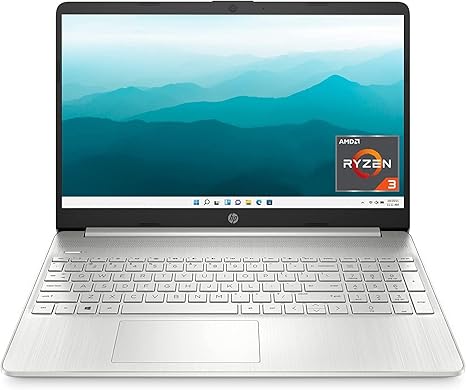
The HP 15 Laptop with the AMD Ryzen 3 5300U processor, 8 GB of RAM, and 256 GB SSD storage brings an affordable and efficient option to those seeking a reliable laptop for daily tasks. Aimed at students, professionals, and casual users, it’s designed to deliver a decent performance for everything from productivity to light entertainment. With Windows 11, you get a fresh, modern user interface designed to enhance your workflow, creativity, and connectivity. But is this laptop really the workhorse it claims to be? Let’s find out.
In terms of specifications, this laptop comes with the AMD Ryzen 3 5300U processor, which offers four cores and eight threads. It’s a solid entry-level CPU, offering decent performance for multitasking and office-related tasks. Whether you’re typing up documents, juggling multiple browser tabs, or taking video calls, the Ryzen 3 processor can handle those tasks without breaking a sweat. However, you’ll want to keep expectations realistic when it comes to more demanding creative tasks or gaming. For heavier workloads, like video editing or 3D rendering, you might hit a performance ceiling, but for day-to-day productivity, it should be more than enough.
The AMD Radeon Graphics card is another key feature here. While it won’t win any awards for gaming performance, it’s more than capable for basic media consumption and some light gaming. Watching videos and streaming content is smooth, and even light games should run well at lower settings. For those who aren’t hardcore gamers, this GPU is just fine for casual gaming and entertainment, making it an excellent choice for general users and media consumers.
When it comes to memory, the 8 GB of RAM is a good middle ground for most users. It supports smooth multitasking, allowing you to run several apps or browser tabs simultaneously without slowdowns. However, if you’re a power user who tends to keep dozens of tabs open, or you run more memory-intensive applications, you might find the 8 GB a bit limiting. Fortunately, the 256 GB SSD should help make up for that by offering faster load times and quicker boot speeds compared to traditional hard drives. It’s the kind of storage that’ll improve your overall user experience, with snappy system performance and faster file transfers.
The 15.6-inch HD Micro-Edge display is another highlight. With a thin bezel and a high screen-to-body ratio, the visual experience is quite immersive for its size. The resolution is standard HD (1366 x 768), which might feel a little dated compared to Full HD screens at this price range. While the screen is fine for everyday tasks and media, it’s not quite as sharp or vibrant as higher-end displays, especially for content creators. But for most users, this display will serve its purpose well, offering decent brightness and color reproduction for videos, web browsing, and office work.
Battery life is another area where this laptop performs reasonably well. With up to 7 hours and 15 minutes of usage, it’s got enough juice to last through a full workday with moderate usage. Whether you’re writing, watching videos, or attending Zoom meetings, this should get you through. The added bonus of HP’s Fast Charge technology means that you can top up quickly, getting up to 50% charge in just 45 minutes—ideal for when you’re on the go or in a pinch.
In terms of connectivity, the HP 15 stands out with Wi-Fi 6, which offers significantly faster speeds and more stable connections than Wi-Fi 5. This will come in handy if you’re working from home or streaming content. Bluetooth 5.0 also ensures smooth connectivity with peripherals like headphones, wireless mice, or keyboards. While the number of ports is fairly standard, you get a good selection: two USB 3.1 Type-A ports, one USB Type-C port, an HDMI port for connecting to external displays, and an SD card reader for added convenience. While there’s no Ethernet port, the solid Wi-Fi and Bluetooth options should make wired connections unnecessary for most users.
Thermals on the HP 15 are acceptable. It doesn’t run particularly hot during light tasks like browsing or word processing, though you might notice some warmth when it’s under heavier load. The fan noise is on the quieter side, so it won’t be distracting during everyday use. However, if you’re pushing the laptop harder, such as with gaming or extended video streaming, you may hear the fans ramp up. Overall, it’s not the quietest laptop in this price range, but it’s manageable for most users.
One of the key advantages of this laptop is its portability. Weighing in at just 3.75 pounds and measuring only 0.7 inches in thickness, it’s light and thin enough to take with you wherever you go. Whether you’re commuting, working in a café, or studying in the library, the HP 15 is easy to slip into a bag and carry around all day without feeling weighed down.
Now, let’s talk about the keyboard and trackpad. The keyboard layout is fairly standard, with a full-sized design including a number pad, which is great for those who do a lot of number crunching. Key travel and feedback are decent, making it comfortable for extended typing sessions, though it may not have the premium feel of higher-end models. The trackpad is spacious and responsive, with good palm rejection, so you won’t have to worry about accidental touches while typing. The only minor issue here might be the lack of a backlit keyboard, which could be inconvenient for late-night work sessions.
When it comes to value for money, the HP 15 presents a solid package for its price. You’re getting a laptop with a reliable processor, decent RAM, fast SSD storage, and a good mix of ports and connectivity options. The display might not be the sharpest out there, and the battery life isn’t exceptional, but for everyday tasks and moderate multitasking, this laptop is a solid performer. If you’re looking for a laptop that can handle basic productivity tasks, media consumption, and light entertainment without breaking the bank, the HP 15 is a good choice.
For comparisons, there are a few direct competitors in this price range. The Lenovo IdeaPad 3 and the Acer Aspire 5 both offer similar specs, but the HP 15 wins with its slightly better display design and faster Wi-Fi 6 support. However, the Lenovo IdeaPad 3 offers a better screen in terms of resolution with its Full HD display, which might appeal to those who want a sharper screen.
In terms of build quality, the HP 15 feels sturdy enough for everyday use, though it’s not the most premium in terms of materials. The chassis is mostly plastic, but it holds up well under regular use. The hinge feels solid, and there’s no noticeable flex or creaking when opening or closing the lid. While it’s not an ultra-premium feel, it’s perfectly fine for a budget laptop.
Looking at customer support, HP has a solid reputation for providing good support, with a decent warranty and the option for on-site repair if necessary. Their global presence means you should be able to find help or parts if you need them.
To wrap it up, the HP 15 is a solid, budget-friendly laptop that’s perfect for students, casual users, and professionals looking for a reliable machine for basic tasks. It’s not a powerhouse, but it does everything it promises well and offers great value for the price. If you’re someone who needs a dependable laptop for word processing, media consumption, and light multitasking, the HP 15 should be a strong contender. For those who need more power or a better display, you may want to look elsewhere, but for everyday use, it’s tough to beat this at its price.
Thanks for watching! If you want to get your hands on the HP 15, check the comments box for the link. Feel free to drop a question or share your experience if you’ve already used it. Catch you next time!
Available to buy here:


