

Available to buy here:
Welcome to “Reviews inside tv”! Today, we’re taking a look at a product that promises to level up your multitasking game, especially for those on the go – the Maxfree Laptop Screen Extender, S1. This 14-inch portable monitor could be a game-changer if you’re looking to extend your screen space without the hassle of lugging around a bulky second display. Let’s see if this device truly delivers on that promise and if it’s worth your investment.
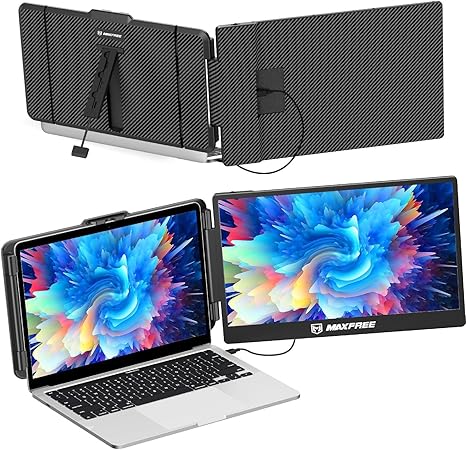
The Maxfree S1 is a compact and lightweight 14-inch monitor designed to be used as a second screen for your laptop. With a full 1080P FHD resolution, it offers a vibrant display with a 300-nit brightness and a contrast ratio of 1,000:1. It uses an IPS panel, which means you’ll get better color accuracy and wider viewing angles compared to a standard TN panel. The screen supports 16.7 million colors, ensuring that images and videos are rich and detailed. If you spend long hours working on documents, watching movies, or just need more space to handle multiple tasks, this could be a solid choice.
Now, let’s talk about the setup process. One of the highlights of the Maxfree S1 is its plug-and-play functionality. There’s no need to install any drivers – just plug it in, and you’re good to go. It includes everything you need out of the box, including a Type-C cable, a USB-A cable, and an HDMI cable. The best part? The monitor supports both Type-C and HDMI connections, making it versatile for different devices. Whether you’re using a Windows laptop, a MacBook, or even a gaming console like the PS5 or Switch, this screen extender can handle it. It’s worth mentioning that when using the HDMI connection, you’ll need to plug in the USB-A cable for power, but once it’s set up, it’s smooth sailing.
In terms of design, the Maxfree S1 is built to be portable. Weighing just 2.3 pounds, it’s lightweight enough to carry around with you without feeling like you’re adding extra bulk to your bag. The monitor comes with a built-in stand that’s adjustable up to 45°, which gives you the flexibility to find the best viewing angle whether you’re sitting at a desk or working on the go. The stand is stable, and the rubber pads at the bottom help ensure it stays put, reducing the risk of slippage.
But how does it actually perform in the real world? Let’s break it down. For office and productivity tasks like web browsing, document editing, and managing multiple apps, the Maxfree S1 does exactly what it’s supposed to. If you’re a power user with lots of windows and tabs open, the extended screen space makes it much easier to multitask. You won’t feel cramped with just a single display. If you’re streaming movies or shows, the 1080P FHD resolution and IPS panel deliver a crisp and clear image with good color accuracy. While it’s not quite as sharp as 4K displays, it certainly holds its own for general media consumption.
For content creators, the Maxfree S1 might not be your top choice for color-critical work like photo or video editing, as it doesn’t support wide-gamut color spaces like AdobeRGB or DCI-P3. But for everyday tasks like writing, researching, and casual video editing, it provides ample screen real estate. If you’re looking to do heavy-duty media production, you may want to consider a more specialized display, but for light work, this monitor should serve you well.
When it comes to gaming, the Maxfree S1 isn’t necessarily a high-performance gaming monitor. It doesn’t have high refresh rates or low response times that would be critical for competitive gaming. But for casual gaming on the go, like on your PS5 or Switch, the 1080P display should be more than enough for an enjoyable experience, especially if you’re using it as a secondary screen.
Battery life isn’t a big concern here since the monitor doesn’t have its own battery. It draws power directly from your laptop or device, which means it’s only as portable as your laptop’s battery allows. If you’re traveling and you’re relying on battery power, just be mindful of how long you’ve been running your laptop and monitor together, as it will drain your laptop’s battery faster than usual.
As for noise, since the Maxfree S1 is essentially a passive monitor, it doesn’t have any fans or moving parts that could create noise. So, whether you’re in a quiet office or a coffee shop, you won’t have to deal with any distracting sounds. It’s a quiet companion for both work and play.
Now, let’s take a quick look at the ports and connectivity. The Maxfree S1 comes with a USB-C port, USB-A port, and an HDMI port. This covers pretty much everything you need for modern devices, including laptops, tablets, and consoles. The Type-C port ensures that you can quickly connect to the latest laptops without needing an adapter. The HDMI connection works well with older devices, offering compatibility across a range of setups.
In terms of build quality, the monitor is sturdy yet lightweight. The materials feel solid, and despite its slim profile, it doesn’t feel flimsy. However, it’s important to note that the monitor doesn’t have the same premium feel as some high-end models, but it’s more than sufficient for a portable screen extender.
So, who exactly is the Maxfree S1 best suited for? If you’re someone who needs extra screen real estate for work or media consumption and you’re frequently on the move, this portable monitor could be a great addition to your toolkit. It’s perfect for business professionals, students, or anyone who regularly works in coffee shops, airports, or other public spaces. The ability to quickly extend or mirror your laptop’s screen can make a huge difference in productivity. If you’re a content creator or a gamer who requires high-end color accuracy or refresh rates, you might want to look elsewhere.
In terms of value for money, the Maxfree S1 sits comfortably in the mid-range. It’s not the cheapest portable monitor on the market, but it offers good build quality, solid performance, and decent display quality for its price. You’ll find some similar models out there, but many of them won’t offer the same plug-and-play functionality or ease of use that the Maxfree S1 does.
All in all, the Maxfree S1 is a great option for anyone looking to add a second screen to their setup while on the go. It’s lightweight, easy to set up, and provides a solid visual experience for a variety of tasks. It’s a no-fuss, functional solution that serves its purpose well, making it a strong contender in the portable monitor market.
Thanks for watching, and if you’re thinking about getting the Maxfree S1, be sure to check out the link in the comments box for more details. If you’ve used this monitor or are considering it, let us know your thoughts or questions below. Don’t forget to like, subscribe, and hit that bell icon so you never miss a review from “Reviews inside tv”! Until next time, stay productive and enjoy your extra screen space!
Available to buy here:


