

Available to buy here:
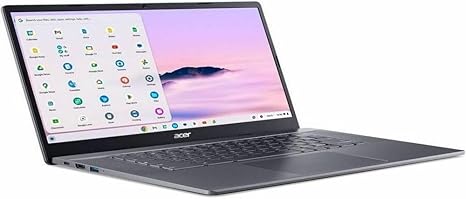
Welcome to “Reviews inside tv.” Today, we’re taking a look at the Acer Chromebook Plus 515, a Chromebook designed to offer a large-screen experience with the simplicity and speed of Chrome OS. With its 15.6-inch Full HD display and some solid internal specs, it promises to be a good companion for students, office users, and anyone who values a straightforward, no-fuss laptop.
The Acer Chromebook Plus 515 is powered by the Intel i3-1215U processor, a low-power chip from Intel’s 12th generation lineup. It features 6 cores and 8 threads, giving you the ability to juggle basic tasks like browsing, email, and document editing without breaking a sweat. It’s coupled with 8GB of LPDDR5X RAM, which is fast enough for multitasking in the Chrome OS environment. For storage, you get 128GB of UFS, which is a faster alternative to traditional eMMC storage, and will help with snappy app launches and quick file transfers. The laptop also supports Wi-Fi 6E, ensuring strong and fast internet connectivity, especially in crowded areas.
The standout feature here is the 15.6-inch Full HD display. Unlike many smaller Chromebooks, the larger screen provides a more comfortable viewing experience. The narrow bezel around the display allows the screen to take up more of the lid, and the anti-glare coating ensures that reflections won’t get in the way when you’re working in brighter environments. However, it’s worth noting that this isn’t an OLED or mini-LED panel, so colors might not pop as much as they would on higher-end screens. Still, it’s a solid option for daily productivity tasks, media consumption, and even light multitasking.
When it comes to everyday use, the Chromebook Plus 515 holds up well. With Chrome OS, you get a streamlined experience that’s fast and easy to use, especially for those who are familiar with Google’s ecosystem. Web browsing with multiple tabs open is smooth, and tasks like word processing or spreadsheet management are done without hiccups. The performance feels fluid for most basic work tasks, and the 8GB of RAM is enough to keep things running efficiently even when juggling a few apps at once. Streaming video looks good on the 15.6-inch screen, though it’s not the sharpest or most vibrant if you’re used to higher-end displays. For media consumption, this Chromebook does just fine for casual watching on YouTube or Netflix.
As for content creation, this is definitely not the laptop you’d want for demanding tasks like photo or video editing, but for basic editing tasks, document writing, or creating presentations, it does the job without any slowdowns. Gaming is out of the question, as the integrated Intel UHD graphics won’t be able to run anything graphically intensive. But if you’re looking for a laptop for productivity, media consumption, and light web-based work, the Acer Chromebook Plus 515 will serve you well.
In terms of thermals, the Chromebook Plus 515 stays cool under typical workloads. There’s no noticeable fan noise during light use, which makes it a good option for working in quiet spaces. Under heavier tasks like streaming or having multiple apps running at once, you may hear the fans kick on, but they remain relatively quiet compared to many other laptops in this category. The chassis does get warm but never uncomfortable, so using it on your lap won’t be an issue.
Battery life is a major selling point for Chromebooks, and the Acer Chromebook Plus 515 is no exception. With its 50Wh battery, you can expect to get around 8 to 10 hours of use under typical conditions, like browsing the web, working on documents, or streaming video. The Chromebook’s efficiency with Chrome OS and the low-power Intel i3 CPU ensures that you’ll make it through a full workday without reaching for the charger. When you do need to recharge, the USB-C charging is fast and convenient, though you may find the included charger a bit on the bulky side.
Typing on the Acer Chromebook Plus 515 is quite comfortable, thanks to a full-sized keyboard with well-spaced keys. There’s enough key travel for a pleasant typing experience, and the feedback is solid for long typing sessions. The trackpad, though not the most spacious, is responsive and precise, offering smooth navigation for everyday tasks. There’s also a fingerprint scanner for an added layer of security, though it’s not essential for most users.
In terms of connectivity, the Chromebook Plus 515 is well-equipped for its category. It includes two USB-A ports, two USB-C ports (one of which supports Thunderbolt 4), an HDMI port, a microSD card reader, and a headphone jack. This gives you plenty of options for connecting external peripherals, monitors, and accessories. Wi-Fi 6E ensures fast internet speeds, and Bluetooth 5.2 rounds out the connectivity options, allowing for seamless connections with wireless devices like headphones and mice.
The build quality is solid, with the chassis feeling sturdy enough for everyday use. While the materials aren’t premium (you’re not looking at aluminum or magnesium here), the plastic feels durable, and the laptop has a good overall rigidity. Weighing in at 1.8 kg (about 4 lbs), it’s not the lightest Chromebook in its class, but it’s still portable enough to carry around in a backpack or bag for a full day of work or school.
When it comes to value for money, the Acer Chromebook Plus 515 offers a balanced performance-to-price ratio. It’s priced in the mid-range for a Chromebook of its size and features, making it an appealing option for those who need a reliable laptop for everyday use but don’t want to pay for higher-end specs that might not be necessary. Competing models like the Lenovo IdeaPad Flex 5 or HP Chromebook x360 offer similar performance, but the Acer’s larger screen and solid build quality give it an edge for those who prioritize screen real estate.
To wrap things up, the Acer Chromebook Plus 515 is an excellent choice for students, office workers, and anyone who needs a dependable laptop for productivity, media consumption, and casual web use. Its large Full HD display, efficient performance, and solid battery life make it a great option for those who want a simple, easy-to-use device without any frills. However, if you’re looking for high-end gaming performance or a premium display for content creation, this one’s probably not for you.
Thanks for watching! Be sure to check the comments box for the link to grab this Chromebook. Don’t forget to like, subscribe, and hit the bell icon for more reviews like this one. And if you’ve already tried this model, drop a comment and let us know what you think. Until next time, take care, and happy reviewing!
Available to buy here:


