

Available to buy here:
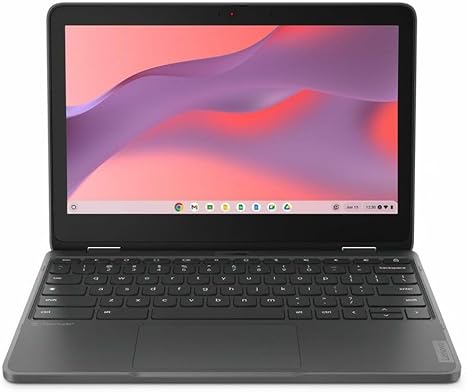
Welcome to “Reviews inside tv”! Today, we’re looking at the Lenovo 300e Yoga Chromebook Gen 4, an 11.6″ touchscreen convertible 2-in-1 Chromebook that brings a unique blend of portability and versatility. Designed with students, teachers, and casual users in mind, this Chromebook aims to offer convenience and performance at a budget-friendly price. But does it live up to expectations? Let’s find out.
The Lenovo 300e Yoga Chromebook is built around an octa-core ARM Cortex A76 and Cortex A55 processor. While not the most powerful chip on the market, it’s designed to handle everyday tasks like web browsing, document editing, and video streaming with ease. Paired with 8GB of RAM and 64GB of flash storage, this Chromebook ensures smooth multitasking for light office work or entertainment, though you might run into limitations with more demanding tasks like video editing or heavy apps. Flash storage offers fast boot times and quick access to files, but it’s not quite as fast or as large as the more common NVMe drives seen in higher-end models. The 1366×768 resolution on the 11.6-inch display delivers decent image quality, but don’t expect crisp 4K sharpness here. The color accuracy and viewing angles are acceptable for casual use, and it’s certainly enough for media consumption and basic productivity.
This Chromebook’s display is perfect for those who are mainly using it for productivity on the go. The 11.6-inch size makes it incredibly portable, and the touchscreen is responsive and useful when switching between laptop and tablet modes. Whether you’re reading, sketching, or watching videos, the flexibility of the 2-in-1 design comes in handy, especially in tablet mode for note-taking or presenting. However, the HD resolution means that more pixel-dense tasks like photo editing or gaming may feel a bit limiting.
Battery life is another area where this model delivers impressively. With a battery that should last around 8 to 10 hours under moderate use, you can rely on this Chromebook to get you through a day of work or study without needing a charger. It’s not the longest battery life you’ll find in its class, but it’s definitely above average, especially for something so compact. In terms of portability, the 2-in-1 design keeps it lightweight and easy to carry around, which is great for students or anyone constantly on the move.
The keyboard on the 300e Yoga is surprisingly comfortable for a budget Chromebook, with decent key travel and a responsive typing experience. The trackpad is also functional, though it might feel a little cramped for those used to larger, higher-end laptops. While the keyboard layout is standard, some users might find the absence of a number pad or larger keys slightly limiting during intense typing sessions. Still, it’s more than adequate for the intended audience of students and casual users.
In terms of ports and connectivity, this Chromebook keeps things simple. You get a USB-C port, a couple of USB-A ports, an HDMI port for connecting to external displays, and an SD card reader for expanding storage. Wi-Fi 5 support should be more than enough for everyday web browsing and streaming, though it may not deliver the fastest speeds compared to newer standards like Wi-Fi 6. Bluetooth is present as well, allowing you to easily pair your wireless peripherals.
One of the standout features here is its thermals. Because this is a low-power device with an ARM processor, it stays relatively cool during typical use, even when multitasking. Fan noise is non-existent in most scenarios, making it a great option for quiet environments like libraries or classrooms. Even under heavier loads, the device remains quiet and comfortable, though there’s always the potential for slight warmth if you’re really pushing it.
When it comes to real-world performance, the 300e Yoga is designed primarily for light office tasks and media consumption. It handles multiple tabs in Chrome, video calls, and document work effortlessly. The ARM-based processor ensures you’re not dealing with lag during typical day-to-day use, but if you’re looking to use heavy apps or multitask with demanding software, this Chromebook may start to show its limits. Streaming movies and TV shows is a breeze, with the decent display quality and solid speakers, though the HD resolution means you won’t get the sharpest picture available.
On the downside, while this laptop offers solid performance for its price, its display resolution could leave something to be desired for users who need higher clarity for tasks like editing or design work. The keyboard, while functional, lacks the feedback and comfort you’d find on more premium models, and its compact size might make typing for long periods a bit of a challenge. Also, with only 64GB of storage, you’ll have to rely on cloud storage or external drives for larger files, which might not be ideal for some users.
Value for money is where this Chromebook shines. For the price, it’s tough to find a more versatile 2-in-1 that balances portability, battery life, and general performance. However, if you need more power for creative tasks or gaming, you may want to look at higher-end models with faster processors, larger storage, and higher-quality displays. For what it’s meant to do—light productivity, web browsing, media consumption, and basic tasks—this Chromebook offers great value.
Comparing it to other devices in the same price range, you’re getting a solid design, good portability, and reasonable battery life, but the competition may offer slightly better performance in specific areas like display quality or processing power. Still, this model stands out for users looking for an affordable, no-frills laptop that can handle the basics with ease.
As for build quality, the Lenovo 300e Yoga is sturdy for a budget laptop. The plastic chassis doesn’t feel cheap, and the hinge mechanism is strong enough for consistent tablet mode use. While it’s not made from premium materials like aluminum, it feels solid for its price. Lenovo has built a reputation for producing reliable laptops, and this one doesn’t feel like it will fall apart after a few months of use.
In terms of customer support, Lenovo is generally known for providing solid service, with warranties and support options available if needed. It’s worth noting that while the Chromebook might not be as supported in terms of software updates compared to some high-end Chromebooks, it will still receive regular updates from Google to ensure security and performance for a decent period of time.
To wrap up, the Lenovo 300e Yoga Chromebook Gen 4 is an excellent choice for students, educators, and casual users who need a budget-friendly, portable 2-in-1 device for everyday tasks. While it might not be the powerhouse that creators or gamers need, it delivers great value for those primarily focused on productivity, media consumption, and light multitasking. Its portability, solid battery life, and quiet performance make it a great option for those who need an affordable yet reliable device.
Thanks for watching! If you found this review helpful, be sure to like, subscribe, and hit the bell icon for more detailed laptop reviews. The link to grab this Chromebook is in the comments box below, and if you’ve already got one, drop your thoughts in the comments! Catch you next time on “Reviews inside tv”—where tech meets simplicity.
Available to buy here:


