

Available to buy here:
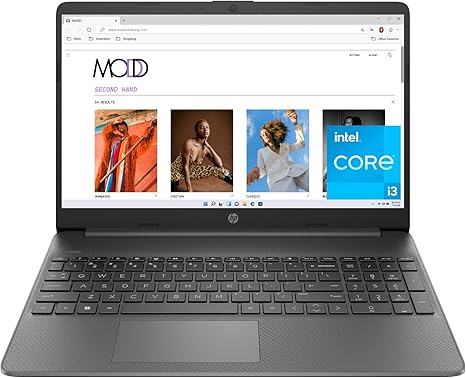
Welcome to Reviews inside tv. Today I’m taking a look at the HP 15‑inch Laptop, model 15‑dy5599nr (2023), with a 12th Generation Intel Core i3‑1215U, 8 GB RAM, 128 GB SSD, 15.6‑inch FHD IPS display and integrated Intel UHD Graphics. This is clearly pitched as a budget, everyday laptop — something aimed at students, office users and light‑use households rather than power users. It’s the kind of machine that promises portability, simplicity, and “just enough” performance to get through daily tasks without fuss. Hold on to your tea, let’s see how well it delivers.
This HP 15 brings in a 15.6‑inch IPS panel at Full HD (1920×1080) with a micro‑edge design — in simple terms: a large screen that uses most of the lid space and should offer decent clarity for documents, browsing, video streaming, and light media work. It’s paired with the Intel Core i3‑1215U — a 12th‑gen 6‑core (6 cores / 8 threads) CPU capable of boosting up to around 4.4 GHz. That CPU is an “Alder Lake‑U” part designed for efficiency and low power draw, well tuned for everyday tasks like web browsing, Office work, streaming, and general multitasking. Graphics duties go to Intel UHD Graphics (the integrated solution with 64 EUs typical for that i3 CPU), which means no dedicated GPU — so heavy 3D, AAA gaming or serious editing are not its strong suits. On the memory side there’s 8 GB RAM (likely a single module) and a 128 GB SSD — giving snappy boot and application load times compared with an HDD, though storage is minimal. On the power front, you get a 3‑cell 41 Wh battery and a 45 W smart AC charger that reportedly brings the battery to 50% in about 45 minutes. Ports include a mix of USB‑A, USB‑C (data-only), HDMI 1.4b, a headphone/mic combo jack and Wi‑Fi 6 + Bluetooth for networking. The chassis is plastic, and the build is lightweight and portable — easy to slip into a backpack and carry around.
In everyday use this machine behaves like what it is: a reliable basic tool. For office work — word processing, spreadsheets, email, browsing with multiple tabs open — it performs smoothly; the i3 has enough headroom and the SSD ensures quick boot and responsive app switching. Video calls, streaming, media playback, and typical student or office workloads are handled without noticeable slowdown. For casual content creation — maybe light photo editing, simple video trimming or social‑media content — it’s usable, but you’ll feel the limitations: the integrated graphics and modest RAM mean large files or complex multitasking will strain the system. As for gaming: you can play older or light titles (think low‑demand indie games or browser‑based games, maybe some eSports‑style 2D/low‑poly titles) — but you’re not looking at modern AAA games with any meaningful performance. Day-to-day responsiveness, waking from sleep, and basic navigation feel smooth, though the limited storage might fill up fast if you keep many large files. Because of single‑channel RAM and integrated graphics, you’ll want to avoid heavy multitasking or memory‑hungry workflows.
Thermals and noise remain fairly tame under typical everyday loads — the CPU is low‑power and the plastic chassis helps keep weight down, so there’s no obvious heat buildup when browsing or writing documents. Under heavier load (say prolonged streaming or lots of browser tabs) you might feel some warm air, but nothing dramatic. Fan noise stays low — mostly quiet, only occasionally audible under heavier load. For typical tasks this makes the machine comfortable for lap use and long sessions without discomfort. But this isn’t a laptop built for extended rendering, heavy compute or gaming marathons — under those it would likely push limits and run warm.
Battery life is modest but practical. With a 41 Wh battery, you should expect somewhere around 6 to 8 hours for light office work, browsing or document editing — enough for a class, work session or commuting day. If you stream video or push it harder, maybe towards the lower end. The included charger reaching 50% in about 45 minutes is a nice plus — convenient for topping up on the go. The light weight and thin build help with portability: overall, it’s easy to carry around campus, a café or commute bag without much fuss.
Typing and general inputs feel okay for this class: there’s a full‑size keyboard with numeric pad, which is decent for productivity tasks, though a few reviewers find the key travel shallow and layout cramped for a 15‑inch machine. The power button is reportedly small and lacks feedback — a minor annoyance but worth noting. The touchpad supports multi‑touch gestures and feels responsive, though a bit sensitive for some tastes. There’s no fingerprint reader or other fancy biometric unlocks — just a clean, basic input setup. It does include a webcam (HD) suitable for video calls, which for many will be its best use case.
On ports and connectivity, the laptop covers the basics: a couple of USB‑A ports, one USB‑C (data only), HDMI, and a headphone jack — enough for external mouse, flash drives, maybe a second monitor via HDMI, and headset or speakers. Wi‑Fi 6 support is a nice plus for future‑proof networking and generally makes wireless connections snappy and stable; Bluetooth covers wireless peripherals. On expandability: the SSD is M.2 (but only 128 GB, so quite small) and RAM is soldered or single‑slot — upgrades may be possible in principle but might involve replacing the existing module and removing the bottom cover which some users find fiddly. That limits long‑term flexibility.
This HP 15 earns its keep when you consider what it’s aiming for: a budget‑friendly everyday laptop that does the basics well. It’s fast enough to avoid everyday irritation, light enough to carry around, and has a screen that’s decent for work, streaming, and casual media. On the flip side, storage is tight, RAM is minimal and potentially single‑channel, graphics are limited, and build quality feels budget‑grade — meaning future‑proofing and heavy workloads aren’t part of the deal. For office work, students writing essays, web browsing, streaming video and light productivity, it makes sense. If you need photo/video editing, serious multitasking, gaming or any workflow demanding power, you’ll quickly bump into limitations.
Compared with other budget laptops in 2025, this HP 15 is about as basic as it gets — good for everyday minimal tasks. But if spend improves a bit, alternatives with 16 GB RAM, larger SSD, or even integrated Iris Xe graphics rather than basic UHD make more sense for longevity and smoother multitasking.
If you just want a no‑frills, lightweight machine for writing, browsing, streaming and light work, this HP 15 does its job. If you think you might outgrow it soon, it’s worth looking a bit higher up the ladder.
Thanks for watching. If you own this laptop or plan to get it, drop your thoughts or questions down in the comments — I’d love to hear what you think. Catch you in the next one, and stay sharp.
Available to buy here:


