

Available to buy here:
Welcome to Reviews inside tv, your go-to spot for honest, in-depth tech reviews. Today, we’re taking a look at the Lenovo 100e Chromebook Gen 4, a budget-friendly option designed for those who need a simple, reliable device for everyday tasks. Whether you’re a student, a casual user, or someone looking for a light computing experience, this could be your next Chromebook. Let’s see if it delivers on the basics or falls short in critical areas.
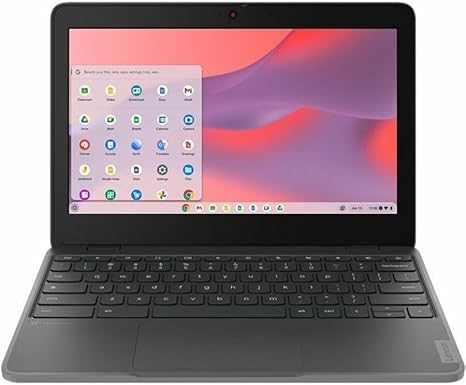
The Lenovo 100e Chromebook Gen 4 comes equipped with an octa-core MediaTek Cortex A76 and Cortex A55 processor, which is a solid entry-level chip for handling light tasks like web browsing, document editing, and video streaming. With 4 GB of RAM and 32 GB of flash memory, this Chromebook is designed to offer smooth multitasking within its limits. But, as we all know, 4 GB of RAM can feel restrictive for power users—though, for light work, it should be fine. The 11.6″ display features a 1366 x 768 resolution, which is decent for media consumption, but don’t expect sharp, crisp visuals that pop like you’d get with a full HD or 4K display. The smaller screen size and resolution work for basic tasks but might feel cramped when working with multiple windows side by side.
For the casual user, this Chromebook is built to be no-nonsense. The 32 GB flash storage is, however, on the lower end—while it’s enough for the Chrome OS and cloud-based apps, you’ll likely need to rely on cloud storage for files. The storage might feel limiting for those who tend to keep a lot of documents or media locally, so keep that in mind. The built-in Wi-Fi and Bluetooth provide reliable connectivity for light tasks, although heavy video calls or streaming might push its limits.
When it comes to real-world performance, this Chromebook performs admirably within its category. Basic tasks like web browsing with multiple tabs open, handling emails, and working on documents are smooth, and the device stays responsive for these kinds of daily activities. Media consumption, like watching movies or YouTube, is acceptable, but don’t expect the vivid colors or clarity you might get from higher-end models with IPS or OLED screens. That said, it handles 720p video just fine, so if you’re mainly watching standard-definition content, you’re good to go.
In terms of gaming, don’t expect miracles. This isn’t a gaming laptop by any means, but simple games like web-based games or low-intensity mobile games should run without issue. Just don’t expect to run anything graphically demanding—this Chromebook isn’t designed for that.
One of the things you’ll likely appreciate is its light weight and portability. Weighing in at just around 2.4 pounds, it’s easy to carry around in a bag without even noticing it’s there. It’s not the thinnest Chromebook in its class, but it’s certainly compact and easy to handle. If you’re constantly on the move or need something to throw in your backpack without hassle, the 100e Chromebook is a solid option. Battery life, with its relatively modest 42Wh capacity, is decent, though you shouldn’t expect to go beyond 7 to 8 hours with regular use. Streaming videos, working in Google Docs, or browsing the web should give you a full day of use, but more demanding tasks will definitely shorten that runtime.
Let’s talk about the keyboard and trackpad. The keyboard has good travel and feels comfortable enough for typing for extended periods, although it’s not as premium as what you’d get on higher-end devices. The trackpad is responsive but is on the smaller side, which isn’t ideal for more complex gestures or if you prefer a spacious trackpad. Still, for the budget price, it’s acceptable.
When it comes to connectivity, you get a few decent ports for this kind of device. There’s one USB-C port for fast data transfer and charging, one USB-A for older peripherals, and a headphone jack. You’ll also get an HDMI port if you want to hook up to an external monitor or TV, though with the limited storage and performance, this Chromebook is better suited for personal use rather than as a heavy-duty productivity device with multiple monitors. The Wi-Fi performance is stable for general browsing, and Bluetooth is there for connecting wireless peripherals, though don’t expect it to handle anything too high bandwidth like Bluetooth audio for long periods without potential lag.
Thermals and fan noise are surprisingly good for this kind of device. The cooling system on the Lenovo 100e is effective enough to keep things from overheating, even during extended web sessions or video calls. It doesn’t get hot to the touch, and fan noise is practically nonexistent, making it great for working in quiet environments.
Now, let’s get into the pros and cons of the Lenovo 100e Chromebook. On the plus side, the compact size and light weight make it easy to carry around. The performance is more than sufficient for casual tasks like web browsing, document editing, and streaming. Battery life is solid for a device of this size, and the fan noise is practically nonexistent. On the flip side, the display resolution is only 1366 x 768, which feels dated, and the 32 GB of storage may not be enough for users who keep local files. It’s also not a powerhouse by any means, so if you’re looking for something that can handle heavy workloads or more graphically intensive tasks, you might want to look elsewhere.
When it comes to value for money, the Lenovo 100e Chromebook Gen 4 is a very budget-friendly option, making it great for students, schools, or anyone on a tight budget. At its price, you’re getting a device that does the basics well, but if you need something that can handle more demanding tasks, you’ll need to spend more for a more powerful model. Competitors in the same price range, like the HP Chromebook 11a or Acer Chromebook 11, may offer similar performance but might differ in terms of design or build quality.
For those looking for a lightweight, portable Chromebook for basic tasks like browsing, media consumption, and document work, the Lenovo 100e Gen 4 is a solid pick. It might not win any awards for cutting-edge performance or design, but it delivers what it promises and does so reliably. If you’re after a device that just works for everyday tasks and comes at an affordable price, this one is worth considering.
Thank you so much for watching! Be sure to check out the link in the comments box to grab your own Lenovo 100e Chromebook. If you already own one, feel free to drop your thoughts in the comments—let’s get a conversation going. Don’t forget to like, subscribe, and hit that bell icon for more reviews like this. Catch you next time on Reviews inside tv!
Available to buy here:


