

Available to buy here:
Welcome to Reviews inside tv! Today, we’re taking a closer look at the Lenovo 100e Chromebook Gen 4. If you’re on the hunt for a compact, budget-friendly device for everyday tasks, the Lenovo 100e Chromebook might be just what you’re looking for, but let’s see if it’s more than just a low-cost option.
This Chromebook is built for everyday users, especially students and light office workers who prioritize portability, ease of use, and solid performance for basic tasks. With its 11.6-inch HD display, Intel N-Series N100 processor, 8GB of RAM, and 64GB of flash storage, it’s aiming to strike a balance between functionality and affordability. But is it really a workhorse, or just a lightweight in a small package? Let’s break it down.
In terms of core specs, we have the Intel N-Series N100 processor, which is designed for basic tasks—think web browsing, word processing, and media consumption. It’s not a powerhouse by any stretch, but for the price, it’s designed to keep things running smoothly for everyday applications. Paired with 8GB of RAM, this Chromebook is plenty capable of handling multiple tabs, light document editing, and streaming video without noticeable slowdowns. However, this isn’t the machine for running heavy creative software or multitasking with high-end applications. The 64GB of flash storage is adequate for keeping your essentials, but don’t expect to store a massive media library or large software installations. It’s meant for cloud-based use, so if you’re comfortable with Google’s ecosystem, this is a fine fit.
The 11.6-inch HD touchscreen display offers a resolution of 1366 x 768. While not the sharpest display out there, it’s perfectly suitable for web browsing, watching movies, and light work tasks. The colors are decent, but if you’re used to a higher-resolution display, you might notice the difference, especially if you’re comparing it to higher-end laptops or even other Chromebooks. The touchscreen itself is responsive, which makes interacting with apps and navigation a breeze. While the 1366 x 768 resolution doesn’t blow you away in terms of sharpness, it’s still fine for the tasks this Chromebook is designed to handle. The screen’s brightness is adequate for indoor use, but might struggle a bit in direct sunlight or bright environments.
When it comes to performance, the Lenovo 100e excels in its target market. Office work, school assignments, and streaming videos are where this Chromebook shines. It’s not built for gaming, content creation, or anything that requires more than basic processing power. You’ll have no issues with tasks like writing papers, browsing the web, and catching up on Netflix shows. Its 8GB of RAM means you can open a few tabs, maybe a document or two, and handle your day-to-day tasks without issues. But if you push it too hard, say with too many apps or a video-heavy project, the performance might start to feel sluggish.
Speaking of performance, if you’re planning on gaming, you’ll want to look elsewhere. This Chromebook’s GPU is integrated, meaning you’re not going to get smooth frame rates in modern games or graphically intensive tasks. However, for light games or streaming media, the experience is perfectly acceptable. If you’re just trying to kill time with some browser games, the experience will be fine, but don’t expect AAA titles to run well, or at all.
Thermals are another consideration for any laptop, and here the Lenovo 100e doesn’t disappoint. The cooling system keeps the laptop relatively quiet, even during moderate loads. The fan noise is almost non-existent under light tasks, but it may kick up a little when under heavier usage, like running multiple tabs or streaming video for long periods. The keyboard deck and underside stay reasonably cool, so you don’t have to worry about overheating or discomfort during extended sessions.
Battery life is one of this Chromebook’s most impressive features. With its smaller screen and lower-powered CPU, you can easily expect up to 8-10 hours of battery life on a single charge, depending on usage. If you’re just using it for web browsing or light office work, you’ll probably get closer to that 10-hour mark. The charging time is quick as well, which is always a plus when you’re on the go.
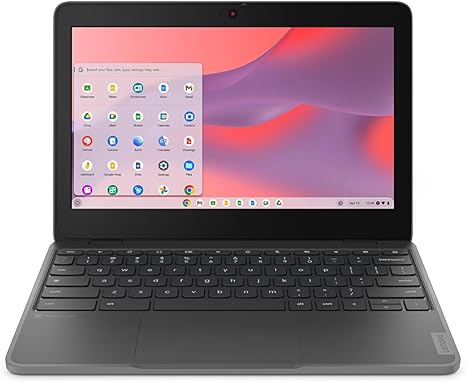
At just over 2.5 pounds, this Chromebook is lightweight and portable, making it a great option for students and professionals who need something that can easily fit in a backpack or be carried around all day without feeling bulky. The 11.6-inch size is compact enough to be easy to handle, but still large enough to get a decent amount of work done comfortably.
The keyboard on the Lenovo 100e is simple but functional. The keys have decent travel and provide a reasonable typing experience, though the small size may not be as comfortable for those with larger hands over long periods. If you’re typing long assignments or emails, it’s certainly usable, but it won’t win any awards for luxury. The trackpad is fairly responsive and gets the job done. It’s not as refined as on higher-end devices, but for this price, it’s adequate. There’s no fingerprint sensor or fancy extra features here, which is expected given the budget nature of this Chromebook.
When it comes to ports, the Lenovo 100e keeps things basic but functional. You’ve got two USB-A ports for peripheral devices, a single USB-C port for charging or data transfer, an HDMI port if you need to connect to an external monitor, and a headphone jack. For wireless connectivity, you’ve got Wi-Fi 5 and Bluetooth, which should cover most needs, but Wi-Fi 6 would have been a nice addition for the future-proofing aspect. There’s no SD card reader, which might be an issue for some who want to transfer files from cameras or other devices directly.
For a Chromebook in this price range, the build quality feels pretty solid. The body is plastic, but it’s durable enough for everyday use and can handle being tossed in a bag or taken to class without feeling fragile. The hinge is firm and smooth, so you won’t have to worry about it breaking easily. The overall design is simple, but it doesn’t feel cheap.
So, who is the Lenovo 100e Chromebook Gen 4 best suited for? If you’re a student or someone who needs a lightweight, budget-friendly laptop for basic tasks like browsing the web, watching videos, or working on documents, this is a great choice. It offers solid performance, decent battery life, and a screen that’s perfectly acceptable for day-to-day use.
However, if you’re looking for a machine that can handle creative work, gaming, or multitasking with demanding applications, you might want to look at something more powerful. Its performance is limited, and with just 64GB of storage, you’ll likely need to rely heavily on cloud services or external storage for larger files.
For those who need a reliable, affordable laptop for basic tasks, the Lenovo 100e Chromebook is a great option. It doesn’t offer much in terms of flashy features or cutting-edge performance, but it delivers where it counts: battery life, portability, and enough power for daily tasks.
Thanks for watching Reviews inside tv! If you’re thinking about getting the Lenovo 100e, you can find more details in the comments box. Feel free to ask any questions or share your experience if you’ve already got one. Until next time, keep your reviews inside and your laptops running smoothly!
Available to buy here:


