

Available to buy here:
Welcome to “Reviews inside tv,” where we bring you the most honest and in-depth tech reviews. Today, we’re looking at the HP ZBook Firefly G11, a 16-inch mobile workstation that promises a solid mix of performance, portability, and professional features. With a focus on those who need power for demanding workloads, this laptop targets professionals in creative fields, business environments, and anyone who requires robust computing on the go.
The HP ZBook Firefly G11 comes packed with impressive specs that make it stand out in the mobile workstation category. At the heart of this device is the Intel Core Ultra 7 155U processor, a 12-core chip that can reach up to 4.80 GHz when turbocharged. This setup offers serious multitasking power, allowing for seamless switching between heavy applications and complex workloads. The 32GB of RAM ensures that running multiple programs and tabs, from office tasks to creative applications, won’t slow you down. When it comes to storage, the 512GB SSD provides fast boot times, quick file access, and ample space for most users, though for those needing even more storage, an external drive or network solution may be necessary.
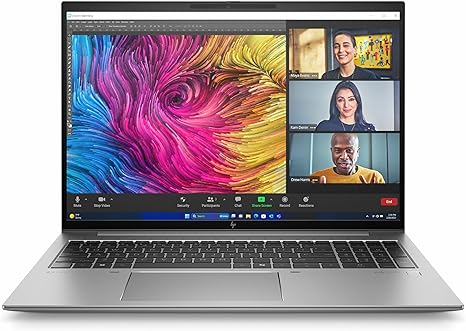
The 16-inch WUXGA display, with a resolution of 1920 x 1200, strikes a balance between screen real estate and portability. While it doesn’t push the higher pixel counts of 4K, the resolution is sharp enough for detailed work, whether you’re editing documents or analyzing spreadsheets. The screen type utilizes in-plane switching (IPS) for better color consistency and viewing angles, although it’s important to keep in mind that it might not be as vibrant as some of the higher-end OLED options, but it will still do a great job for most office tasks, media consumption, and light creative work.
As a mobile workstation, the HP ZBook Firefly G11 comes with a 4-cell, 55 Wh battery, which should deliver a good amount of power throughout the day. Expect around 8 hours of productivity use with web browsing, word processing, and light multimedia. For heavier tasks like video editing or design work, you’ll likely see this drop to around 5–6 hours. Its 65W USB-C charging capability allows for quick top-ups, which is a convenience for those who don’t have time to wait for long charging sessions.
Portability is a key factor in a mobile workstation, and the ZBook Firefly G11 doesn’t disappoint. Weighing in at just under 4 pounds, it strikes a reasonable balance between performance and weight. It’s light enough to toss into a bag for a day’s worth of meetings or a client visit without feeling like you’re carrying a brick, yet it still feels solid enough to take on a variety of tasks.
The keyboard and trackpad are solid for long typing sessions, with good key travel and tactile feedback. The layout is designed with business users in mind, offering a number pad and function keys in easy reach. The trackpad is responsive, and while it’s not the largest on the market, it does the job for everyday tasks. The addition of a fingerprint reader is a nice touch, adding extra security for business professionals who handle sensitive data.
When it comes to ports, the HP ZBook Firefly G11 gives you all the essentials, including USB-A, USB-C, HDMI 2.0, and a microSD card reader. There’s also an Ethernet port for those who need a reliable wired internet connection and Wi-Fi 6 for fast wireless speeds. Bluetooth 5.2 rounds off the connectivity options, making sure you can connect to a wide range of accessories and peripherals. However, some might find the lack of Thunderbolt a bit limiting if you require fast external storage or high-resolution displays, but the available ports still cover most professional needs.
Thermal performance on the ZBook Firefly G11 is impressive, especially considering it’s a relatively thin device. Under lighter workloads, it stays cool and quiet, which is a bonus if you’re working in a quiet environment. However, when pushed during more intensive tasks like video editing or rendering, the fan noise becomes noticeable, though not overly loud. In terms of comfort, the laptop does get warm during these tasks, but it doesn’t reach uncomfortable levels, and the heat is distributed evenly across the keyboard deck and underside, so it’s unlikely to cause discomfort during regular use.
When it comes to battery life, it’s important to remember that the ZBook Firefly G11 is not a super-long-lasting ultrabook, but rather a workstation designed for performance. It handles office work and casual tasks easily for a full workday, but for heavier applications like design software or media editing, you might need to plug it in before the day’s done.
The build quality feels premium, with a solid aluminum chassis that provides both durability and a sleek look. There’s no flex in the lid or body, and the hinge feels secure, which is great for daily use. While it’s not the thinnest workstation around, the size feels appropriate given its power and durability.
Now, let’s take a closer look at performance. In terms of real-world benchmarks, the HP ZBook Firefly G11 is well-suited for office tasks, multitasking, and light to moderate creative work. It’s not going to handle AAA gaming titles or 4K video editing like high-end gaming laptops, but it’s more than capable of running productivity suites, web-based applications, and even some lighter photo or video editing tasks.
For those who need to play games on this machine, expect a performance range that will handle older or less demanding titles at 1080p with medium settings. However, more demanding games like Cyberpunk 2077 or Call of Duty: Warzone will require lower settings, and even then, you might see some performance drops depending on the load. Real-world FPS for titles like these on the ZBook Firefly G11 averages around 40-60 FPS on medium settings at 1080p, and while it’s playable, it’s not the smoothest experience for competitive gaming.
In terms of thermals, during heavier workloads, you might notice the fan speed ramping up and the laptop’s underside becoming noticeably warmer, but this shouldn’t be a problem for short bursts of intense work. Long-term, this means the laptop is designed for stable performance, with minimal thermal throttling.
As for the competition, in a similar price range, laptops like the Lenovo ThinkPad P Series or the Dell Precision 3000 offer comparable specs and performance, but the ZBook Firefly G11 stands out with its lighter weight and business-focused design. While some may prefer the heavier-duty, ultra-rugged build of a ThinkPad, the HP strikes a balance between durability and portability.
The ZBook Firefly G11 offers solid value for its performance and portability. For those looking for a workstation that can handle daily office tasks, content creation, and light multimedia, it’s a strong contender. The lack of a dedicated GPU and high-end gaming performance may be a drawback for some, but for professionals who need power and reliability without the weight of a full workstation, it’s a great option.
So, who is this laptop for? It’s ideal for professionals, creators, and business users who need a reliable, portable machine for productivity and light creative work. If you’re a gamer looking for high-end performance, this laptop probably isn’t the right fit. But for those who prioritize power, portability, and a solid display in a workstation, the ZBook Firefly G11 hits the mark.
If you have any questions or already own the HP ZBook Firefly G11, feel free to share your thoughts in the comments. Thanks for watching, and don’t forget to subscribe to “Reviews inside tv” for more honest tech reviews. Until next time, keep working smart!
Available to buy here:


